Advanced DVB-S2 Receiver Operational Manual
SR1 Software and Firmware Upgrade
63
11.2.2 Software Images Upgrade with Flash Magic
Do not use this procedure unless instructed explicitly by Ayecka Support
The file type for SW application upgrade using Flash Magic is XXX.hex.
To define the required settings:
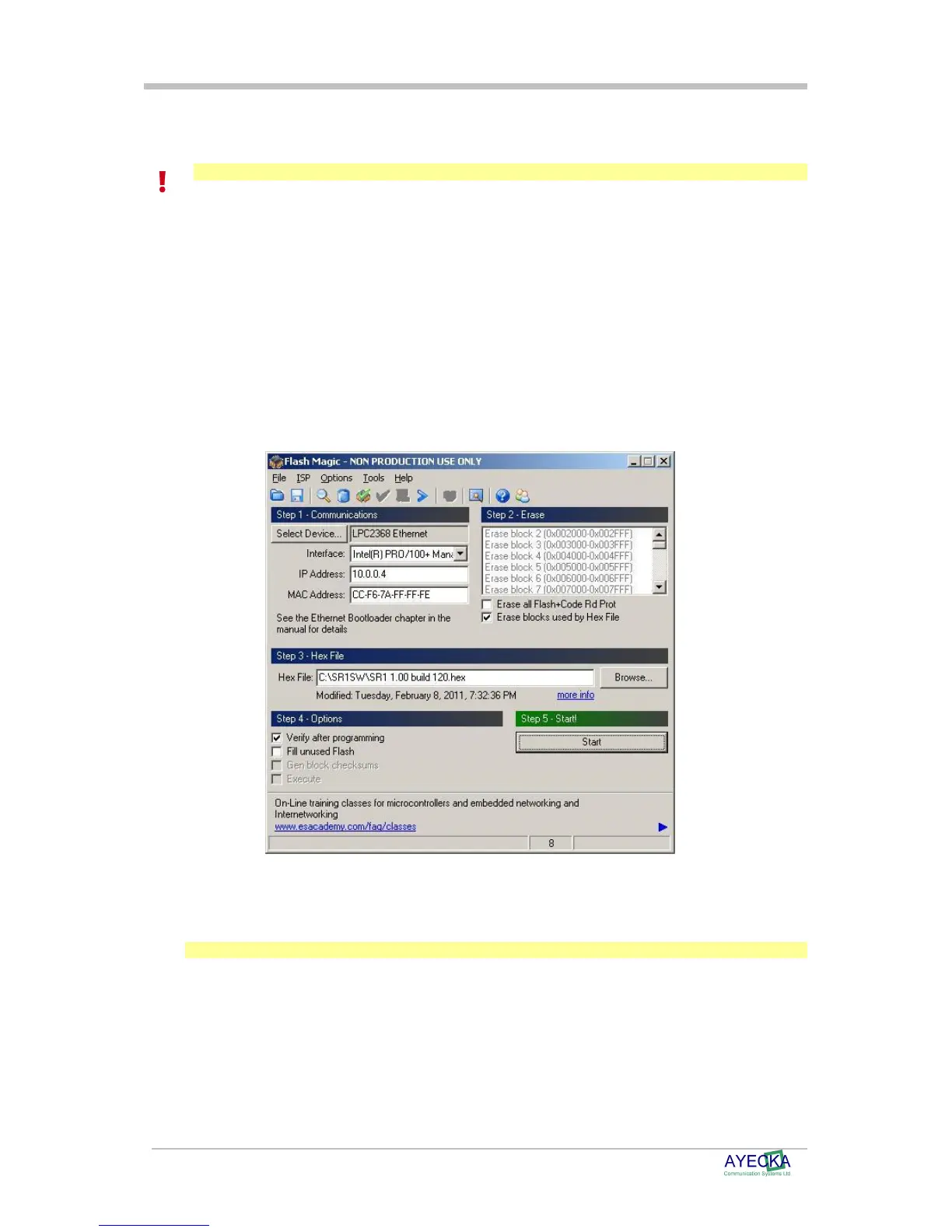
After installing the Flash Magic software select the following settings:
Device – LPC2368 Ethernet
Interface – select the NIC of the computer that is connected to the Sr1
Management interface.
IP Address – 10.0.0.4
MAC Address – CC-F6-7A-Ff-Ff-FE
Erase blocks used by Hex File – checked
Verify after programming - checked
Figure 10 - FlashMagic screen dump
Use the Browse button to select the .hex file to load to the SR.1.
Note
Only One SR1 can be upgraded in given time



 To Next Page