OmniCare EVC System
Installation & Commissioning Manual
30 OmniCare issue 1
C
O
M
M
U
N
I
C
A
T
I
O
N
S
3.2.3.2 Set Option Jumpers
If required, set the option jumpers to the required configuration.
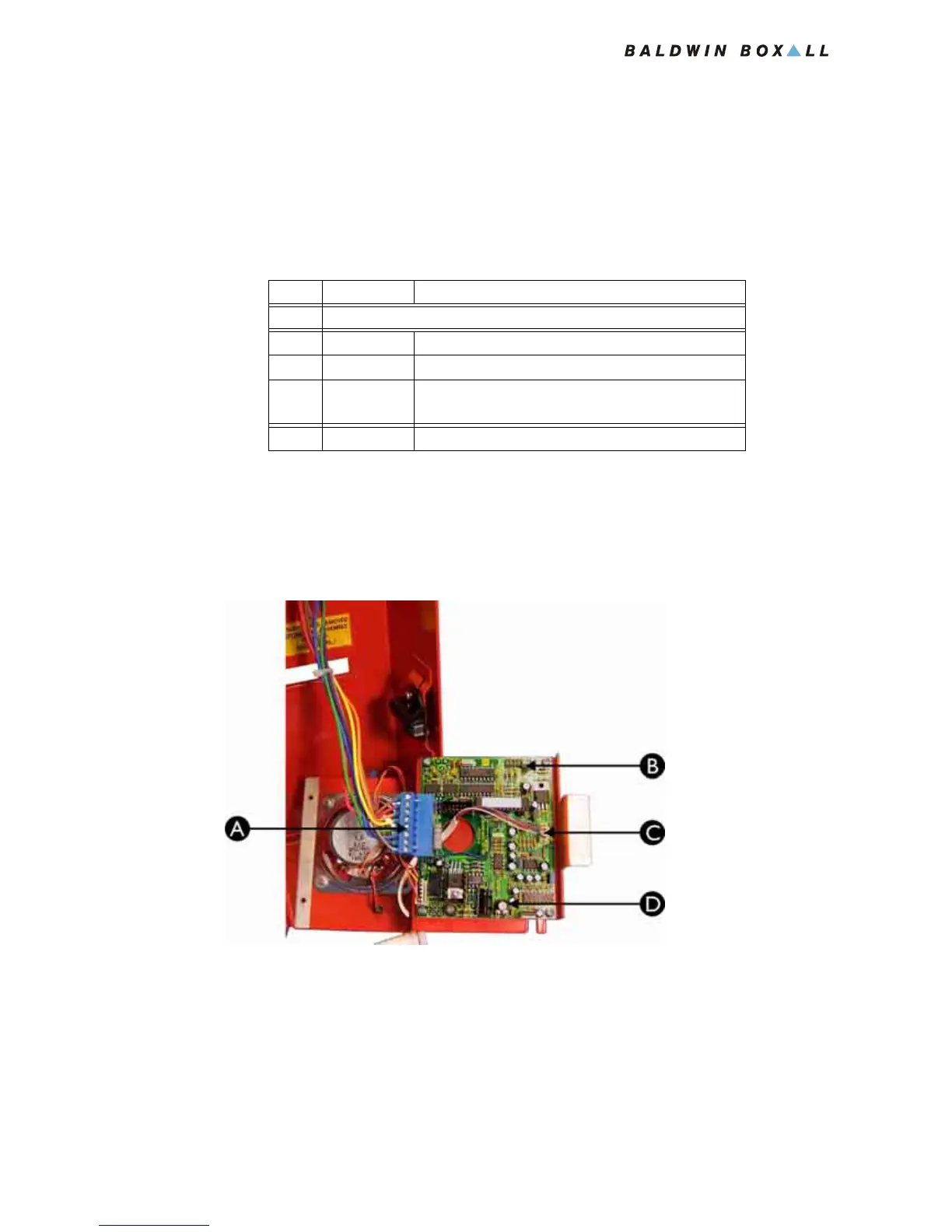
These are shown as item "B" in
Figure 3.8.
The bold options in Table 3.5 show the factory preset settings.
Table 3.5 — BVFHL Jumper Settings
3.2.3.3 Connecting the Remote Unit
1. Connect the 8 way Blue Connector from the Termination
Board (item A in
Figure 3.8).
Figure 3.8 — Rear View of BVFHL Remote Unit
JP # Status Option
J2 Must NOT Be Fitted
J3 Fitted Audio Self Test Enabled
J3 Not Fitted Audio Self Test controlled by Tone Configuration
Default Tone Configuration -
Audio Self Test disabled
J4-J6 N/A No effect on operation
A Cable Termination Block
B Option Jumpers J2 - J6 see Table 3.5 for details
C Handset connector
D Volume control



 To Next Page