51R5917517 /00 ClickShare CB Core, CB Pro
5.2 Configurator UI (User Interface)
5.2.1 About the configurator UI (User Interface)
Overview
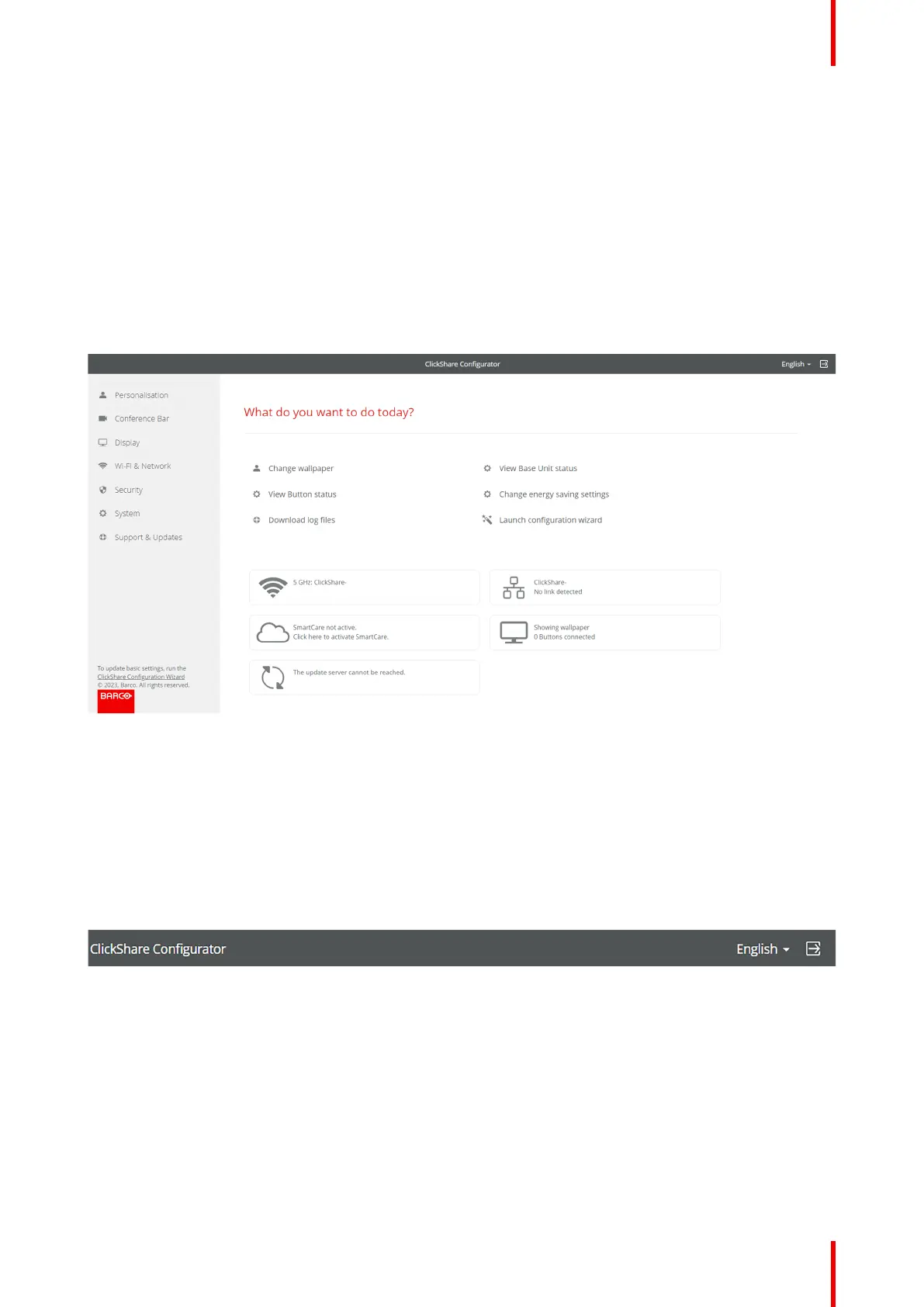
The configurator UI (User Interface) is built up out of three main sections:
• The header (dark grey background)
• The side bar (light grey background):
Used to navigate through the features.
• The main window (white background):
Displays information about the currently selected category and allows for the editing of features.
Image 5–2 Example of the homepage of the configurator
5.2.2 Header
Overview
The header consists of three basic features and can be accessed at any time while navigating the ClickShare
configurator:
• Dashboard
• Language selector
• Logout
Image 5–3 Example of the header of the configurator
About dashboard
The dashboard can be seen as a homepage or landing page for the configurator and is the first page that gets
displayed.
Clicking on the text “ClickShare Configurator” at the center of the header, will show the dashboard page. For
more information, see “Dashboard”, page 56
About language selector
The language selector allows for the configurator to be displayed in multiple languages. The chosen language
is applied across the entire web application and can be changed at any time.
ClickShare configurator


 To Next Page