Configuring Your Router
System – Internet Time
BEC 8920AC User Manual
System
Internet Time
The router does not have a real time clock on board; instead, it uses the Network Time Protocol (NTP)
to get the most current time from an NTP server.
NTP is a protocol for synchronization of computers. It can enable computers synchronize to the NTP
server or clock source with a high accuracy.
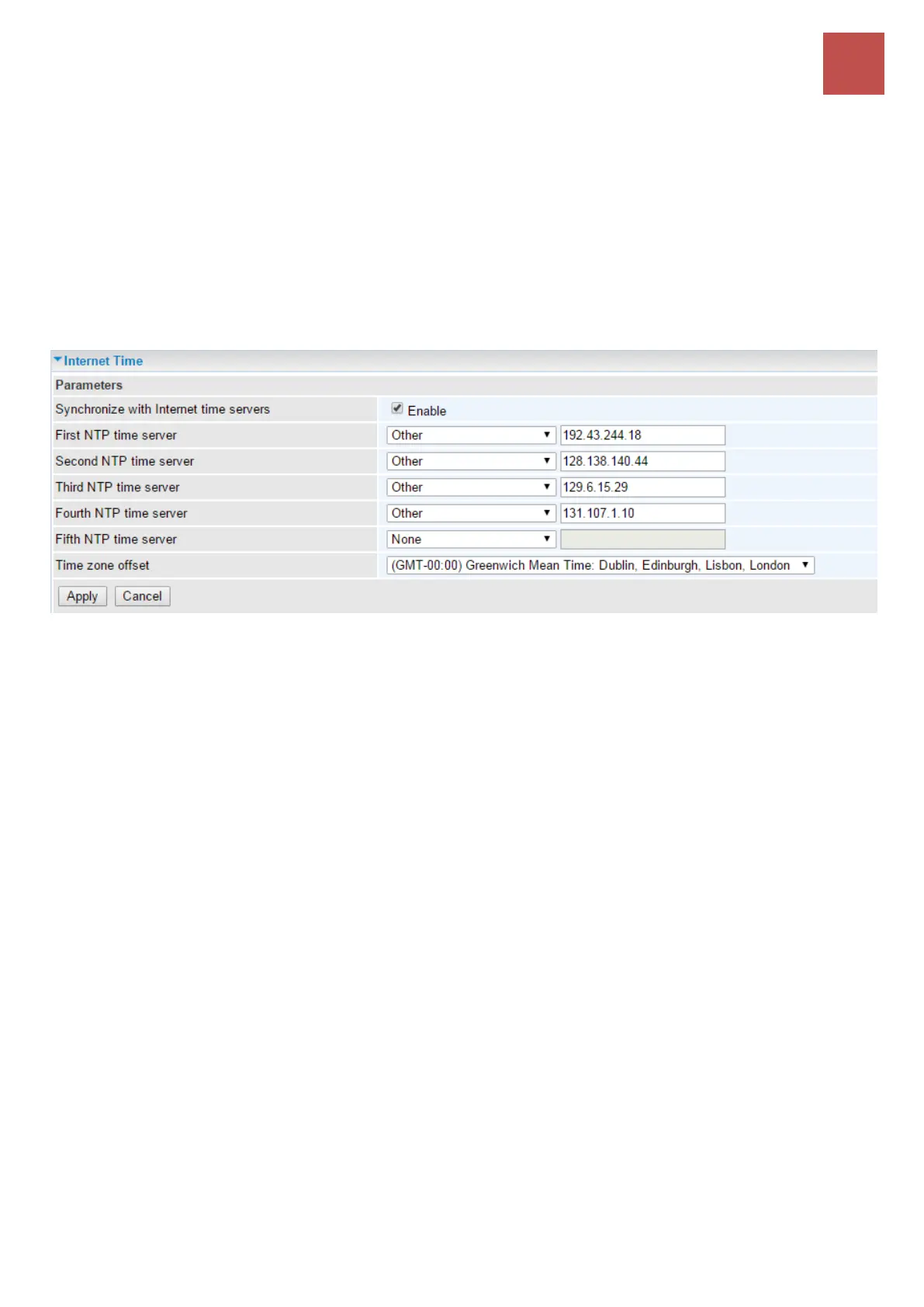
Choose the NTP time server from the drop-down menu, if you prefer to specify an NTP server other
than those in the drop-down list, simply enter its IP address in their appropriate blanks provided as
shown above. Your ISP may also provide an SNTP server for you to use.
Choose your local time zone from the drop-down menu. After a successful connection to the Internet,
the router will retrieve the correct local time from the NTP server you have specified. If you prefer to
specify an NTP server other than those in the drop-down list, simply enter its IP address in their
appropriate blanks provided as shown above. Your ISP may also provide an NTP server for you to
use.
Click Apply to save your settings.



 To Next Page