Configuring Your Router
Advanced Setup – Management (Time Schedule)
BEC 8920AC User Manual
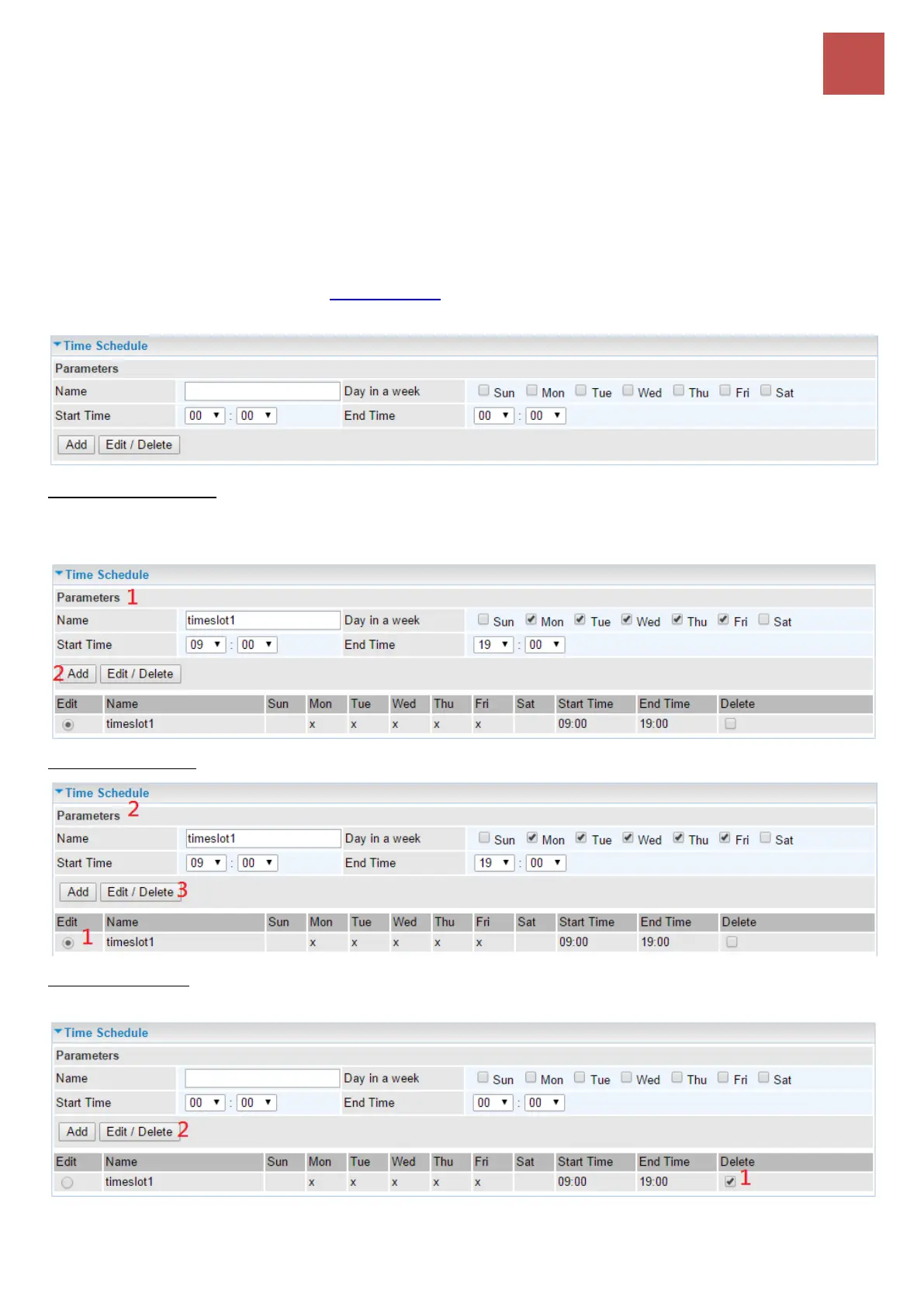
Time Schedule
The Time Schedule supports up to 32 timeslots which helps you to manage your Internet connection.
In each time profile, you may schedule specific day(s) i.e. Monday through Sunday to restrict or
allowing the usage of the Internet by users or applications.
This Time Schedule correlates closely with router’s time, since router does not have a real time clock
on board; it uses the Simple Network Time Protocol (SNTP) to get the current time from an SNTP
server from the Internet. Refer to Internet Time for details. You router time should synchronize with
NTP server.
To add new entries: Add a timeslot named “timeslot1” features a period of 9:00-19:00 on every
weekday (Monday thru Friday).
Click Add to add a rule
To make changes, click Edit button of a WAN entry to re-configure the settings.
To delete entries simply click checkboxes of the unwanted schedules then click Delete to remove
entries.



 To Next Page