Configuring Your Router
Wake on LAN
BEC 8920AC User Manual
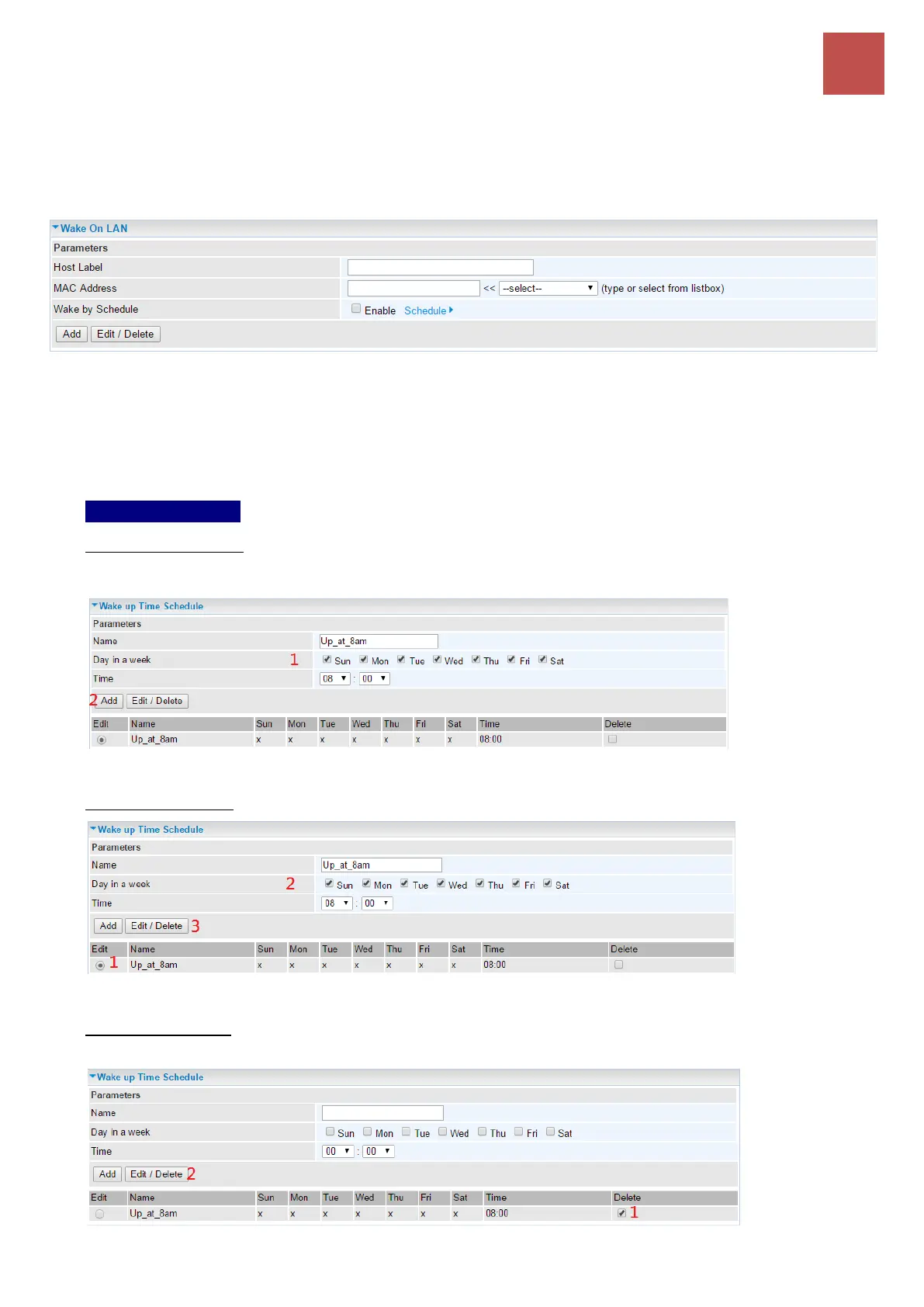
Wake on LAN
Wake on LAN (WOL, sometimes WoL) is an Ethernet computer networking standard that allows a
computer to be turned on or woken up remotely by a network message.
Host Label: Given a name to this service.
Select: Select MAC address of the computer that you want to wake up or turn on remotely.
Wake by Schedule: Enable to wake up your set device at some specific time. For instance, user can
set to get some device woken up at 8:00 every weekday. Click Schedule to enter time schedule
configuring page to set the exact timeline.
Setup a Schedule
To add new entries, Set the device to wake up at 8:00am everyday from Sunday thru Saturday.
Click Add to add a time schedule.
To make changes, click Edit button of a WAN entry to re-configure the settings.
To delete entries, simply click checkboxes of the unwanted schedules then click Delete to
remove entries.



 To Next Page