Configuring Your Router
LAN – Interface Grouping
BEC 8920AC User Manual
Examples:
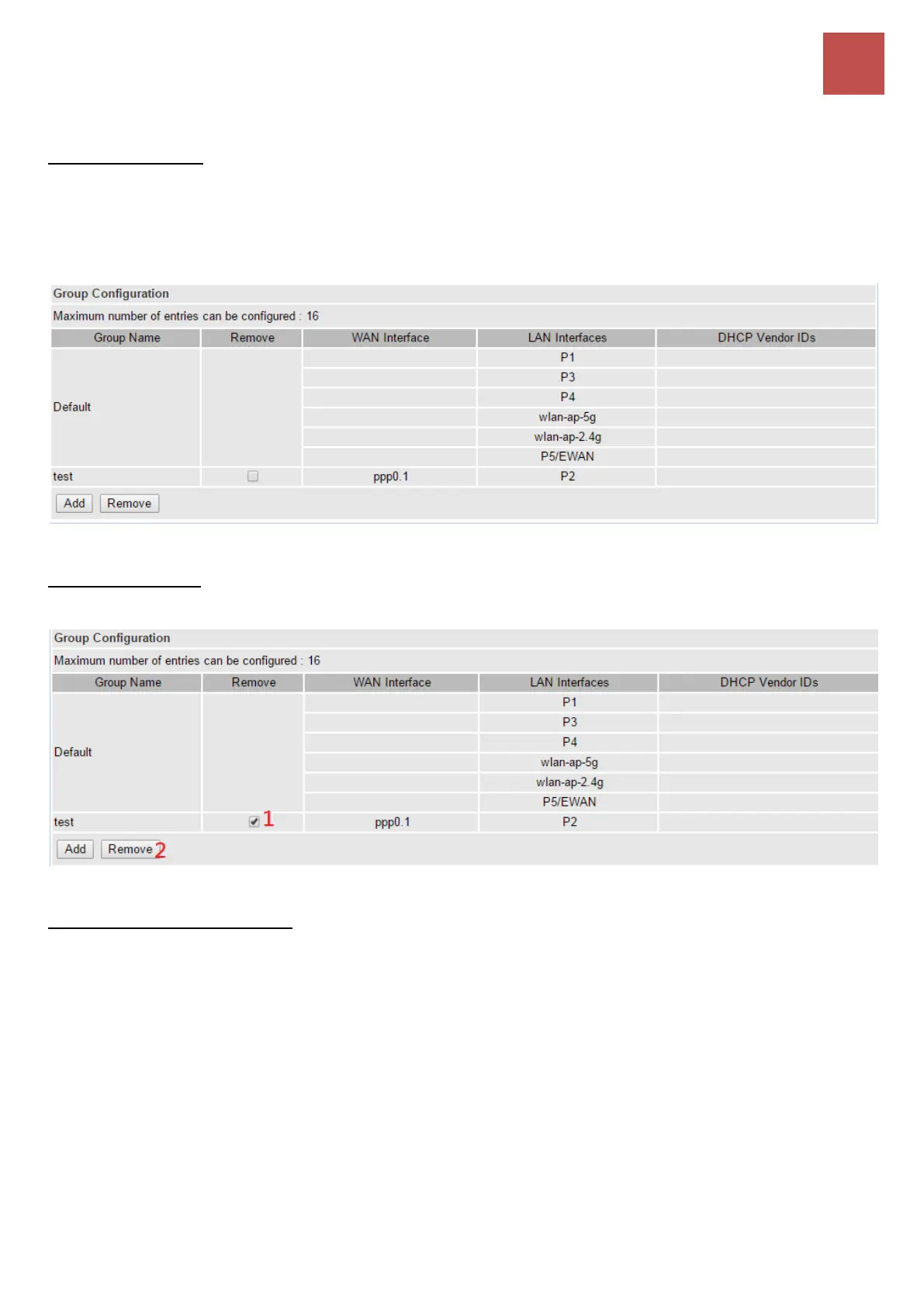
To Create a Group
In group "test", P2 and PPP0.1 are grouped in one group, they have their only network.
If Group Isolation is being turned on, Group “Default” and “test” are now isolated to each other. All
devices connect to default group ports (P1, P3, P4, Wireless 2.4g, Wireless 5.g, and P5/EWAN), will
not be able to communicate with device in the test group, P2.
To Delete a Group
If you want to remove the group, check the box as the following then click Remove.
To Automatically Add a Group
If you like to automatically add LAN clients to a WAN Interface in the new group add the DHCP vendor
ID string.
By configuring a DHCP vendor ID string any DHCP client request with the specified vendor ID (DHCP
option 60) will be denied an IP address from the local DHCP server.
If a vendor ID is configured for a specific client device, please REBOOT the client device attached to
the modem to allow it to obtain an appropriate IP address.
Each LAN interface can only be added into one group and one WAN interface can only be used in one
group.



 To Next Page