113
Sun protection
Drives
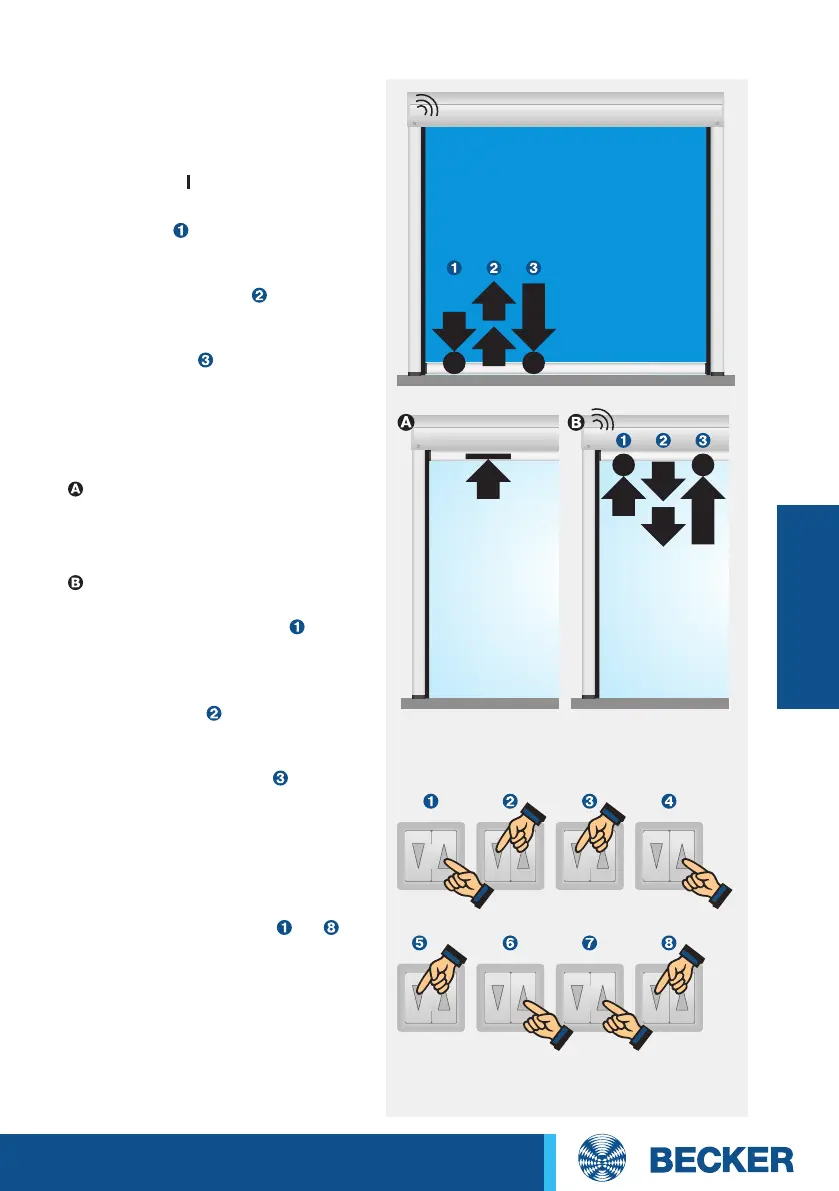
Short! Short! Short! Short!
Short! Short! Short! Press
and
hold!
2. Setting the Retract limit
position using the operator
control
To Retract limit position stop
Run the shading solution to-
wards the upper stop until the
drive stops automatically.
To Retract limit position point
Open the shading solution to the
Retract limit position
. Then
move the shading solution in the
Extend direction briefly twice,
waiting for 1 second between
movements, then in the Re-
tract direction until the drive
stops automatically and clicks
once after 3 seconds .
1. Programming the Extend
limit position using the
operator control
At least one switch on the drive head
must be in the position.
Run the shading solution to the lower
limit position
. Now move the shad-
ing solution in the Retract direction
briefly twice, waiting for 1 second in
between movements,
then in the
Extend direction again until the drive
stops automatically and clicks once
after 3 seconds
.
3. Deleting the limit positions
using the operator control
Run the drive for 6 seconds in the
Retract or Extend direction.
Then run through steps
to of
the deletion sequence shown oppo-
site at one second intervals until the
drive clicks twice.
When using operator controls with
maintained operation mode, a STOP
command must be issued after
every short drive command.
Setting the limit positions using the operator control
1x click
1x click




 To Next Page