© BEKA 2019 All rights reserved! -46-
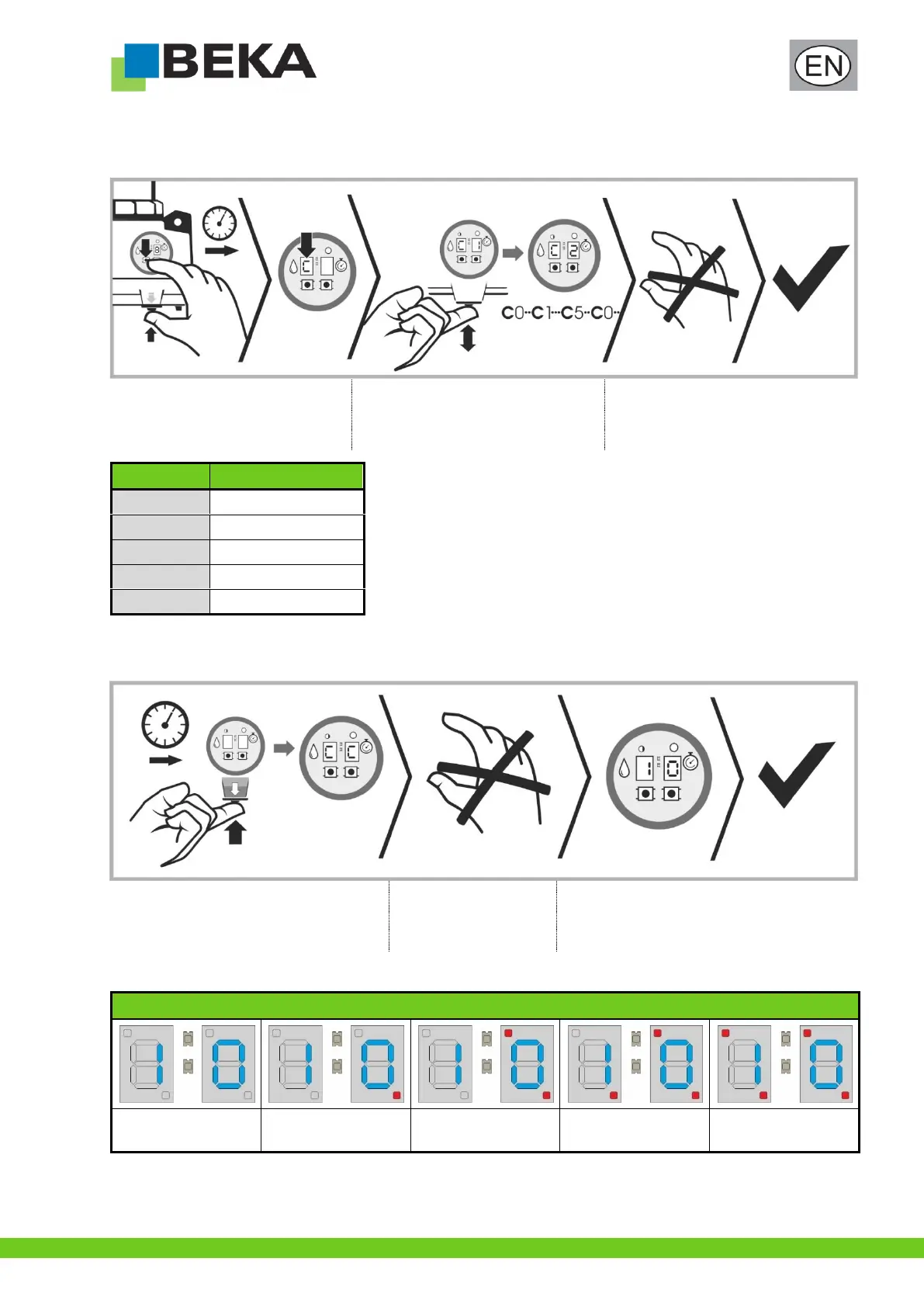
11.6 Setting the cartridge size
The device must be set to the inserted cartridge size in order to enable a reliable use of the level prewarning:
Hold down the left control key and the
push-button for intermediate lubrication
until “C” appears in the left segment of
the display.
Press the push-button for intermediate
lubrication as often as required until the
desired setting is reached.
The control saves the setting
automatically; no further confirmation is
necessary.
11.7 Operating hours counter
The device has an integrated operating hours counter which indicates the operating time of the device in emptied cartridges (400g).
Hold down the push-button for intermediate
lubrication until “CC” appears.
Release push-button for
intermediate lubrication
and wait until display
changes
The number of emptied cartridges is displayed
* see also chapter 10.2.1 “Display sequence of the push-button for intermediate lubrication”
10** +1 x 100 =
110 cartridges
10** + 2 x 100 =
210 cartridges*
10** + 3 x 100 =
310 cartridges*
10** + 4 x 100 =
410 cartridges


 To Next Page