32
power LED indicator turns solid green. Follow the on-screen instructions
if you are prompted to charge the projector in power-off or networked
standby mode.
Battery time of a fully charged projector varies according to media content
and settings.
Power supply
Projector
operation
Battery charging
in power-off
or networked
standby mode
Projector
operation &
battery charging
at the same
time
Provided power adapter Yes Yes Yes
USB-C power delivery
ranges from 45W
(20V-2.25A) to 65W
(20V-3.25A)
Yes Yes No
USB-C power delivery
more than 65W
(20V-3.25A)
Yes Yes Yes
Note
The default screen brightness varies by power supply method. You can manually adjust the
brightness as instructed in "Adjusting screen brightness" on page 45.
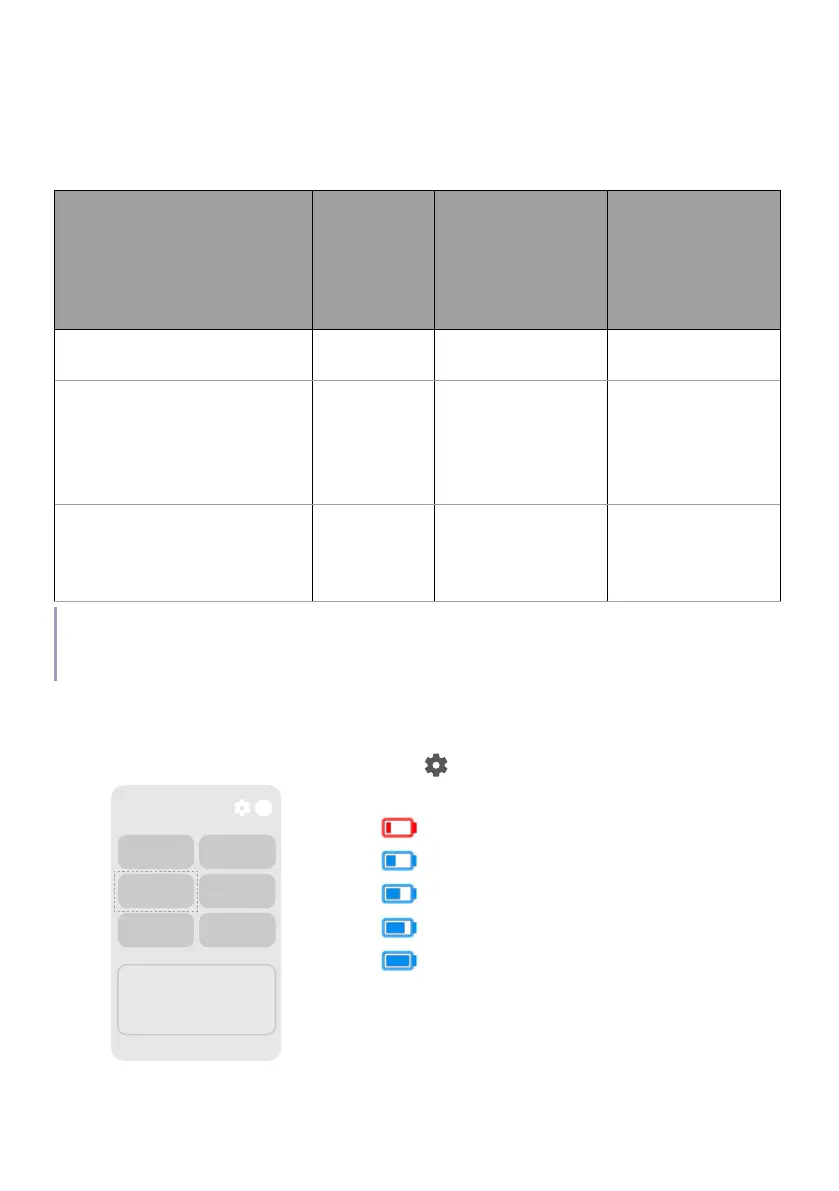
Battery power check
To check current battery power, press > Battery.
Fri. Jun 28
10:00 AM
Screensaver Inputs
Battery
Wi-Fi
Projector
Accessibility
0% ~ 20%
21% ~ 39%
40% ~ 59%
60% ~ 79%
80% ~ 100%



 To Next Page