Operation BERGHOF Automation
46 DC1000_HB_en_2D0982003ZD00.doc 2VF100108FE01.doc
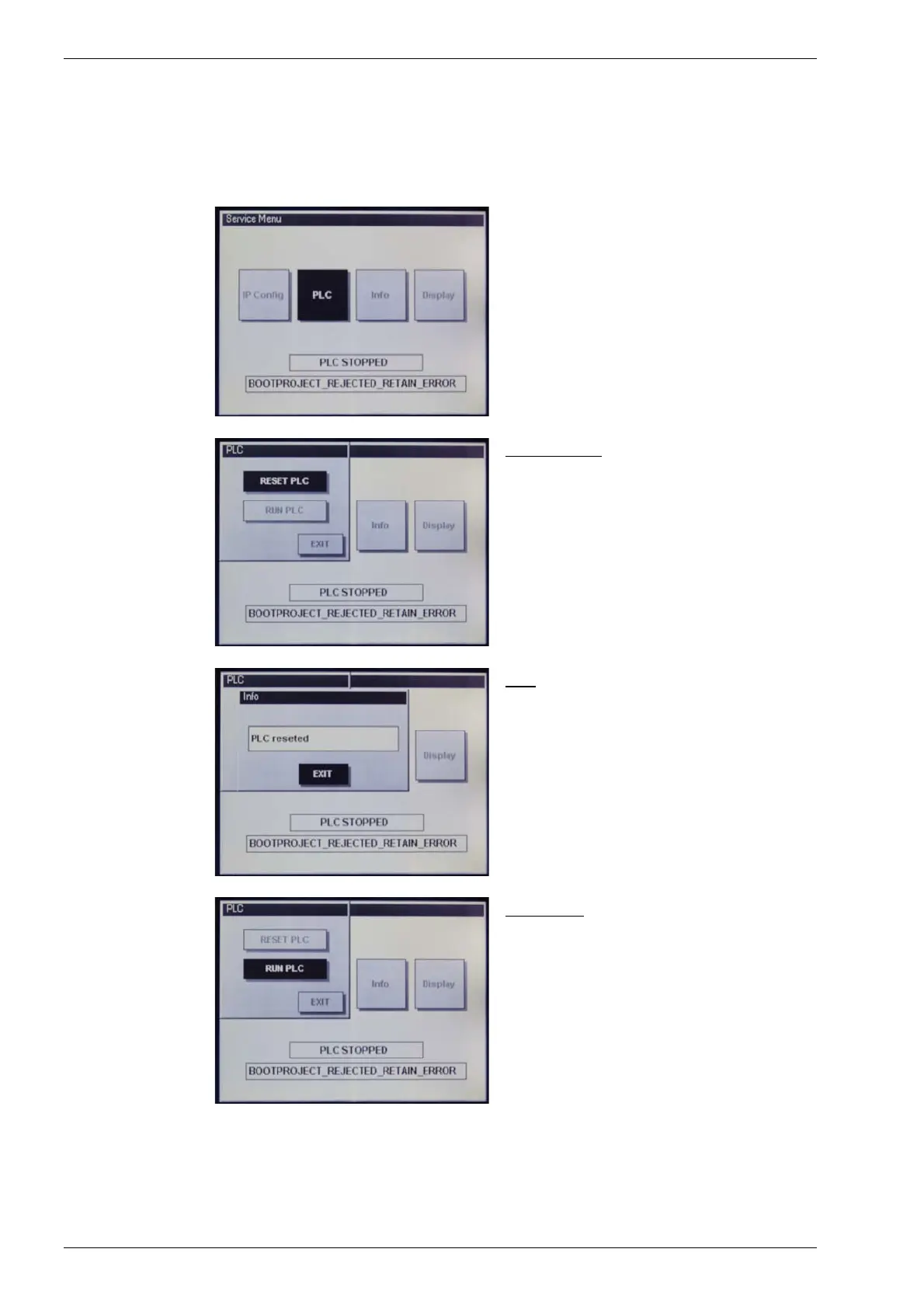
“PLC” service menu
PLC
Change the PLC state.
PLC “RESET PLC”
“RESET PLC”
Command for the PLC program.
This command can be used to acknowledge
an error which has occurred. The prerequi-
site for such an acknowledgement is that the
“RUN PLC” command has been successfully
carried out.
Info:
Status of the “RESET PLC” command.
PLC “RUN PLC”
“RUN PLC”
Command for the PLC program.
If there is a PLC program on the DIALOG
CONTROLLER and if the program was suc-
cessfully started, the service menu is closed
and the PLC program is carried out.
If the PLC program is not/cannot be carried
out, this may be due to one of the following
causes:
• There is no PLC program on the DIALOG
CONTROLLER.
• The operating mode selection switch is
set to “STOP”.
• A PLC program error was not acknowl-
edged by a “RESET” command (see
above).



 To Next Page