139
PC Service Home Guide
E-Book Editor
3.3.2 Importing a HTML file
Click “Section 1” or click to append a section.
Click from the tool bar in the “CM editing” window.
Select file folder of the HTML, then click “Open” to open the file.
Double click the square to edit the text.
Click on the tool bar to save CM.
3.3.3 Importing a text file
Click “Section 1” or to append a section.
Click from the tool bar in the “CM editing” window.
Click from the tool bar, select file folder where the txt file is, then click “Open”.
Click “OK” to load the text.
Click form the tool bar to save CM.
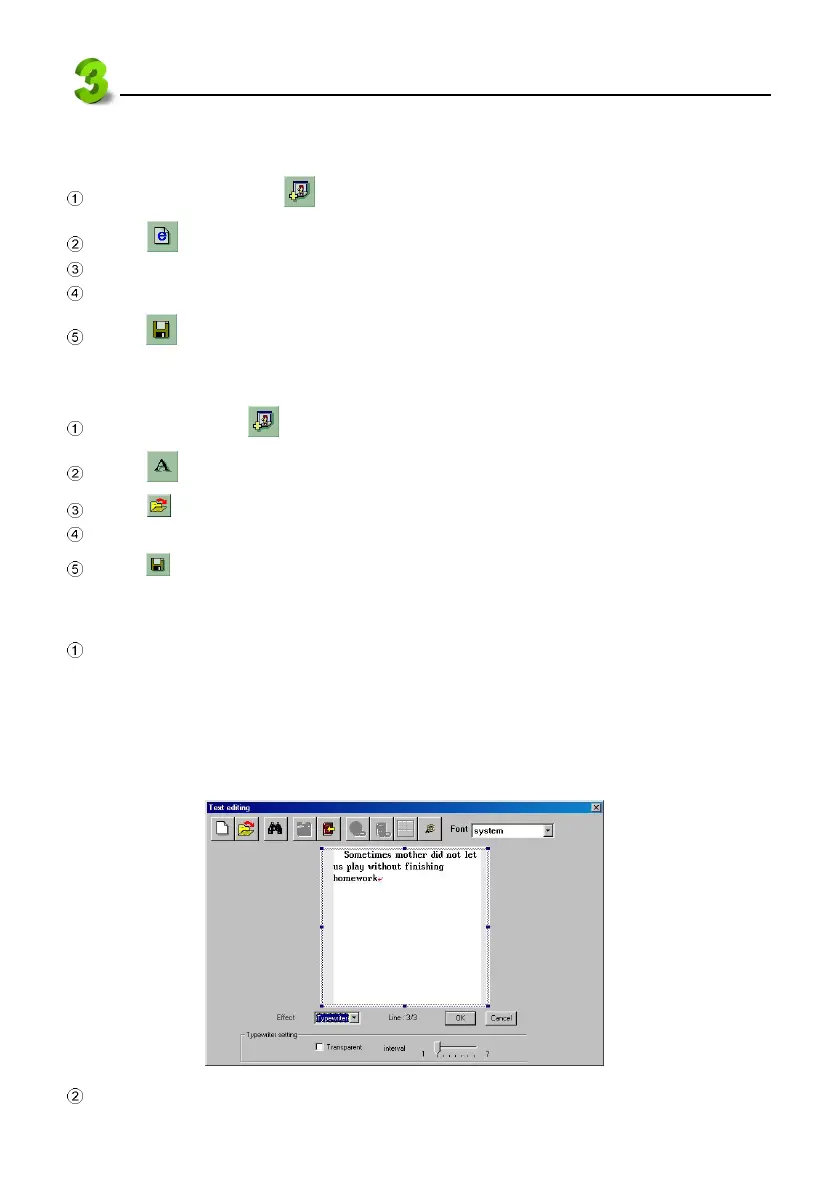
3.3.4 Text effect--reel roller, typewriter
In “CM editing” screen, right click the mouse on the editing text area to open a pop-up menu,
select “Content”, then click “Effect”. Select style from pull-down menu--Normal, Reel roller,
Typewriter, etc.
* If selecting “Reel roller”, you have to select rolling direction--right → left, left → right, up →
down, down → up, and “Time interval”, “Moving length” etc.
* If selecting “Typewriter”, you have to select “
intervalinterval
intervalinterval
interval” (See picture 34).
34
Click “OK”.



 To Next Page