29
User Guide
Input Systems
3.4 Inputting Japanese
There are six methods - Hiragana, Katakana, RHiragana, RKatakana, Japanese PinYin and Japa-
nese Stroke” for Japanese input. For kana input, The keys of ASDFGHJKL* are assigned to input the
50 tones in Japanese. The three keys ZXC are assigned to input Dakuon, Handakoun, Sokuon and
Yoon. To input long tone symbol for KataKana, press [SHIFT] and then [M]. To input dot sign for
KataKana, press {SHIFT] and then .
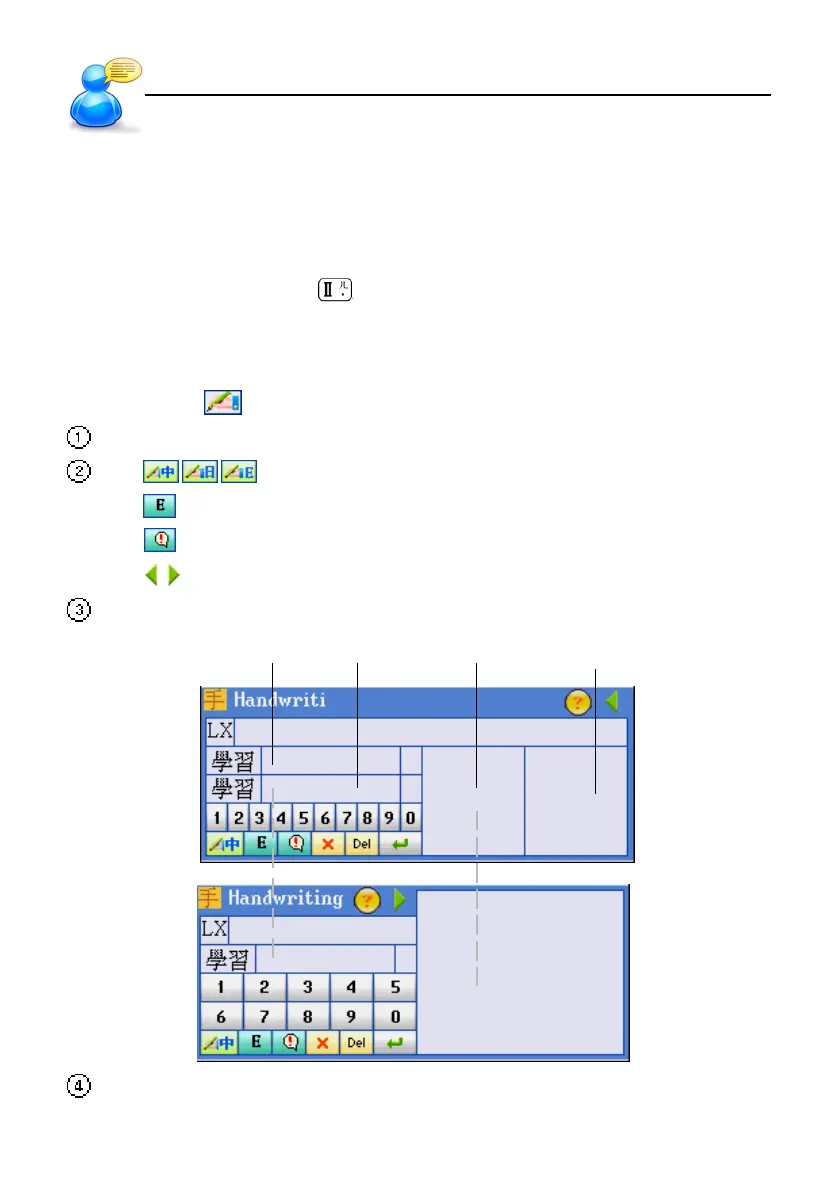
3.5 Handwriting Recognition
Whenever the icon appears on the screen, it indicates the handwriting recognition is available.
Tap the handwriting icon .
Tap / / to write in Chinese/Japanese/English.
Tap to display the on-screen English keyboard;
Tap
to display the on-screen symbol keyboard;
Tap
/ to switch between single or double windows for handwriting keyboard.
Use the stylus to write English letter or Chinese character in the handwriting zone.
standby 1 standby 2 handwriting1 handwriting 2
After you finish handwriting, the recognition will be shown in the standby zone within a few
seconds.



 To Next Page