BestCode Next Series 8 Technical Manual October 2022 Page 235 of 290
BestCode Keymaker
The keyboard editor is used to change character position or presence on the keyboard. Each Series 8 system can have 10
keyboards loaded, and can optimize 4 at a time.
Keyboard Editor
The keyboard editor tool is used to create and edit keyboards on the Series 8 CIJ. This can be used to create custom keys to
customer requirements, or to use special characters.
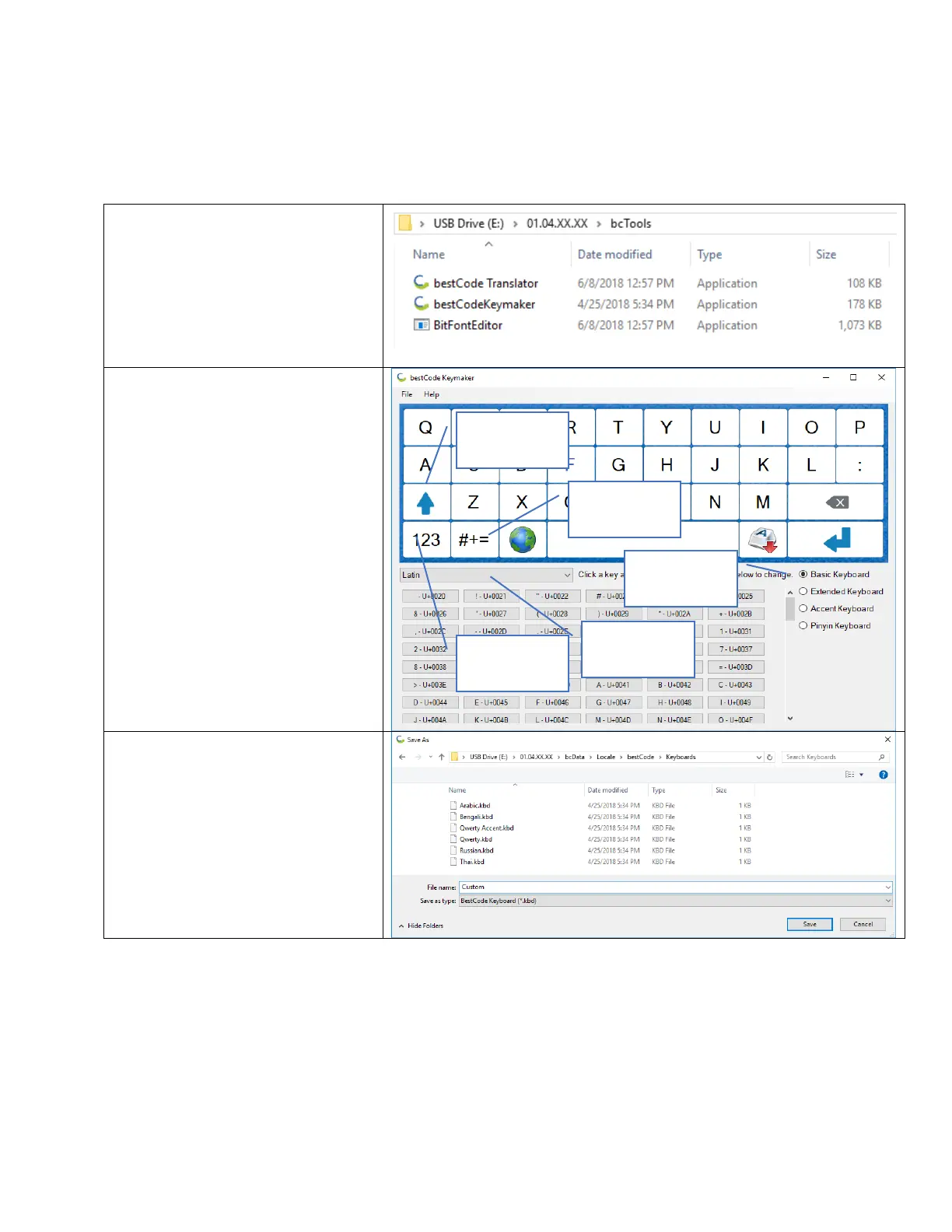
1. Navigate to the bcTools folder
USBDRIVE>01.XX.XX.XX>
bcTools
Note:
01.XX.XX.XX will vary by version
2. Open the bestCodeKeymaker
Application
3. Use the drop down menu to find
extra characters.
4. Use the 4 Keyboard Formats to
further customize your options.
5. Use the on keyboard Shift, Number,
and Symbol key to modify all of the
keyboard options.
6. Press File > Save As
7. Navigate to
USBDRIVE>01.XX.XX.XX>bcData>
Locale>bestCode>Keyboards
Note: Keyboard name should not
have numbers or symbols in it.
8. Press Save



 To Next Page