BestCode Next Series 8 Technical Manual October 2022 Page 53 of 290
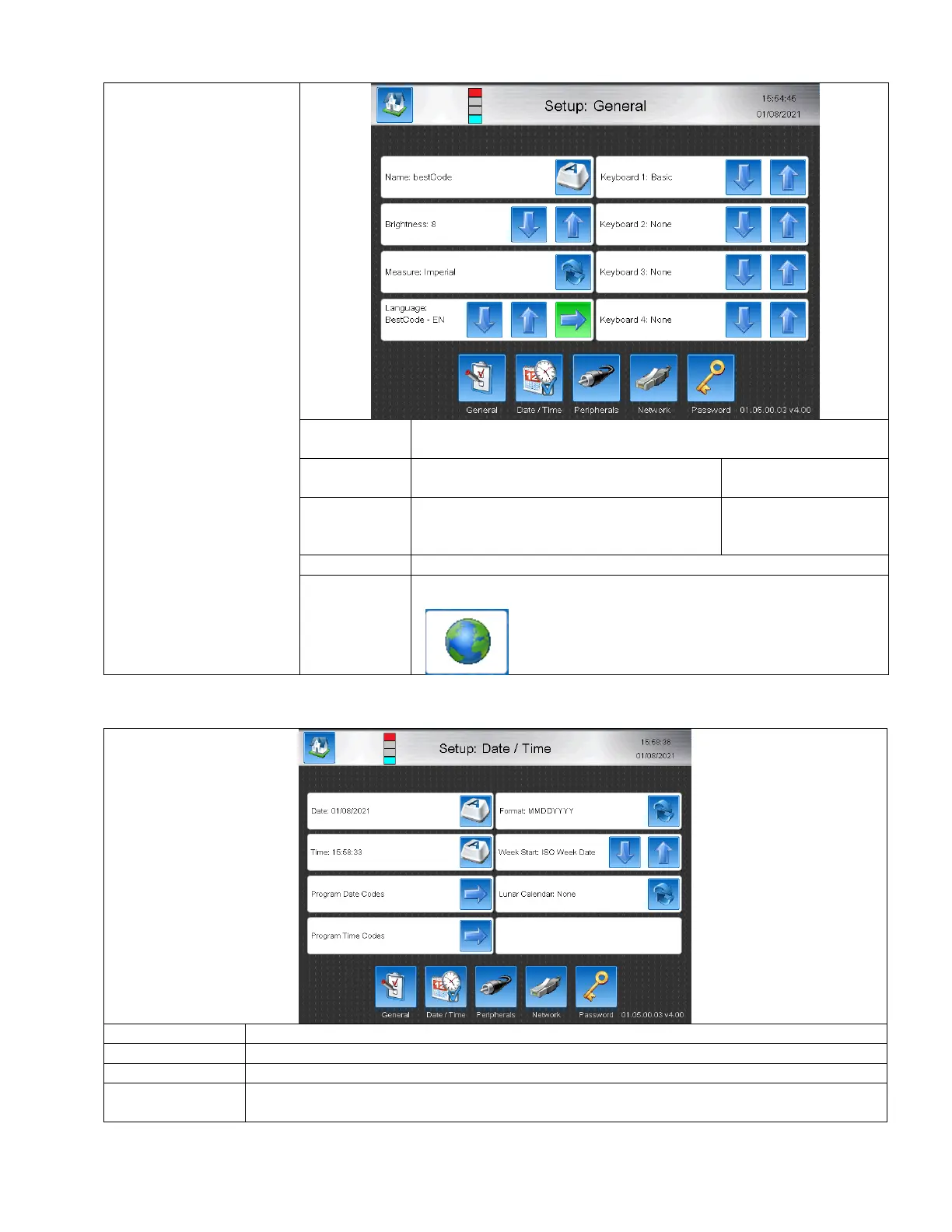
Setup Screen
The setup screen is used for
setting up the machine
languages, date/time,
peripherals, networking,
and passwords.
Give a unique name to the Printer. Often specific to the line the machine
is operating on.
Brightness of the Touch Screen. Can be
increased or decreased by preference.
Selects Imperial or Metric measurement
units. Changes units used when calibrating
the width using the Speed Screen.
Selects the Language file to use on the Printer. Must press arrow to load.
Selects the Keyboard/s to be used for creating messages.
Up to 4 keyboards can be used. Press the Globe button
on any keyboard to change to the next Keyboard.
Sets the format that the date is displayed
Sets the day of the week to associate week codes to (I.E Sunday = 1, Monday =2, or Monday =1,
Tuesday = 2)



 To Next Page