BestCode Next Series 8 Technical Manual October 2022 Page 24 of 290
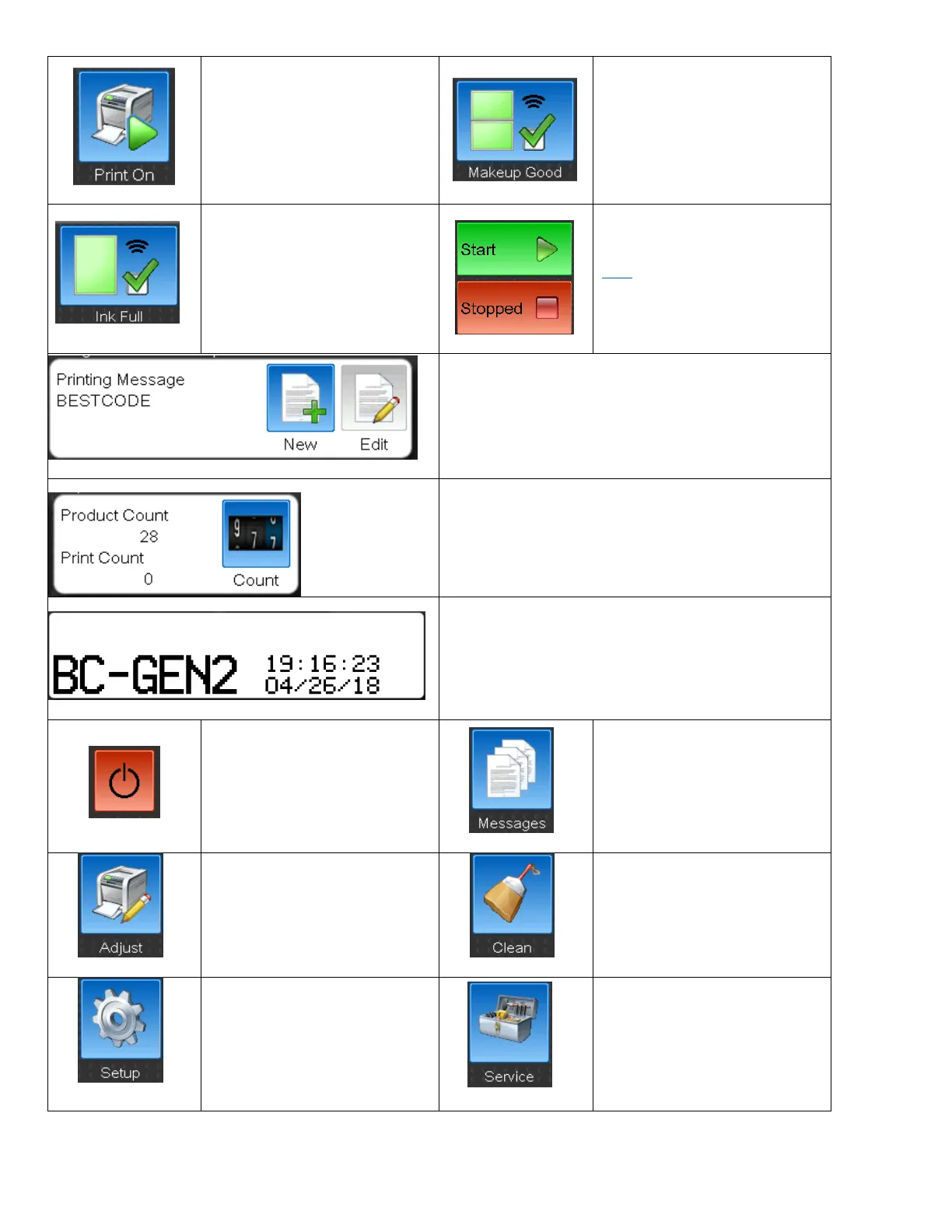
Enable or disable the High Voltage
in the printhead. This will stop the
printer from printing without
stopping the jet. Print triggers
received while this is disable will
be counted, but Print will not
occur.
Shows the Status of the Makeup
Tank. The level indicators will let
the operator know when to add a
Makeup Bottle.
Shows the Status of the Ink Tank.
The level indicators will let the
operator know when to add an Ink
Bottle.
Start & Stop button are discussed
Here on Page 21
Shows the actively Printing Message.
The New button allow the user to create a new message.
The Edit button allows the user to edit the Printing
Message.
Product Count is a count of how many Print Triggers have
occurred on the Printing Message.
Print Count is a count of how many times the Printer has
printed the Printing Message.
The message preview window gives an exact
representation of the Printing Message.
Tapping anywhere in this field will change how much of
the message is visible on screen.
Power down button. The button
will intelligently stop the jet if the
jet is running when the system is
powered down.
The Message button opens the
Message screen. The Message
screen is used to select, create,
edit, or delete messages on the
printer.
The Adjust button opens the
Adjust screen. The Adjust screen is
used to adjust print position, print
rotation, print height, and print
speed.
The clean Button opens the Clean
Screen. The Clean screen has 2
options for cleaning the Printhead.
The setup button opens the Setup
Screen. The setup screen is used
to configure Languages and
Keyboards, Date/Time,
Networking, Operator Passwords,
and Peripheral options
The Service button opens the
service screen. The service screen
allows the operator to check and
modify operating parameters and
gives access to Technician features
when logged in with the
Technician Level Password.



 To Next Page