KBW (E6) 11/2016 page 42/147
8.2.2 Cancelling a running timer program
Press the Program cancelling icon to cancel the program.
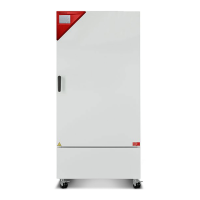
A confirmation prompt is displayed. Press the Confirm
icon to confirm that the program shall really be can-
celled.
After confirming the message the controller changes to Fixed value operation mode. The setpoints of
Fixed value operation mode will then equilibrate.
8.3 Performance after the end of the program
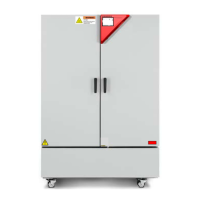
After the end of the program the message “Device
changes to fixed value operation mode” appears on the
screen.
Press the Confirm icon.
After confirming the message the controller changes to Fixed value operation mode. The setpoints of
Fixed value operation mode will then equilibrate.


 To Next Page