CB / CB-UL, CBF / CBF-UL (E7) 01/2022 Page 164/199
22.4 Replacing the CO
2
sensor
• Pull the power plug.
CAUTION
Risk of injuries by sharp edges on the rear panel.
Cuts.
Wear protective gloves when removing or installing the cover on the chamber rear
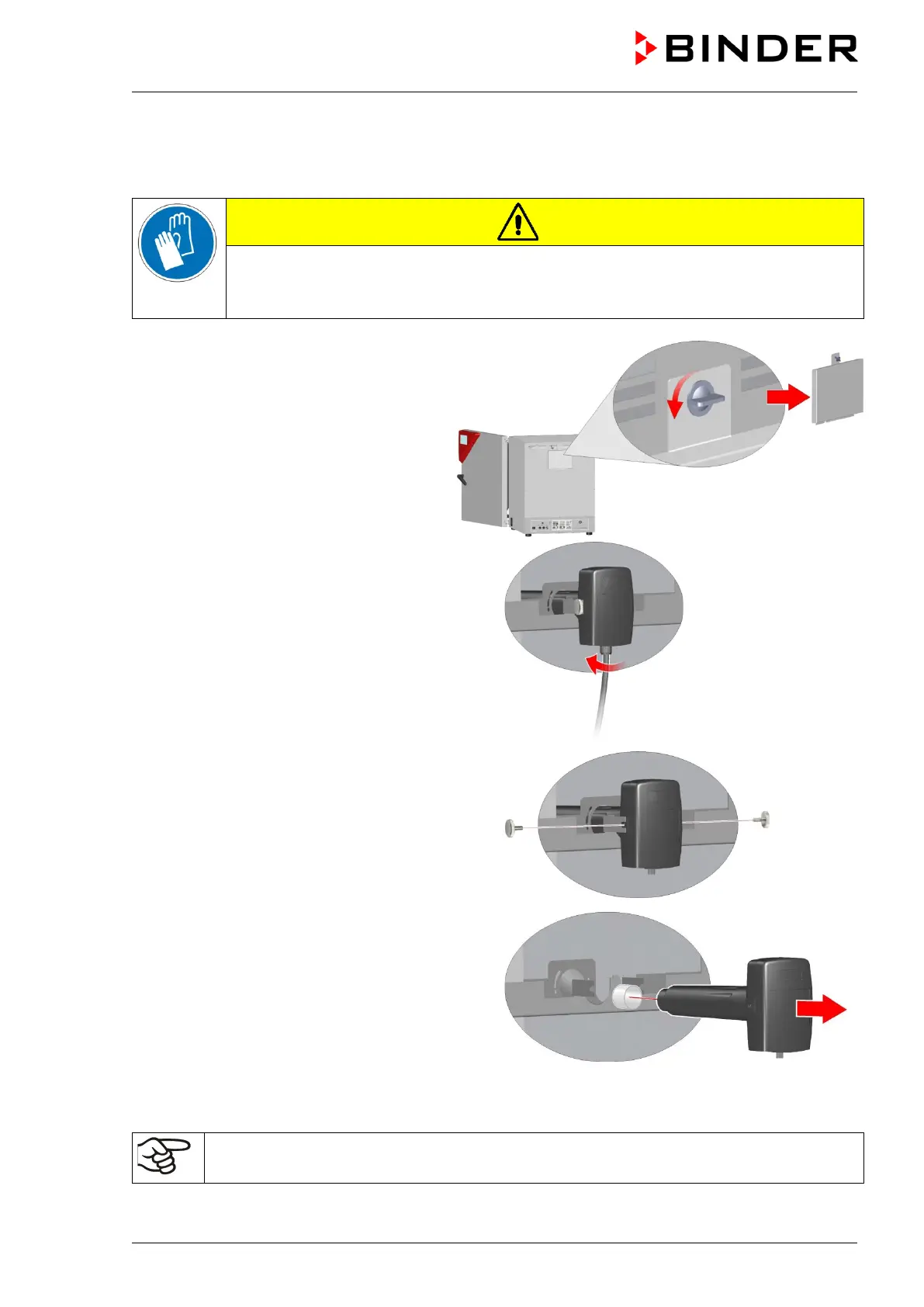
• Remove the cover on the chamber rear
The position of the CO
2
sensor behind
the cover is shown in Figure 50.
• Unscrew the cable from the sensor.
Make sure that the sensor cable does not fall
into the inner chamber.
• Remove the fixing screws on both sides of the
sensor.
• Pull the sensor backwards out of the holder. The
filter (white) attached to the sensor is pulled out
together with the sensor.
• Then mount the new sensor proceeding in reverse order
• Reinstall the cover on the chamber rear.
The sensor may only be used with the attached filter.
After replacing the CO
2
sensor repeat the CO
2
calibration.



 To Next Page