CB / CB-UL, CBF / CBF-UL (E7) 01/2022 Page 172/199
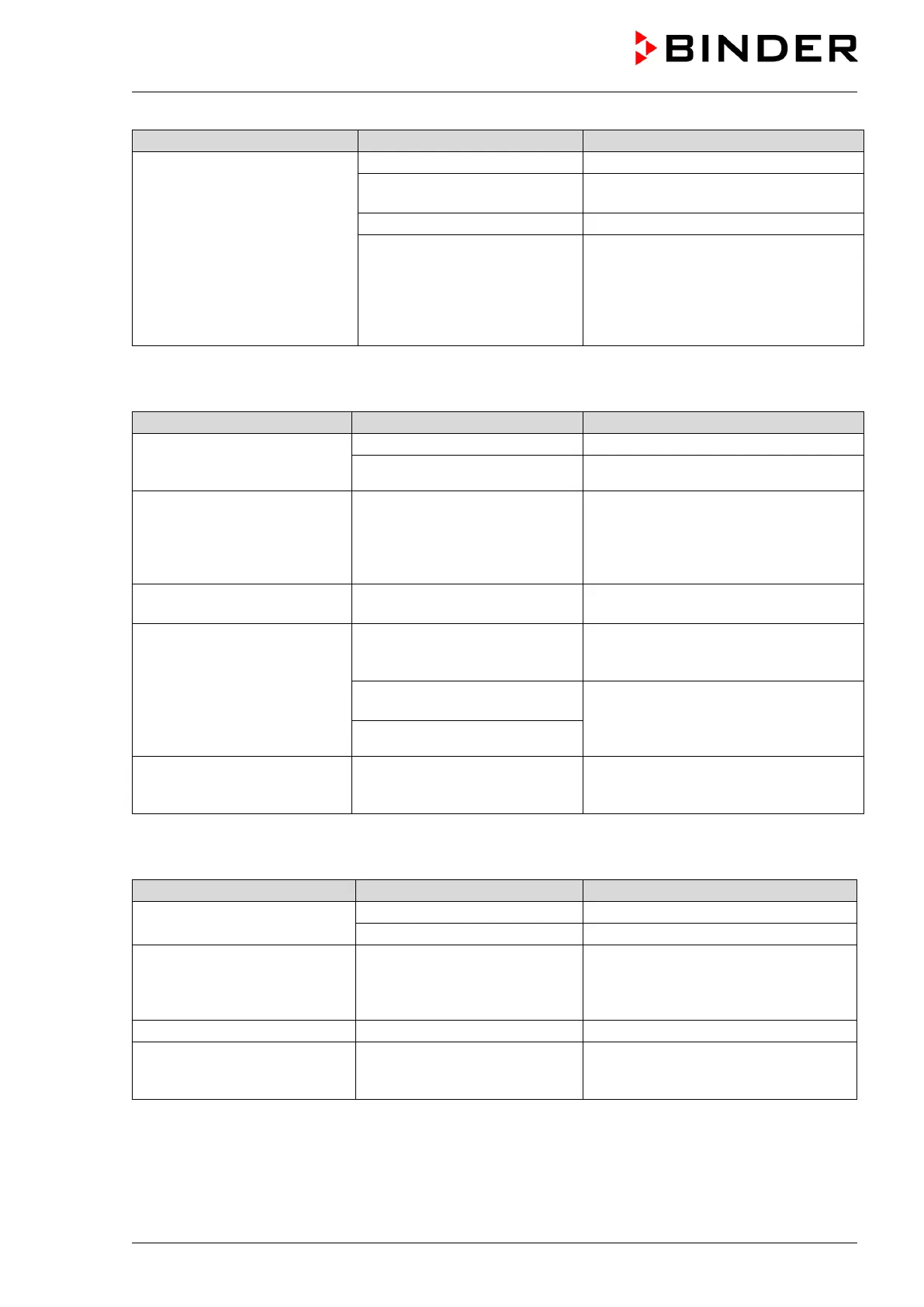
Too low humidity inside.
Increase humidity (chap. 6.8)
Chamber door not properly
closed.
Completely close chamber door.
Permadry™ pan empty.
Fill the outer Permadry™ pan with
water up to the marking on the inner
pan with distilled, sterile water. The
pan must have thorough contact to the
bottom of the inner chamber, see
22.6.7 Humidity (CBF / CBF-UL)
Control accuracy of +/- 3 %
Door opened very frequently. Open doors less frequently.
Humidity fluctuation, together
with temperature fluctuation
> 1 °C with a set-point approx.
3 °C above ambient
Place of installation too hot.
Select cooler place of installation or
contact BINDER service.
Alarm message “Humidity
system”.
Humidity module defective.
Acknowledge the alarm on the
controller. Contact BINDER service.
Alarm message “Freshwater
supply”.
Freshwater bag is empty or
contains air.
Acknowledge the alarm on the
controller. Fill the freshwater bag
The silicon tube is not correctly
inserted into the pump.
Acknowledge the alarm on the
controller.
Place the silicon tube correctly (chap.
Silicon tube kinked.
Too high humidity inside the
chamber (exceeding the set-
Ambient humidity too high at
site of installation
Possible dehumidification depends on
ambient humidity. Select installation
site with lower humidity.
22.6.8 Controller
No chamber function
(dark display).
Main power switch turned off.
Turn on the main power switch.
Menu functions not available.
Menu functions not available
with current authorization level.
Log in with the required higher
authorization. or contact BINDER
service to obtain an activation code
measured-value memory
cleared; information lost.
New setting of storage rate or
scaling (minimum and/or
Change the storage rate or scaling
ONLY if the previously registered data



 To Next Page