11
2. Getting Started
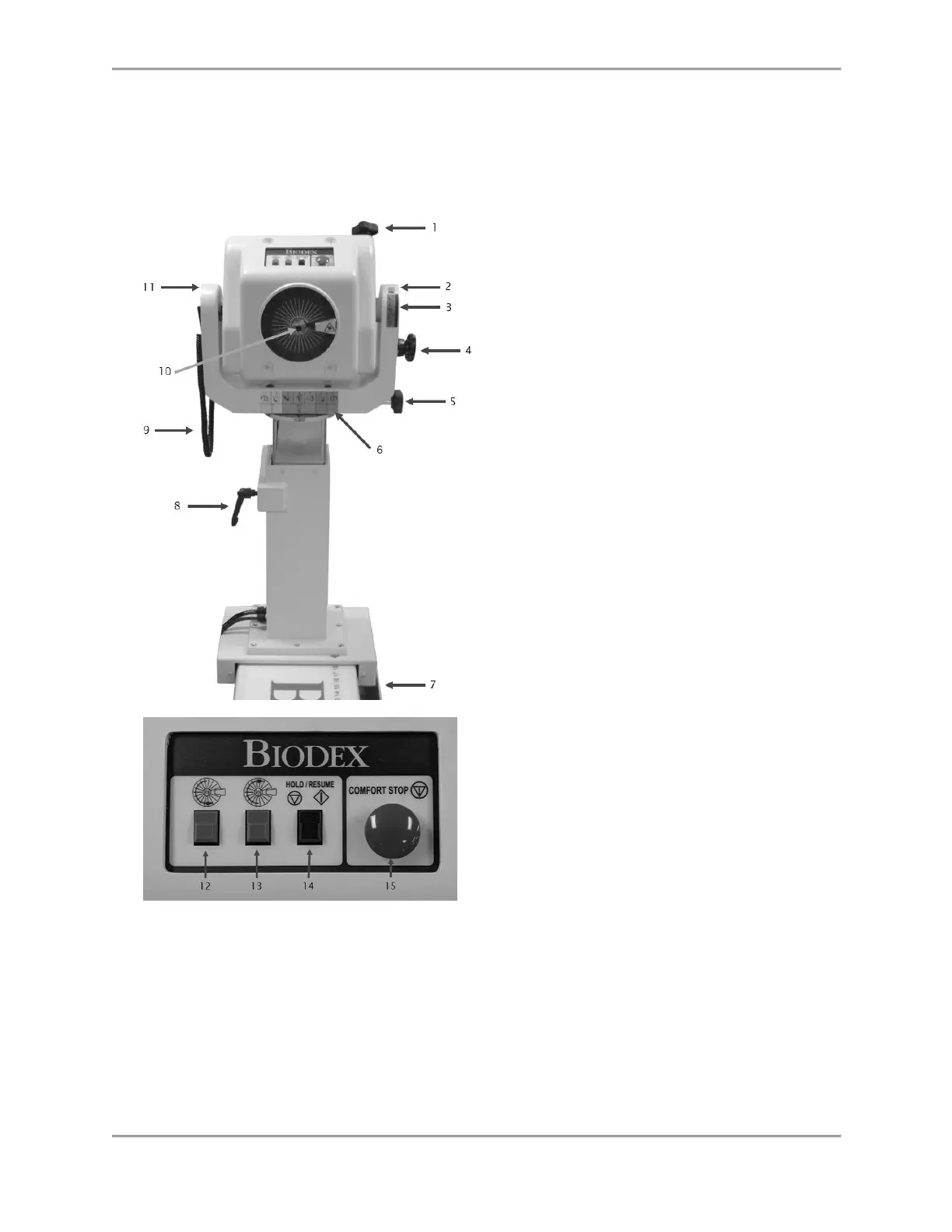
Controls and Adjustments
1. Tilt Knob (locking)
2. Tilt Scale
3. Tilt Key
4. Locking Knob Storage
5. Rotation Knob (locking)
6. Position Color Code Label
7. Foot Pedals (travel) 850-000, 840-000
(not depicted)
8. Height Lever
9. Comfort Stop Pendant (patient-held)
10. Shaft Red Dot
11. Yoke
12. Rotate Counterclockwise Button
13. Rotate Clockwise Button
14. Hold/Resume Button
15. Comfort Stop
Figure 2.1. Dynamometer Positioning Controls and Adjustments.
Dynamometer
Dynamometer Rotation: To rotate the dynamometer in a horizontal plane, loosen the Rotation
Knob by turning it counterclockwise. Rotate the dynamometer in either direction. To secure the
dynamometer rotation position, tighten the knob in a clockwise direction and ensure that the
dynamometer teeth are engaged. Use the Rotation Scale, located on the base of the dynamometer
directly beneath the yoke, to note the new position.



 To Next Page