2. Operating Instruction and Installation
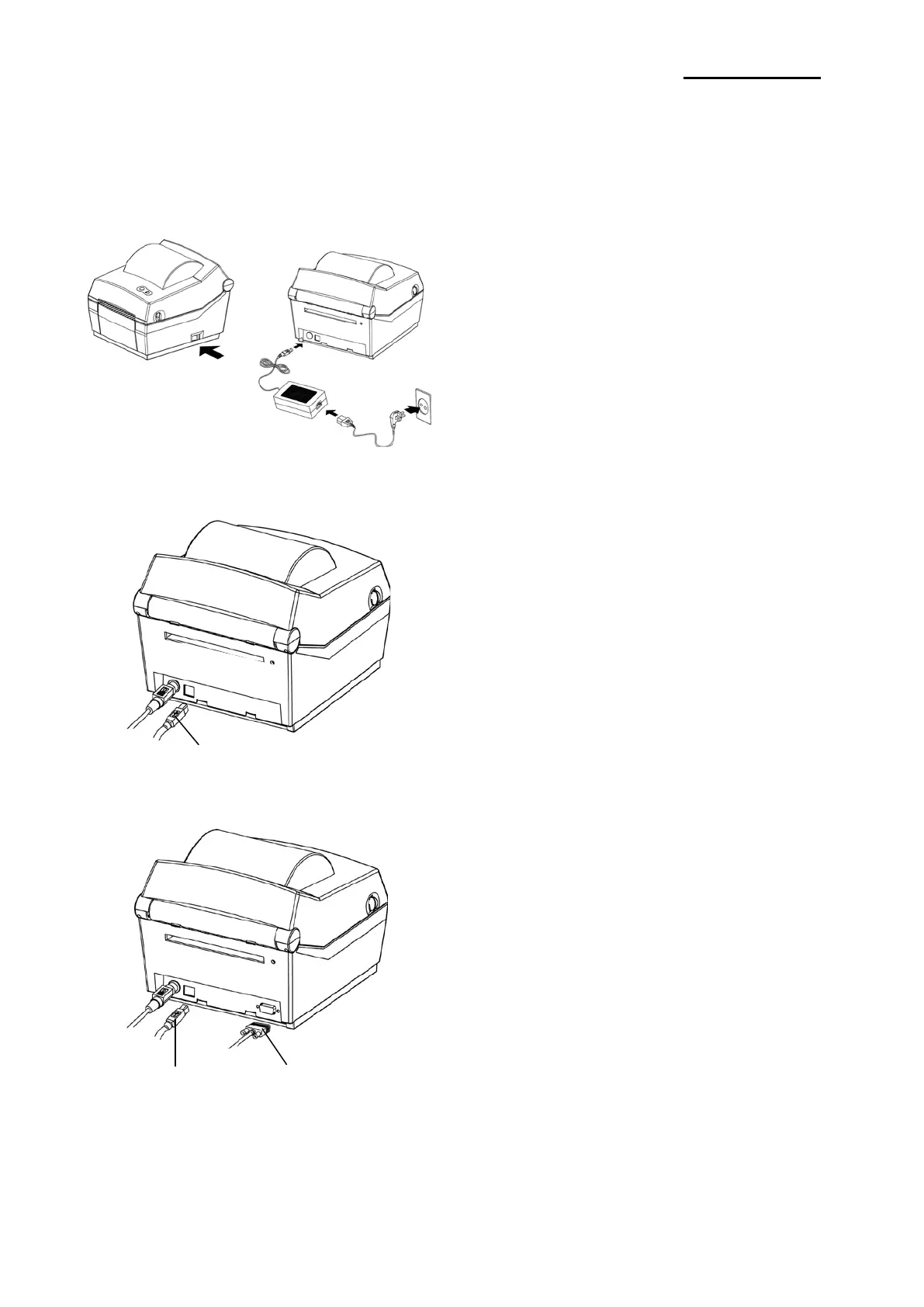
2-1 Installation
2-1-1 SMPS Installation
2-1-2 Interface Cable Installation(STD Model)
2-1-3 Interface Cable Installation(Serial Model)
-232C(Serial) Cable
1) Turn off the printer power switch.
2) Check to see that the AC adapter voltage matches
that of the power source.
3) Connect the AC adapter jack to the printer power
connector.
4) Connect the power cord to the AC adapter.
5) Connect the power cord to a power source/outlet.
1) Turn off the power switch.
2) Connect the communication cable to the printer
communication port to be used.
- Connect USB B-Type cable to the USB port.
(This port requires a shielded cable less than
1.8m long.)
1) Turn off the power switch.
2) Connect the communication cable to the printer
communication port to be used.
- Connect the RS-232C(Serial) Cable to the
SERIAL port and tighten the screw on both
sides.(This port requires a shielded cable less
than 1.8m long.)
- Connect USB B-Type cable to the USB port.
(This port requires a shielded cable less than
1.8m long.)
Ver. 1.01
- 8 -














 To Next Page