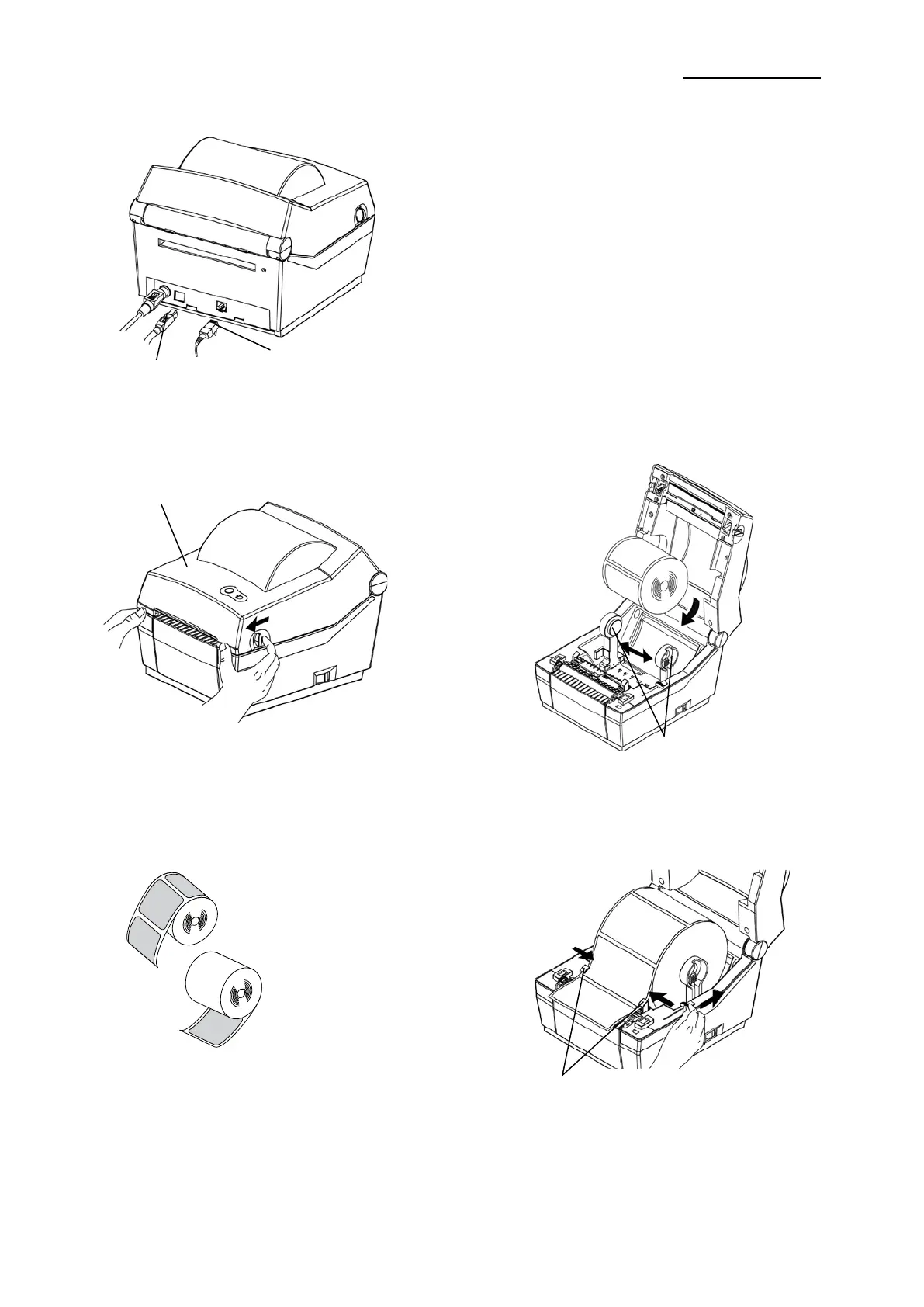
2-1-4 Interface Cable Installation(Ethernet Model)
2-1-5 Paper Installation
1) Open the Paper Cover.
3) Whether the paper label is wound
inwards or outwards, its printing
surface must face up.
5) Close the Paper Cover until a click sound is heard.
1) Turn off the power switch.
2) Connect the communication cable to the printer
communication port to be used.
- Connect the LAN(Ethernet) Cable to the
ETHERNET port.(This port requires a UTP
cable(CAT5 or higher) less than 3.0m long.)
- Connect USB B-Type cable to the USB port.
(This port requires a shielded cable less than
1.8m long.)
2) Spread the paper holder and insert paper as shown.
4) Adjust the paper guide to the width of the paper.
.
Ver. 1.01
- 9 -













 To Next Page