37
1.8 7 7. 8 7 7. 2 2 6 9 BLACKBOX.COM
NEED HELP?
LEAVE THE TECH TO US
LIVE 24/7
TECHNICAL
SUPPORT
1.8 77.877.2269
CHAPTER 12: OSD FUNCTIONS
Resolution
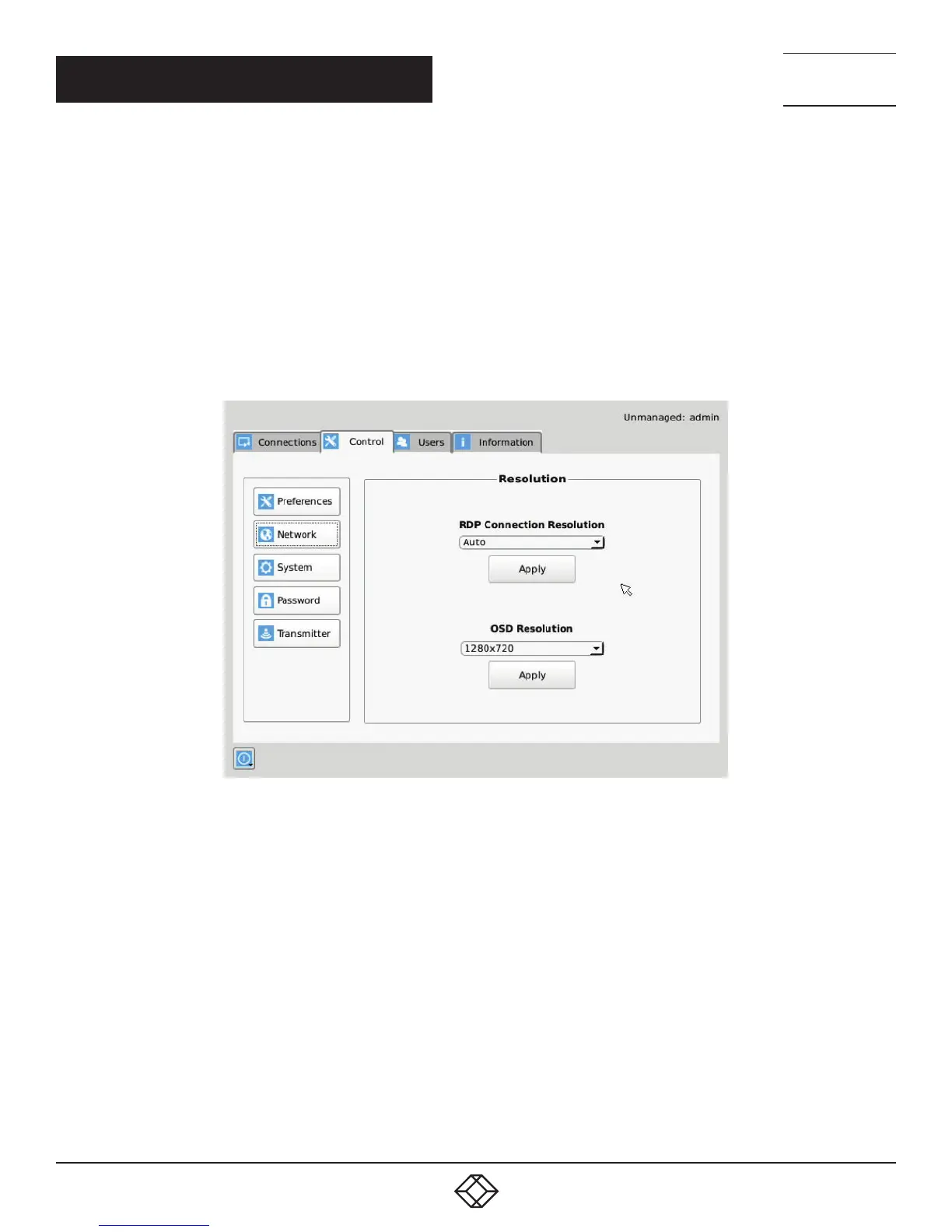
The Resolution button allows an administrator or power user to set the preferred resolution for the RDP Connection and for the OSD.
By default, both the RDP Resolution and the OSD Resolution are set to Auto.
The RDP Connection Resolution allows the resolution to be changed for an RDP connection, (i.e. defines the resolution that the
virtual desktop will be accessed with). If the preferred resolution is not supported, the Receiver will use the next highest resolution
supported by both monitor and Receiver.
The OSD Resolution is set to Auto by default, but can be changed to the available OSD resolutions if the user wants to set
a specific resolution. This setting has no effect when connecting to an InvisaPC Transmitter.
Click Apply button to save the change.
FIGURE 12-9. RESOLUTION SCREEN


 To Next Page