48
1.8 7 7. 8 7 7. 2 2 6 9 BLACKBOX.COM
NEED HELP?
LEAVE THE TECH TO US
LIVE 24/7
TECHNICAL
SUPPORT
1.8 77.877.2269
CHAPTER 12: OSD FUNCTIONS
Video Source Optimization
The transmitter can be configured to handle different applications by changing the way it handles the video signal if it natively
has embedded noise (i.e. from a VGA to DVI converter). You can choose to use “DVI optimized”, “VGA high performance”, “VGA
optimized”, or “VGA low bandwidth” settings. You may change these options to get the best performance out of the transmitter.
EDID Settings
The transmitter can support native EDID options such as “1920x1080”, “1920x1200”, “1680x1050”, “1280x1024”, “1024x768”, or
you can choose to use the remote monitor EDID by clicking on the Generate Clone button which will copy the remote EDID to the
transmitter. The computer may need to be restarted in order for the settings to work. If you find that changing the EDID settings
makes the remote monitor blank out, you may need to select a different option to make it work.
Transmitter Network Settings
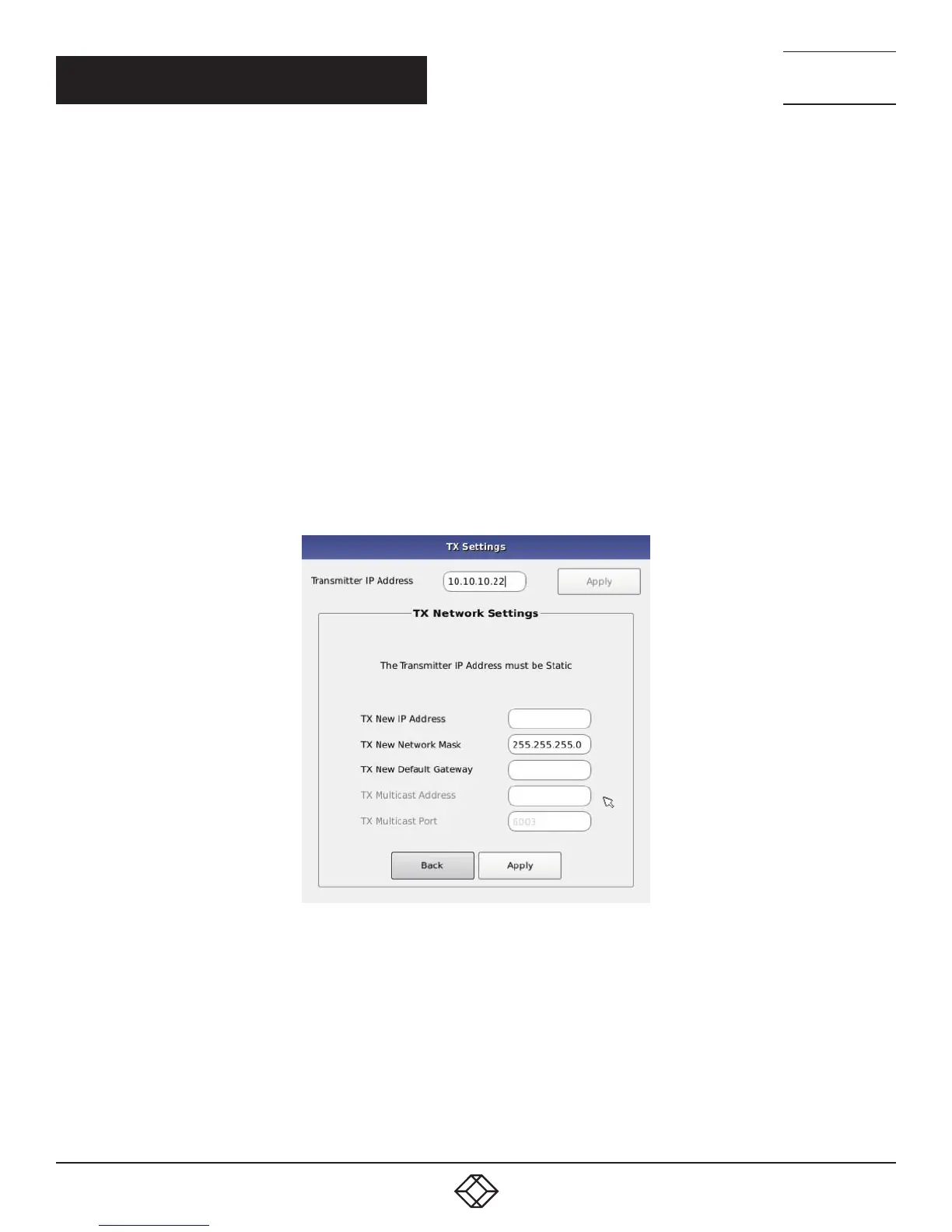
The administrator can click the Network Settings button to edit the Transmitter Network Settings.
To change the IP address settings for a Transmitter, the administrator can enter the new IP address, subnet mask, and gateway, and
then click on the Apply button.
FIGURE 12-21. TRANSMITTER NETWORK SETTINGS WINDOW
If the new IP address for the InvisaPC Transmitter is on a different subnet than the Receiver, the Receiver or Manager will not be able
to communicate with it without going through a router. This is the case even on a point-to-point link between devices.
If the entered IP address is not the address of a valid InvisaPC Transmitter or this address is unreachable, an error message is
returned.
Discover Transmitter IP Address
This requires the Transmitter to be connected to the Receiver or Manager on a point-to-point link or be the only Transmitter on the
attached network. in this case, the administrator can click on the Discover button and follow the wizard to discover the IP address of
the attached Transmitter. This is required in the case when an administrator does not know the IP address of the Transmitter.



 To Next Page