155
1. 8 7 7. 8 7 7. 2 26 9 BLACKBOX.COM
NEED HELP?
LEAVE THE TECH TO US
LIVE 24/7
TECHNICAL
SUPPORT
1.877.87 7.2269
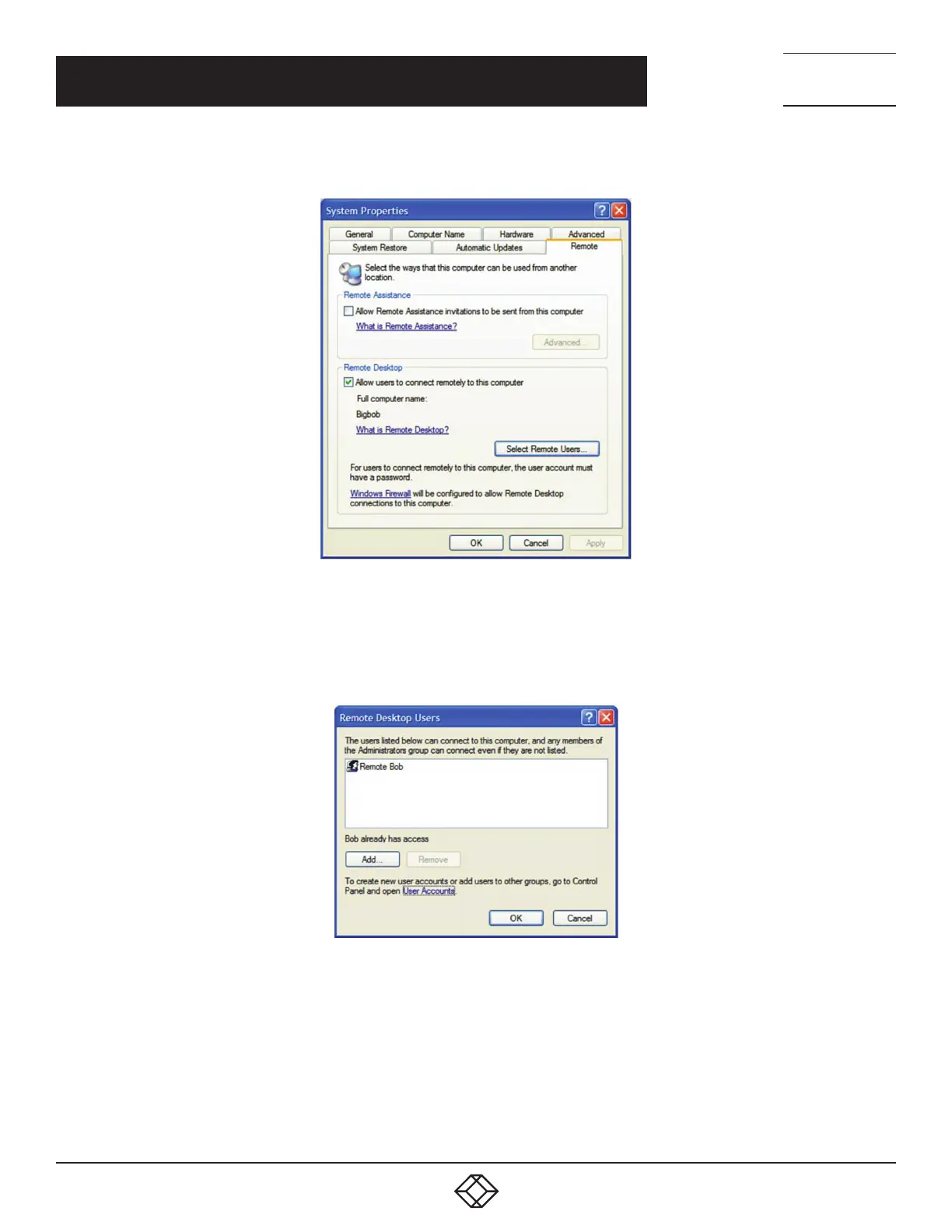
Click the Remote tab.
FIGURE 7-17. REMOTE TAB
Check the Allow users to connect remotely to this computer checkbox.
Click the Select Remote Users… button.
The Remote Desktop Users window opens.
FIGURE 7-18. REMOTE DESKTOP USERS SCREEN
Click the Add… button to add users to the list of those allowed to remotely access the system using the RDP protocol.
Click OK to close the Remote Desktop Users window.
Click OK to close the System Properties window.
Windows generates the available user list from local accounts on the target Windows computer. To setup new users to then add them
to the Remote Desktop Users list:
Navigate to Start Menu > Control Panel.
CHAPTER 7: SSH TUNNELS AND SDT CONNECTOR











 To Next Page