46
1.8 7 7. 87 7. 2 2 6 9 BLACKBOX.COM
NEED HELP?
LEAVE THE TECH TO US
LIVE 24/7
TECHNICAL
SUPPORT
1.8 77.87 7.2269
CHAPTER 5: SECURITY APPLICATION
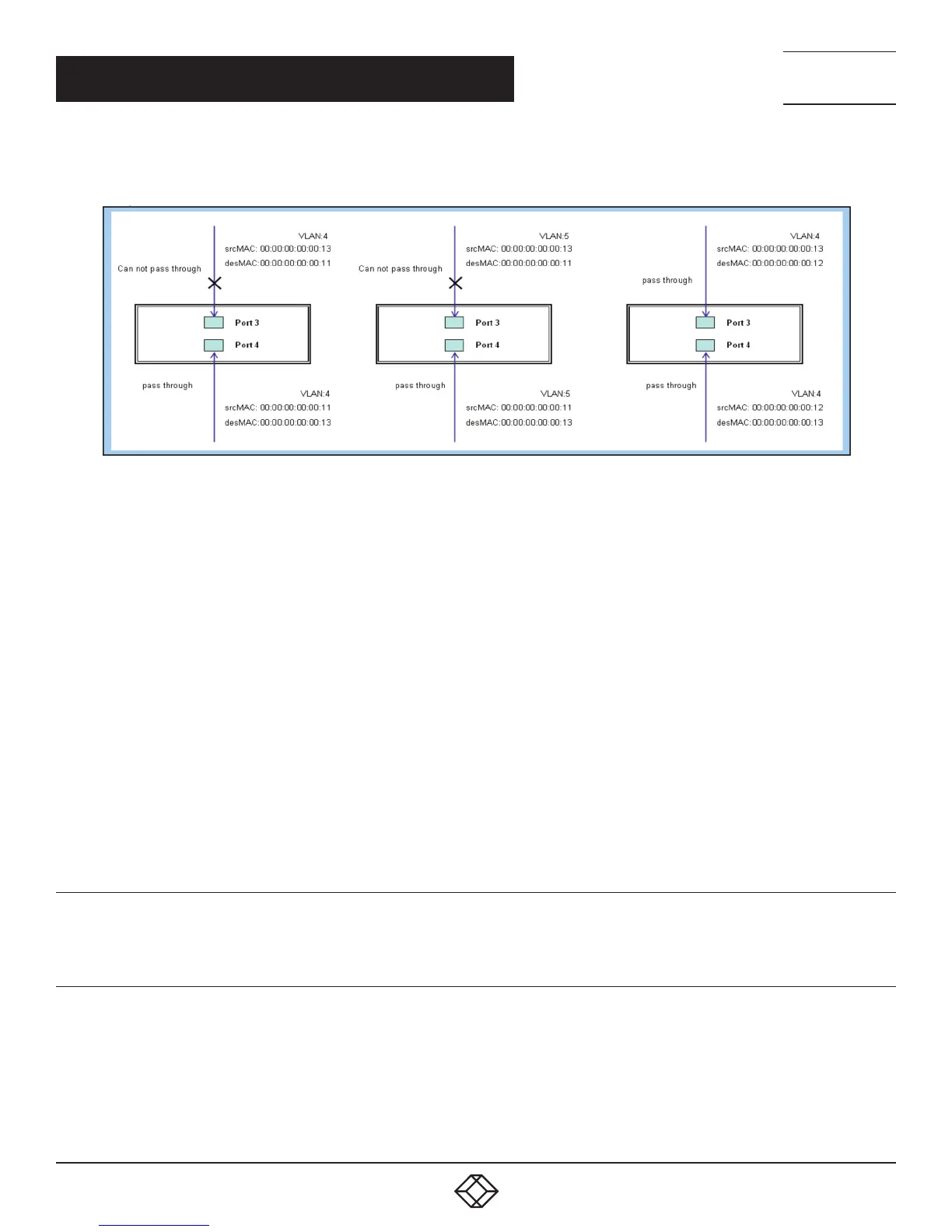
Step 4: Send frames between PORT-3 and PORT-4, and see test result.
FIGURE 5-6. TEST RESULT
CLI COMMAND
access-list ace 2 ingress interface GigabitEthernet 1/3 policy 0 frametype etype smac 00-00-00-00-
00-13 dmac 00-00-00-00-00-11 action deny
exit
interface GigabitEthernet 1/3
switchport trunk allowed vlan 4,5
switchport trunk vlan tag native
!
interface GigabitEthernet 1/4
switchport trunk allowed vlan 4,5
switchport trunk vlan tag nativevlan 4
exit
CASE 1B
This case acts as no ACL function. It means all frames will pass through.
CASE 1C
User can set the default ACL Rule of GE port as “Permit”, then bind a suitable profile with “Queue Mapping” action for some ACL
function. It means GE port can do queue mapping 0–7 of the frame received from this port.













 To Next Page