SAM 950 Berkeley Nucleonics Corporation 31 of 62
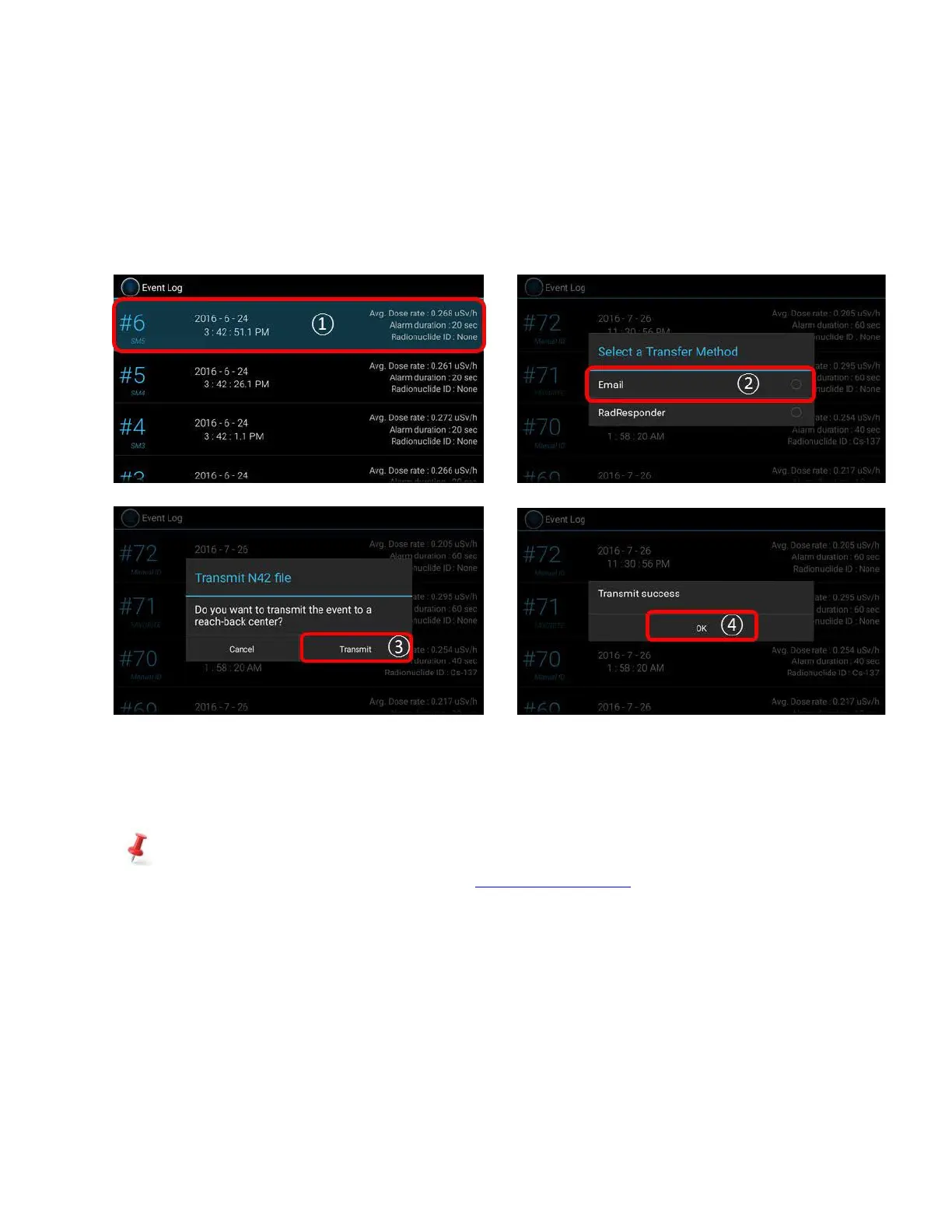
User also can send any event(s) stored in Event Log either to Reach-Back center or third party server
(RadResponder). Figure xx summarizes procedure.
1. Select event from the Event log list and hold for about 2 seconds.
2. Pop up screen appears as shown in figure 4.17. Select ‘Reach-back’ as destination to send.
3. Select transmit.
Figure 4.17. Sending event(s) from Event Log to Reach-back.
✓ Send event(s) from Event Log to RadResponder
Similar to the Reach-back service, the event(s) can be sent to a server of third party directly.
We have partnered with RadResponder team and setup necessary account and data format to send our
event file. For details about RadResponder please visit www.Radresponder.net
Following is steps of using RadResponder feature.
1. Select event from the Event log list and hold for about 2 seconds.
2. Pop up screen appears as shown in figure xx. Select ‘RadResponder’ as destination to send.
3. Sign in with RadResponder account.
4. Click ‘Grant’



 To Next Page