20 en | Connections and settings Digital Video Recorder
F01U | 1.0 | 2007.11 User Manual Bosch Security Systems
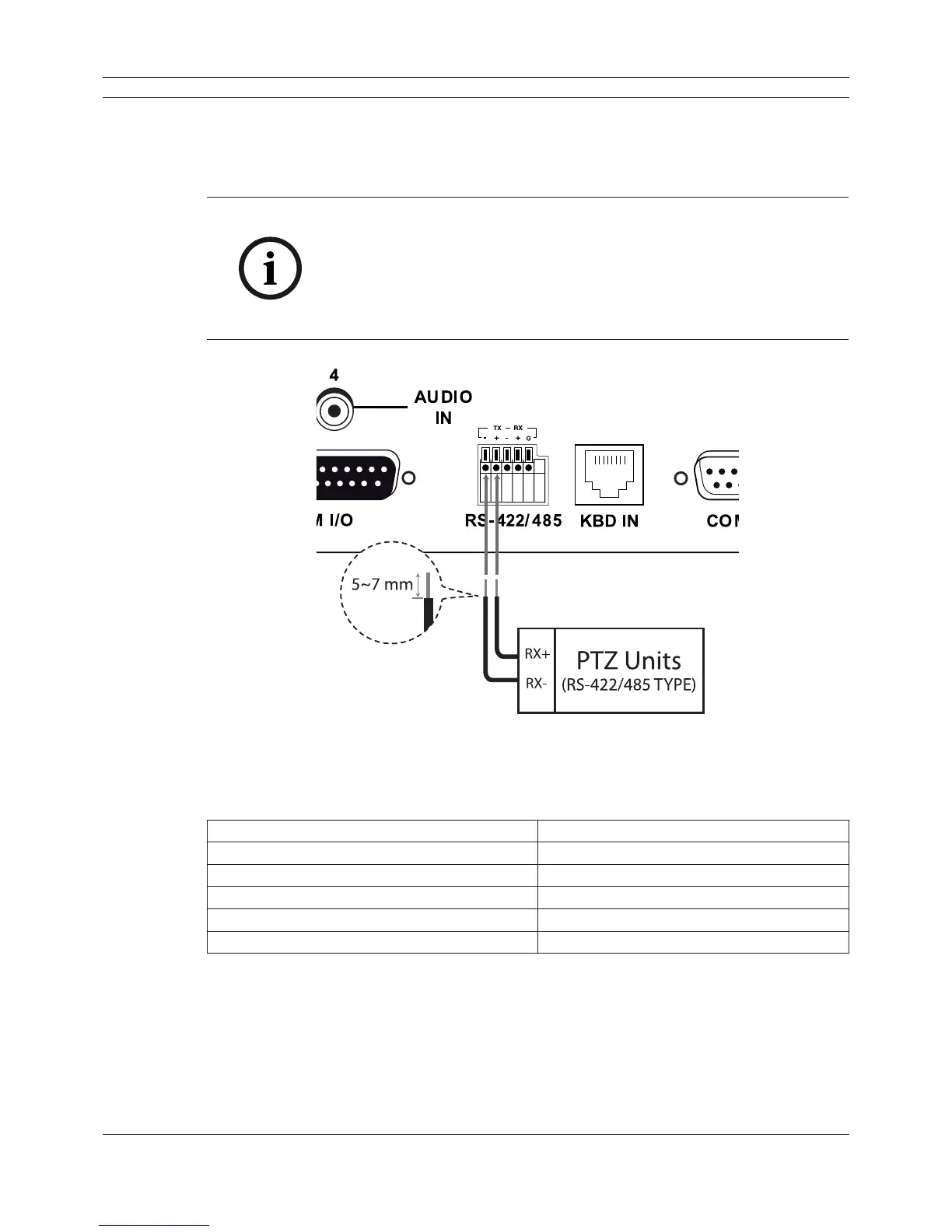
3.8 Connecting a RS-422/485 device
Use this port to connect PTZ cameras or DVRs, for example, when the PTZ camera is connected.
Connect the PTZ serial communication lines to the RS-422/485 terminal.
Notes:
• When connecting lines, connect the TX- of the DVR to RX- of the PTZ
unit and TX+ of the DVR to RX+ of the PTZ unit correctly.
• Recommended initial data are 9600 Baud Rate, 8 Data bits, 1 Stop bit
and No parity.
• When connecting PTZ cameras to DVRs it is necessary to set the setup
menu for this unit according to the RS-485 settings of the camera and
DVRs.
Figure 3.2 RS-422/485 connections
RS-422/485 Terminal Description
TX- (DATA -) Data Transmission
TX+ (DATA +) Data Transmission
RX- (DATA -) Data Reception
RX+ (DATA +) Data Reception
GND Shield
Table 3.1 RS-422-485 connections



 To Next Page