38 en | Connections and settings Digital Video Recorder
F01U | 1.0 | 2007.11 User Manual Bosch Security Systems
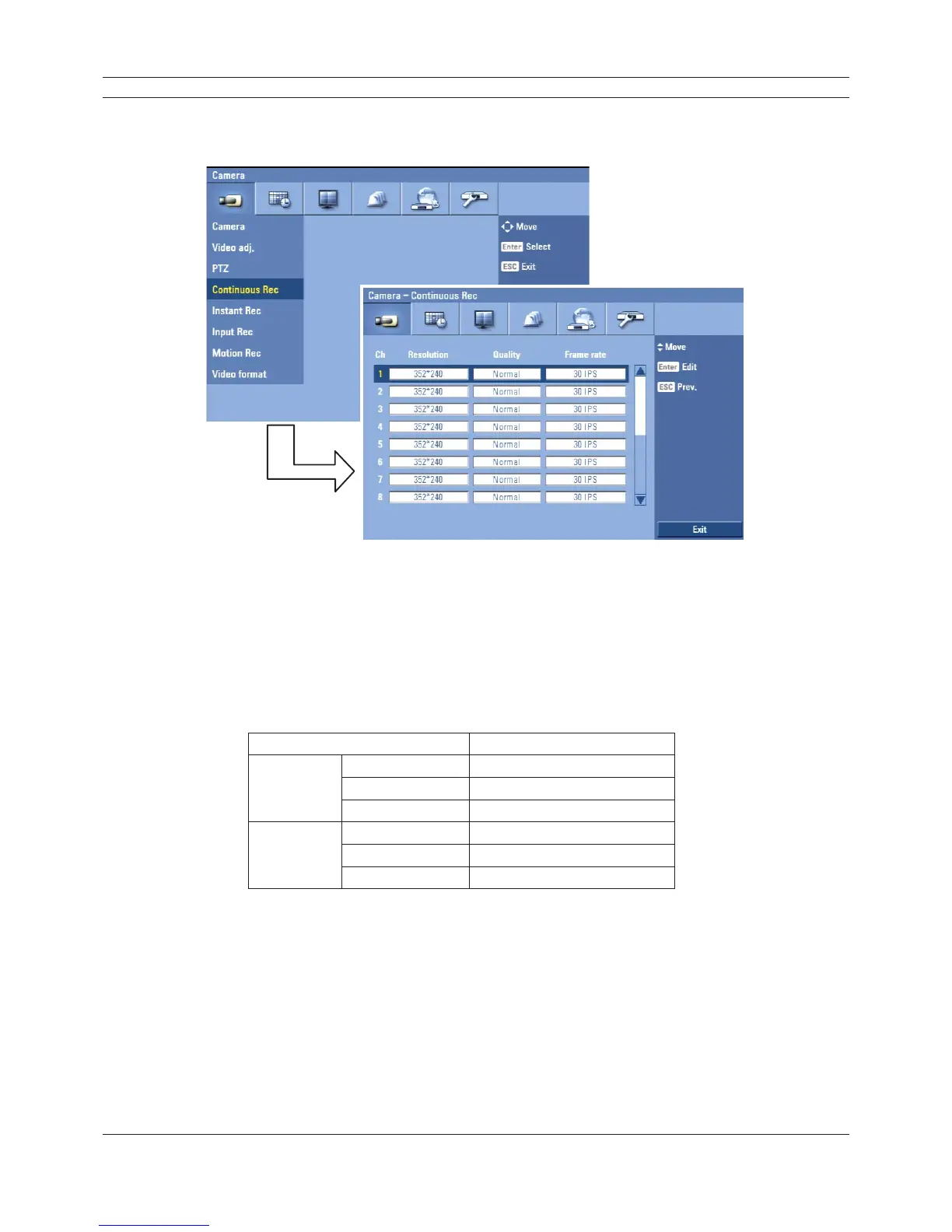
3.19.4 Continuous recording
Settings concerning continues recording.
Figure 3.18 Continuous recording setup menu
• Ch: Displays the channel number.
• Resolution: Selects the recording resolution.
• Quality: Selects the recording picture quality (Lowest, Low, Normal, High or Best).
• Frame rate: Selects the frame rate. The frame rate is the number of recorded frames per
second. According to resolution, the frame rate is set automatically. If you wish to set
manually, refer to the below table.
Resolution Frame rate
NTSC
352*240 1, 3, 5, 7.5, 15, 20, 30
704*240 1, 3, 5, 7.5, 15
704*480 1, 3, 5, 7.5
PAL
352*288 1, 3, 5, 6, 12.5, 20, 25
704*288 1, 3, 5, 6, 12.5
704*576 1, 3, 5, 6
Table 3.7 Frame rate table



 To Next Page