Digital Video Recorder Connections and settings | en 37
Bosch Security Systems User Manual F01U | 1.0 | 2007.11
3.19.3 PTZ
Settings for the PTZ cameras connected via the data port of the biphase connecter or RS-422/485
terminal.
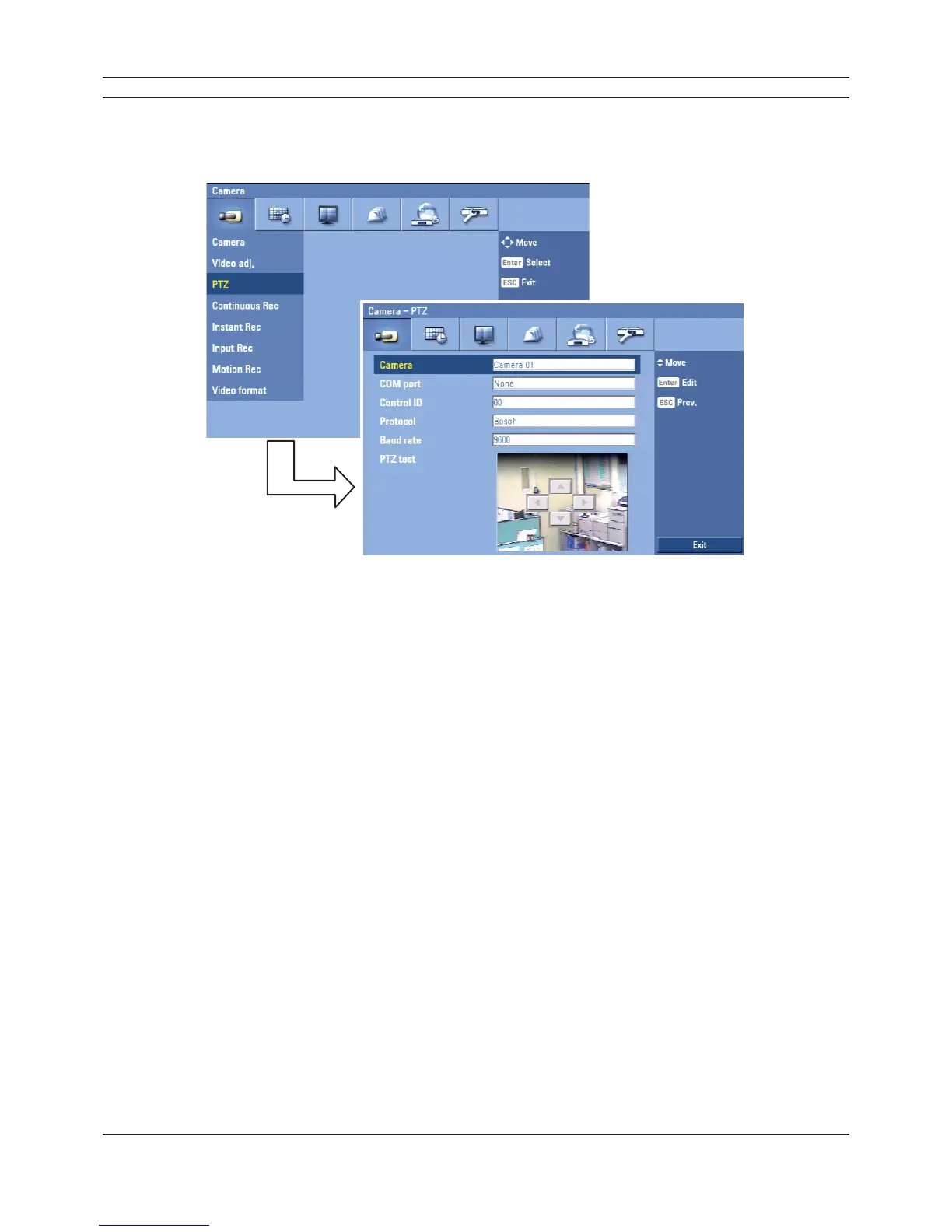
Figure 3.17 PTZ setup menu.
• Camera: Selects the desired camera to set the connected PTZ camera.
• COM port: Selects the connected data port of the biphase connecter, or RS-422/485 terminal
on the rear panel.
• Control ID: Selects the PTZ camera ID from 00 to 255. Make the same settings as the PTZ
camera.
• Protocol: Selects the protocol supported by PTZ camera.
• Baud rate: Selects the communication speed (1200, 2400,4800,9600,19200 or 38400).
• PTZ test: After the PTZ setting, you can test the pan/tilt function for the selected PTZ camera.
You can see the test screen from the preview windows on the right side of the PTZ test option.
- b/B: Test the pan direction.
- v/V: Test the tilt direction.



 To Next Page