Digital Video Recorder Connections and settings | en 27
Bosch Security Systems User Manual F01U | 1.0 | 2007.11
3.14 Selecting live screen mode
3.14.1 Monitor A
You can select the live screen mode to display a full, 4-view, 6-view, 8-view, 9-view or 16-view
screens on the main monitor.
1. Press A (
) button or click the icon in the system control bar.
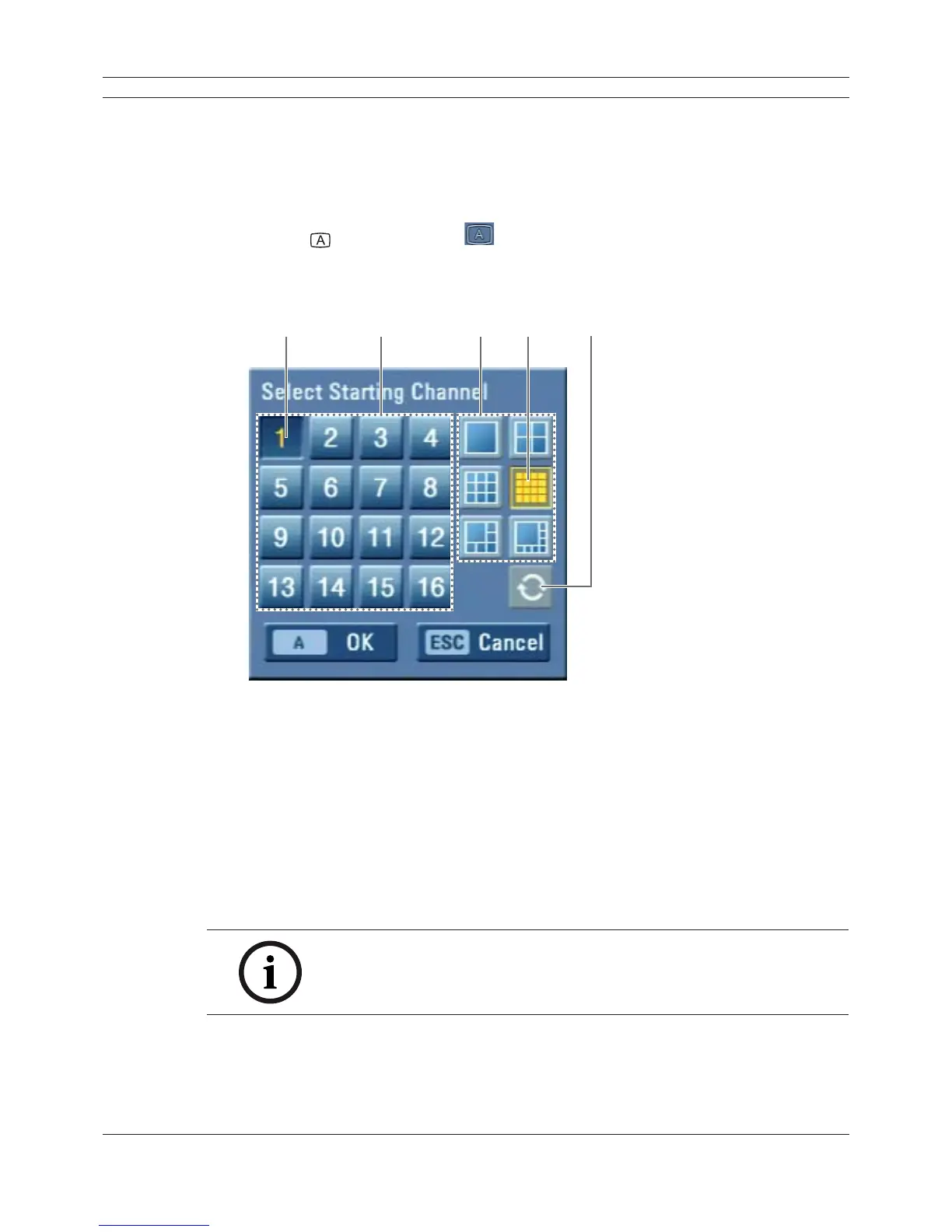
The screen mode select menu of monitor A is displayed on the monitor A.
2. Select screen mode.
ab cde
Figure 3.9 The screen mode select menu of monitor A.
a Selected channel of the monitor A.
b Channel buttons: Press the 1 to 16 channel button to see the current camera images in
selected live screens on the monitor A.
c Screen mode
• Full Screen Mode: When you see the selected channel on the full screen.
• 4, 6, 8, 9 and 16 view Mode: Displays selected multi screens on the monitor A.
d Selected view mode.
e Sequence: Views the all channels in sequence.
3. Select [OK (A)] and press ENTER to confi rm your selection.
Note:
To display the screen you desire to watch in full screen mode, double click
the desired channel.



 To Next Page