Digital Video Recorder Connections and settings | en 31
Bosch Security Systems User Manual F01U | 1.0 | 2007.11
3.15.5 To tour the preset positions
You can tour all preset positions.
1. Press the TOUR button or Click the [TOUR] icon.
All registered preset positions in the camera will be selected. The camera position image will
be switched on the active monitor.
2. You can stop the tour by pressing the TOUR button or clicking the [TOUR] icon.
3.15.6 Setup for PTZ cameras
You can adapt the camera to your requirements by setting up the respective items in menus.
1. Click the [SETUP] icon.
The setup menu appears in the selected window of the main monitor.
2. Use arrows, ZOOM +/- and ENTER buttons to set the options.
Notes:
• Refer to the manuals of the PTZ camera for more details.
• Some PTZ cameras may not operate correctly with this unit.
• You cannot control the other functions when the PTZ virtual remote con-
trol is displayed.
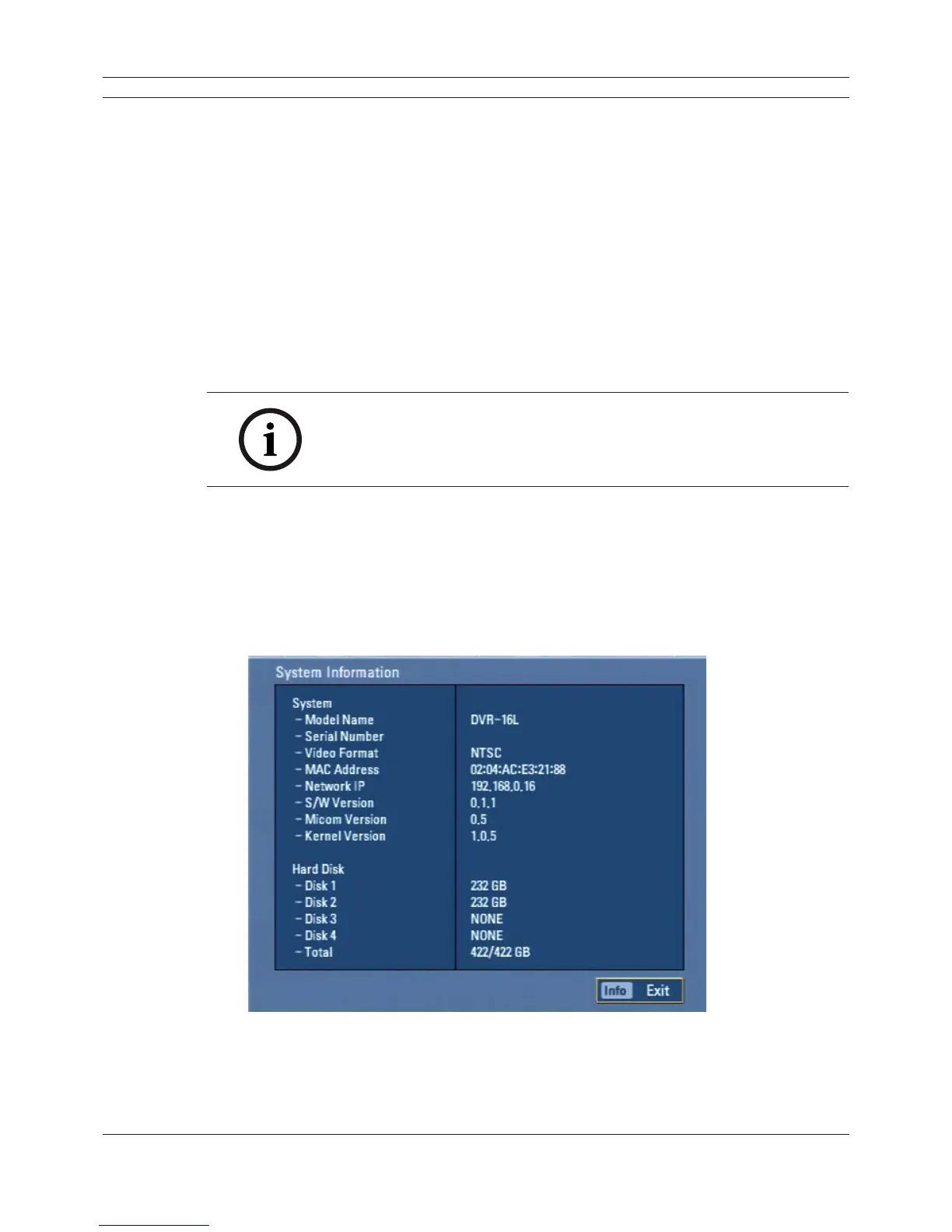
3.16 Viewing System Information
To view system information:
1. Press INFO or click the INFO icon in the system control bar. The system information window is
displayed on the main monitor.
Figure 3.12 System information window
2. Press INFO or click the [Exit(Info)]button to exit the window.



 To Next Page