96 en | Control Center Digital Video Recorder
F01U | 1.0 | 2007.11 User Manual Bosch Security Systems
Camera Setting
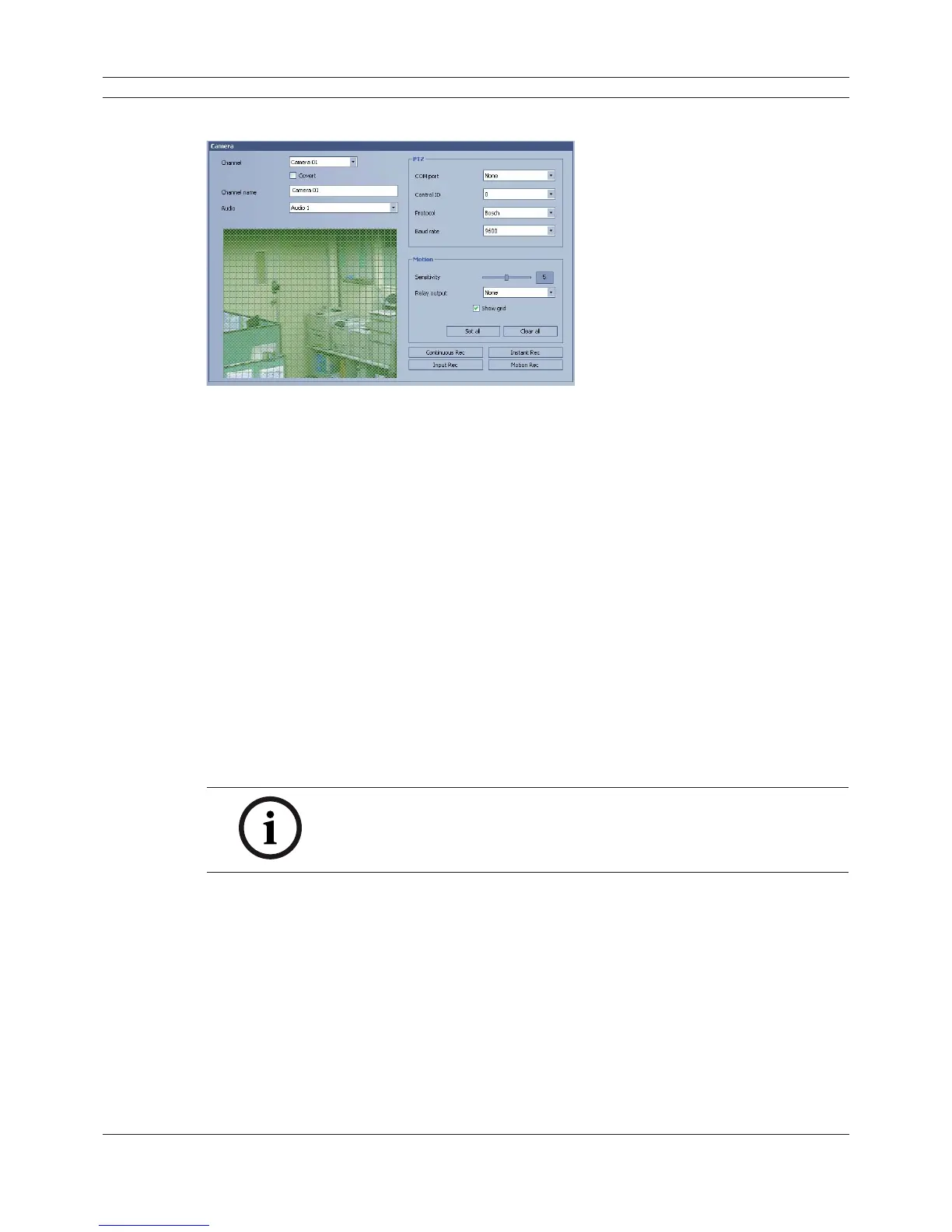
Figure 6.26 The Camera setting window
1. Select a channel for settings.
If you want to block a channel from other users, mark up the convert option.
2. Enter the new channel name.
3. Select input audio channel.
4. Set the PTZ control options.
• COM port: Select the connected data port of the RS-422/485 terminal on the rear panel.
• Control ID: Select the PTZ camera ID from 0 to 255. Make the same settings as the PTZ
camera.
• Protocol: Select the protocol supported by PTZ camera.
• Baud rate: Select the communication speed (1200, 2400,4800,9600,19200 or 38400).
5. Set the motion options.
• Sensitivity: Set the sensitivity level for the created motion detection area. Sensitivity can be
set from 0 to 10.
• Relay output: Select the number of the ALARM I/O port for the output alarm signal when
motion is detected.
• Area: Select the desired motion detection area on the preview window screen using the
mouse. Click the one point and drag & drop the end point to select the motion area.
Notes:
• If you want to display the grid, mark up the [Show grid] option.
• If you want to select the entire area, click the [Set all] button or click
the [Clear all] button to cancel the selected area.



 To Next Page