39
The pad which last received a Note-on message will be
the current pad.
If
you are continually playing back a phrase loop sample
in synchronization to the performance being played by a
sequencer, the rhythm may drift out of synchronization
as time goes on.
If
this occurs, use One Shot playback
instead of looping the phrase, and transmit a Note-on
message to the SP-202 each measure (or each number of
measures according to the length of the sample).
It is not possible to use MIDI Clock messages to modify
the BPM setting for the SP-202's samples.
If
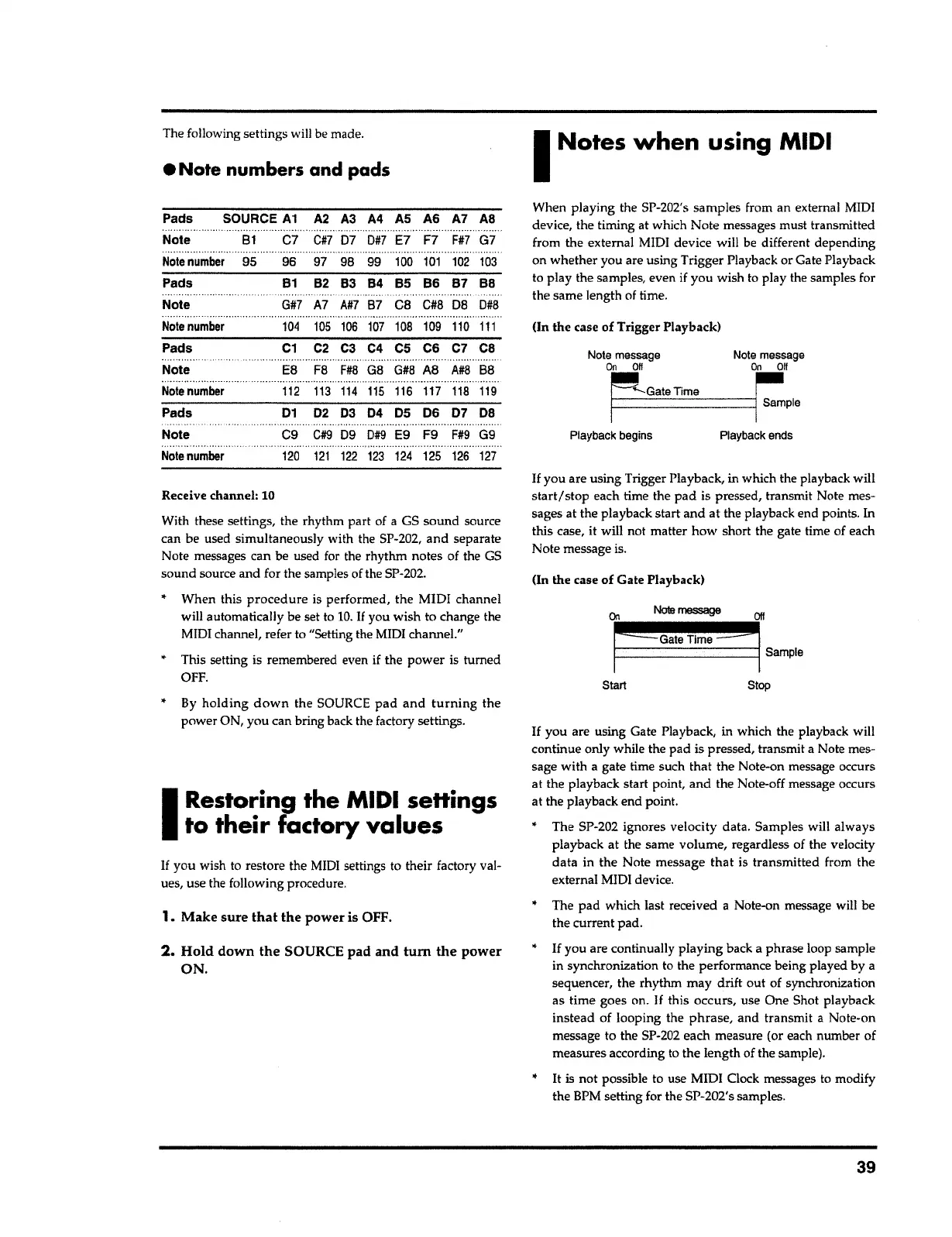
you are using Gate Playback, in which the playback will
continue only while the pad is pressed, transmit a Note mes-
sage with a gate time such that the Note-on message occurs
at the playback start point, and the Note-off message occurs
at the playback end point.
The SP-202 ignores velocity data. Samples will always
playback at the same volume, regardless of the velocity
data in the Note message
that
is transmitted from the
external MIDI device.
Stop Start
On
Nola
message
Off
....
j
cc
G_a_te_T_lm~·e
__ ss
__
__,j
5-lo
(In the case of Gate Playback)
If
you are using Trigger Playback, in which the playback will
start/stop
each time the pad is pressed, transmit Note mes-
sages at the playback start and at the playback end points. In
this case, it will not matter how short the gate time of each
Note message is.
Note message
Note
message
On Off On
Off
G;"--Gate
Time
~
t-F-----------,1
Sample
Playback begins Playback ends
Un the case of Trigger Playback)
When playing the SP-202's samples from an external MIDI
device, the timing at which Note messages must transmitted
from the external MIDI device will be different depending
on whether you are using Trigger Playback or Gate Playback
to play the samples, even
if
you wish to play the samples for
the same length of time
.
I
Notes when using
MIDI
2. Hold down the
SOURCE
pad and tum the power
ON.
1.
Make sure that the power
is OFF.
If
you wish to restore the
MIDI
settings to their factory val-
ues, use the following procedure.
I
Restoring the
MIDI
settings
to their factory values
By holding
down
the SOURCE pad and
turning
the
power ON, you can bring back the factory settings.
*
When this procedure is performed, the MIDI channel
will automatically be set to
10.
If
you wish to change the
MIDI channel, refer to "Setting the MIDI channel."
*
This setting is remembered even if the power is turned
OFF.
With these settings, the rhythm part of a GS sound source
can be used simultaneously with the SP-202, and separate
Note messages can be used for the rhythm notes of the GS
sound source and for the samples of the SP-202.
Receive channel:
10
......................
Note
number
95
96
97
98 99
100
101
102
103
Pads
81
82
83
84
85
86
87
BS
. . . .
.
. .
.
..
.
...
..
.
.
Note
G#7
A7
A#7
87
ca
C#S
08
0#8
...........................................
·-··································
Note
number
104
105
106
107
108
109
110
111
Pads
C1
C2
ca
C4
cs
C6
C7
cs
..
............................
Note
ES
FS
F#8
GB
G#8
AB
A#8
88
...................
·······································
.
.....................
Note
number
112
113 114 115
116
117
118
119
Pads
01
02 03
04
05
06
07
DB
....................
................................
Note
C9
C#9
09
0#9
E9
F9
F#9
G9
Note
number
120
121
122
123
124
125
126
127
A2 A3 A4 AS A6 A7 AS
C#7
07
0#7
E7
F7
F#7
G7
SOURCE
A1
81
C7
Pads
Note
•
Note
numbers
and pads
The following settings will be made.



 To Next Page