Unpacking your Witbox
Your Witbox printer has been carefully packaged using durable materials that
incorporate safety features to protect it during transportation.
1
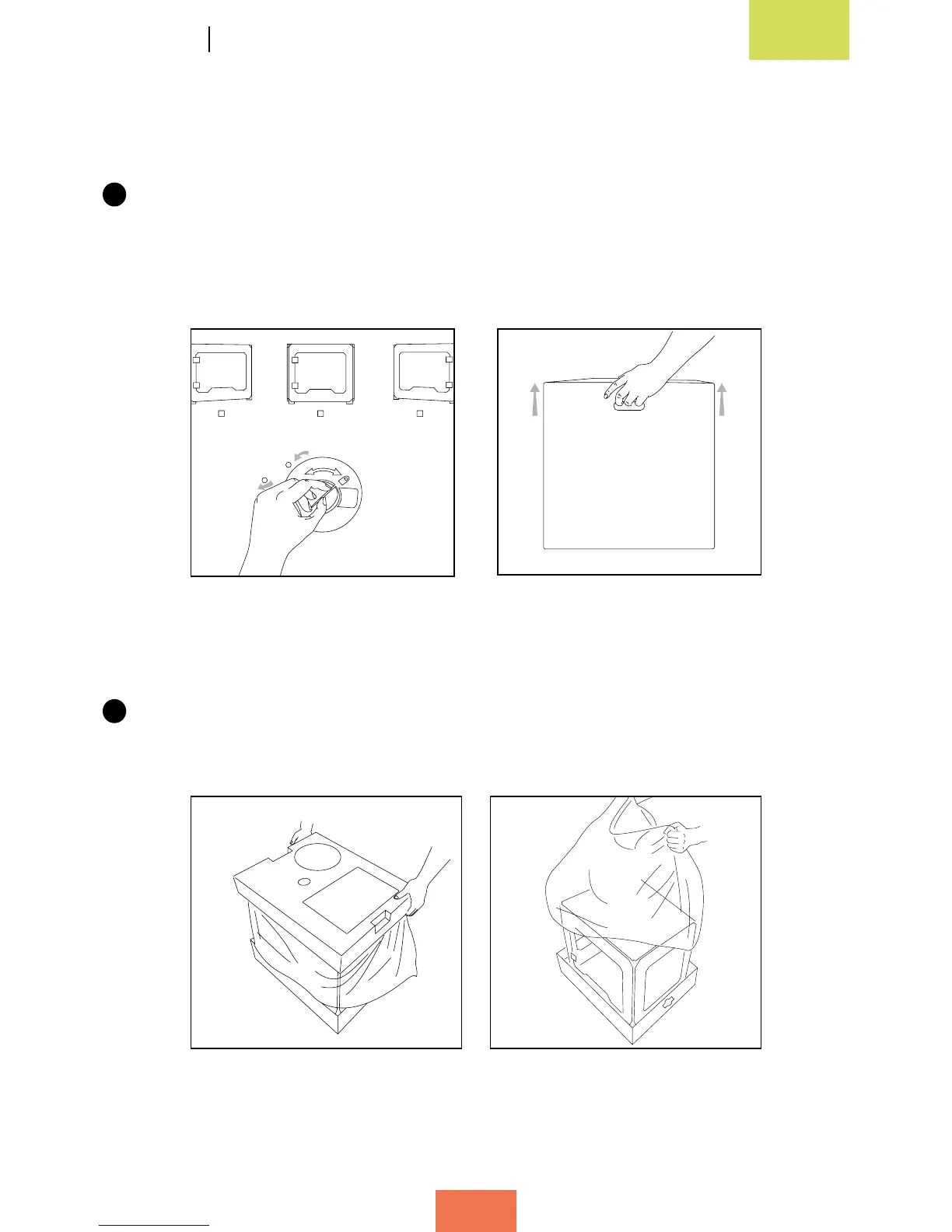
The box is made from two pieces of cardboard: a tray-shaped piece on the bottom
and a printed cover on top. To remove the cover, rst undo the two round plastic
tabs connecting it to the bottom piece (fig. 2.1). Then lift the cover using the
handles near the top (g. 2.2); it should lift off easily.
2
Inside the box you will nd two packages: a box of accessories (g. 2.3) at the top,
and underneath it a tray containing the printer (g. 2.4).
Figure 2.2 Lift off the top cover
Figure 2.3 Top part Figure 2.4Bottompart
1
2
Figure 2.1 Undo the round plastic
tabs on both sides



 To Next Page