Working with Cura
Main Cura interface
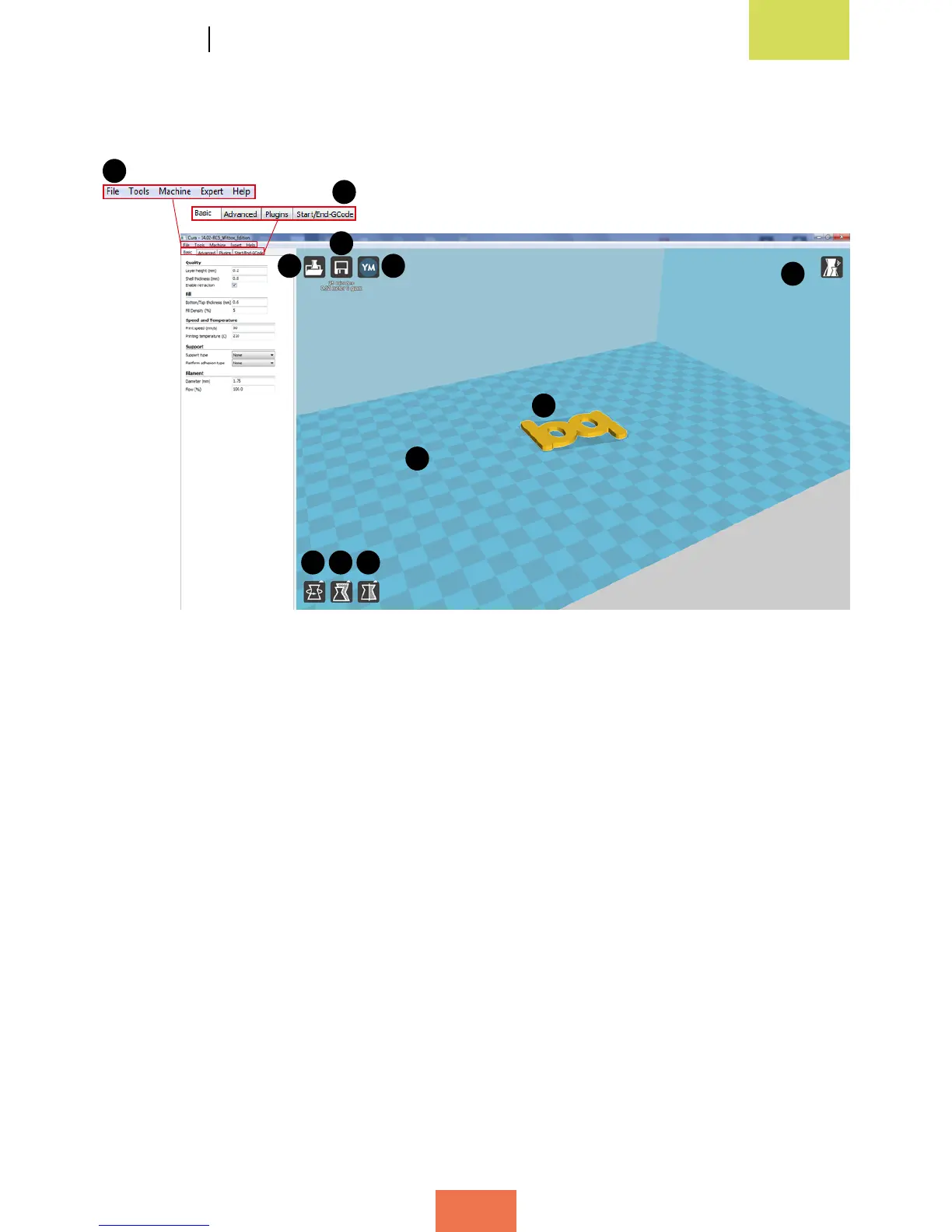
The main Cura interface (Figure 4.5) comprises a main window in which you can view
the 3D design of the object you wish to print, plus a smaller window on the left-hand
side where you can adjust the print settings.
Below is a description of the various elements that appear in the main Cura interface:
1. Menu bar. This bar contains the File, Tools, Machine, Expert and Help options.
2. Settings window. Here you can adjust the print parameters for the object. The
window contains four tabs: Basic, Advanced, Plugins and Start/End-GCode.
3. Load. This function imports the object you wish to print from a directory on your
computer or an external device.
4. Toolpath to SD. This function saves the object you wish to print in .gcode format.
5. Share on YouMagine. Share the object with the YouMagine.com community.
6. View Mode. Changes your view of the object.
7. Witbox print area.
8. Previously imported object.
Figure 4.5 Main Cura interface
1
3
4
5
8
7
9 10 11
2
6



 To Next Page