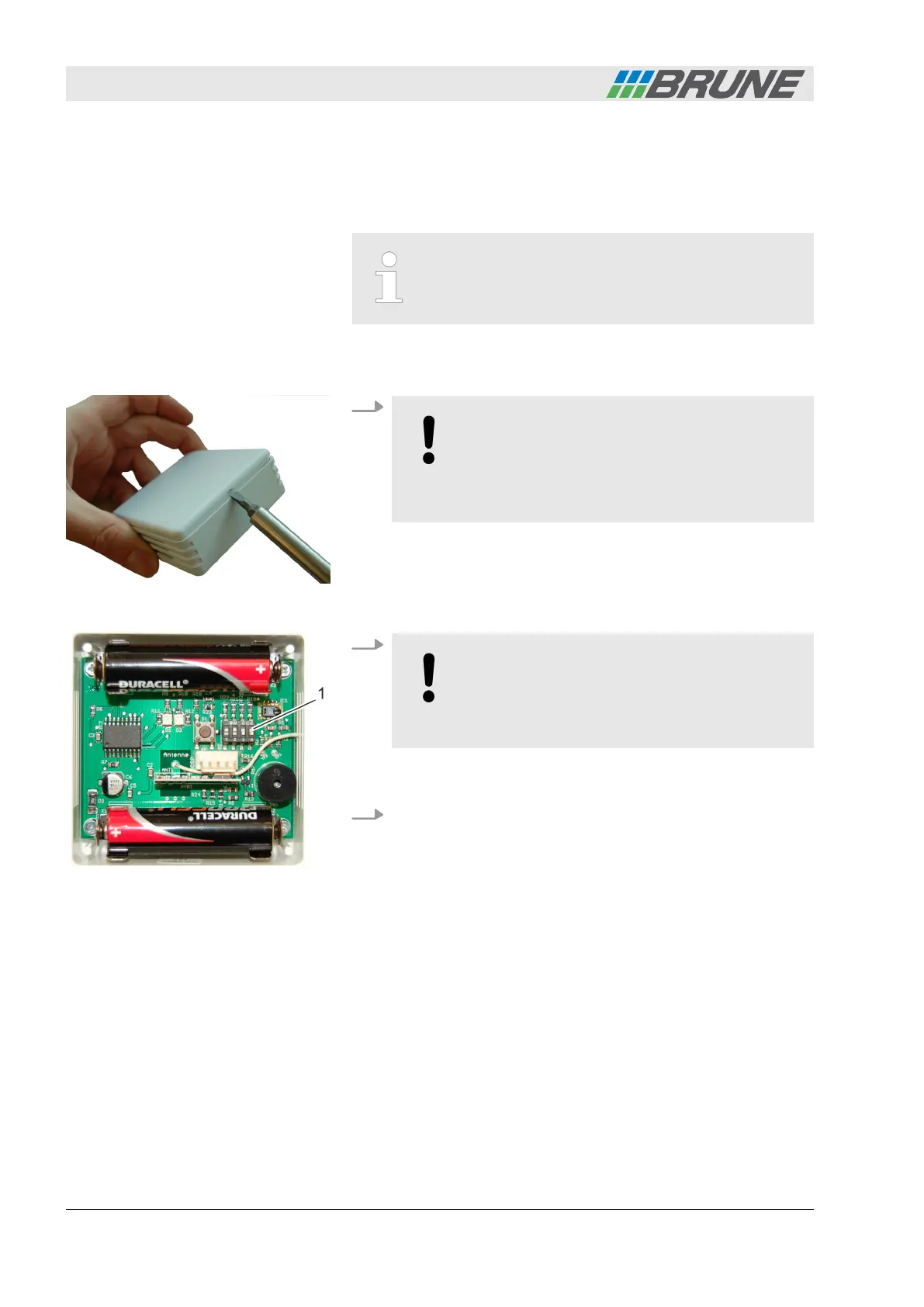
The slide controls for coding are located on the respective boards
of the devices. Each slider has only the following positions: ‘ON =
top’ and ‘OFF = bottom.’ Accordingly, there are 16 different coding
versions.
The coding of the humidifier and the associated wire-
less sensor system must match exactly. Otherwise
functionality is not ensured.
Personnel:
n
Operator
1.
NOTICE!
The electronics of the wireless sensor system
are very sensitive. Ensure that you do not touch
the electronics and do not damage any compo-
nents.
Carefully lift and remove the cover plate of the wireless
sensor system using a small screwdriver (Fig. 16).
2.
NOTICE!
Property damage due to short circuit!
– Code the wireless sensor system only with a
non-metallic object.
Code the wireless sensor system by setting the slide controls
(Fig. 17/1) using a suitable non-metallic object.
3. Close the cover plate of the wireless sensor system again.
Coding the wireless sensor system
Fig. 16: Opening the cover
Fig. 17: Coding the wireless sensor
system
Start-up
Evaporation Humidifier B500 Professional28



 To Next Page