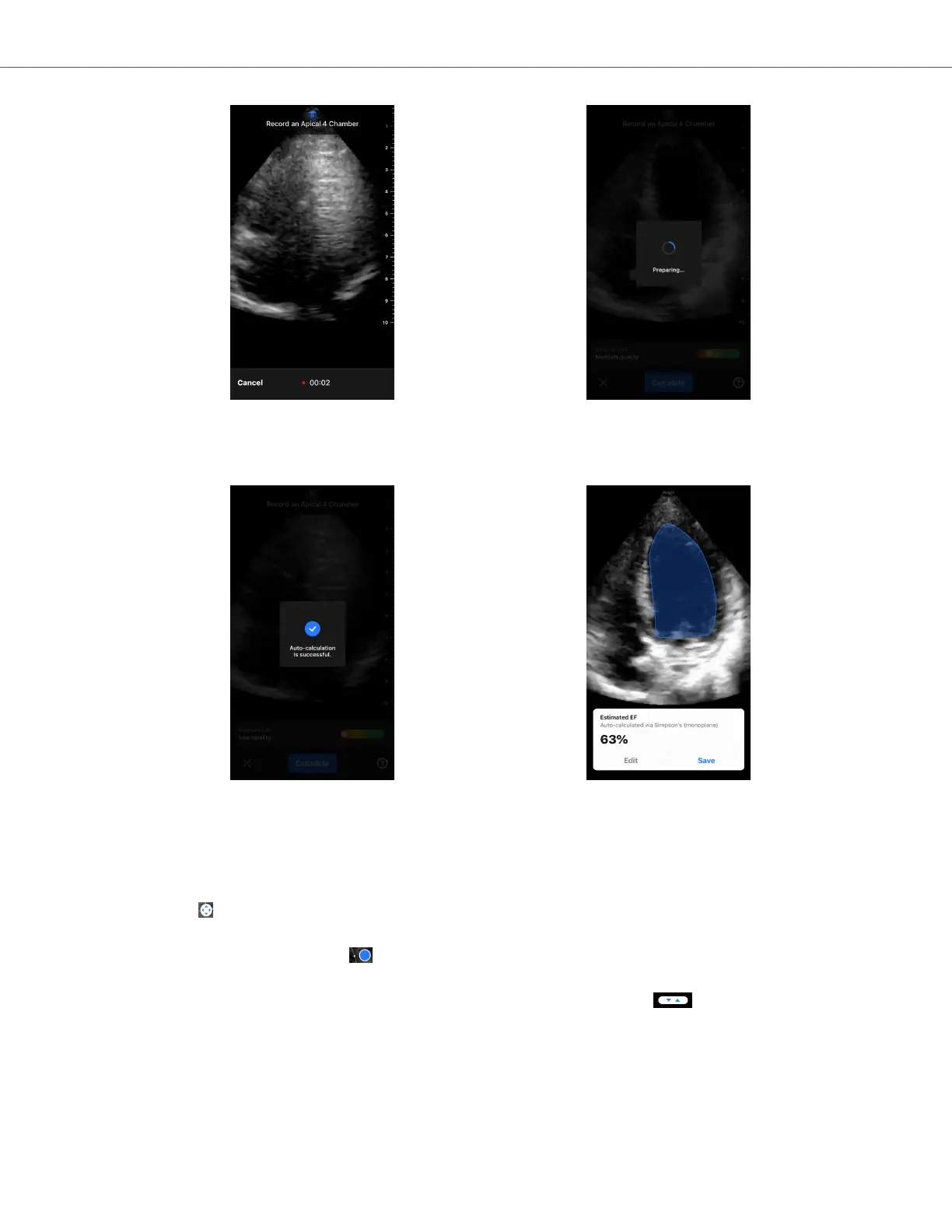
6. If the automatic EF tool is able to calculate an Ejection Fraction, the Automatic Ejection Fraction result screen
is displayed, and the calculated Ejection Fraction is marked as an Auto-calculated Simpson's measurement. You
have the option to either save this automatic result, edit the result and recalculate, or delete the result and cine.
7. If the tool is not able to calculate an Ejection Fraction or you choose to edit your result, you will be directed to
the Edit screen. There, you have the ability to adjust the End Diastole (ED) frame and left ventricle contour.
a. Scroll through the frames on the bottom of the screen to the appropriate frame for ED.
b. To move the overall position of the contour used to measure the ventricle, press and drag the white anchor
point . Release the anchor point when the contour is in the appropriate position.
c. To alter the position of the contour sides used to measure the ventricle, press and drag the blue circle
that indicates an adjust point around the contour. Release the adjust point when the contour is in the
appropriate position.
d. To alter the position of the contour apex, press and drag the Apex Adjust Bar at the top of the
contour. Release the Apex Adjust Bar when the contour is in the appropriate position.
e. Once edits are complete, select Update ED.
Automatically Estimating Ejection Fractions
AI-Assisted Tools 60


 To Next Page