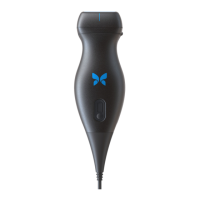
It is expected for the probe to generate heat during scanning and charging. Some presets use more power than
others and you may experience a temperature increase over a shorter duration.
Factors that can affect the heat of the probe are:
• Ambient environment.
• Probe temperature at the start of scanning
• Duration of uninterrupted scan time
• Duration of resting periods between scans
• Preset and mode selected
• Auto-cool initiation feature
Probe Temperature Alert
An alert is displayed on the bottom of the screen when the estimated probe temperature reaches 41.5°C, as it is
approaching the point where it is too warm for scanning.
You can continue scanning during this warning message until the probe reaches the auto-cool initiation.
Auto-cool initiation is triggered when the contact temperature reaches 43°C. The Butterfly app will continue to be
accessible while the auto-cool feature is in progress. The in progress study collateral (images and cines) will not be
impacted.
Scanning can resume after the auto-cool feature has reduced the estimated probe temperature to 38.5°C.
Expected uninterrupted scan time in a high-power preset depends on your probe model, it is approximately 10-25
minutes when you start scanning with the probe at ambient temperature (~25°C). On the Butterfly iQ/ iQ+/ iQ3, if
you remove the probe from the charging pad before or immediately after charging is complete, it is recommended
that the probe be allowed time to cool before use.
Starting a scanning session with a cool probe will optimize scan time performance.
Probe Temperature During Charging
It is normal that the probe may feel warm to the touch while charging, especially on the Butterfly iQ/ iQ+, which uses
wireless charging that is known to create heat during the charging process. On the Butterfly iQ/ iQ+, if you feel the
probe is overheating during charging, review best practices for probe orientation based on the charger model, as
positioning the probe on the charging pad incorrectly can increase the temperature of the probe while charging.
16.3. Troubleshooting Charging Issues
Sometimes if the probe is left idle for a long period of time, the battery can become fully depleted and the probe will
not charge. Often, it can be reactivated by completing the following steps.
Butterfly iQ3 Troubleshooting
1. Plug the magnetic contact charger into the provided power adaptor, and plug the adaptor directly into the wall
using only the provided Butterfly equipment. Do not use an outlet tied to a dimmer switch. Do not use a surge
protector. Do not use a power strip.
2. Place the Butterfly iQ3 on the charger for five minutes.
3. While the Butterfly iQ3 is on the charger, reset it. To do so, hold down the center button for 10-15 seconds.
4. Leave the Butterfly iQ3 on its charger overnight, or at least 6 hours.
5. Reset the Butterfly iQ3 again while it is on the charger by holding down the battery indicator button for 10-15
seconds. The LEDs on the battery indicator button should flash.
Troubleshooting Charging Issues
Troubleshooting 89


 To Next Page