TOTAL LITE Revision 1
SERVICE MANUAL FOR INNOVATION TOTAL LITE Single-Cup Brewer
24
6.6 Recipes Screen
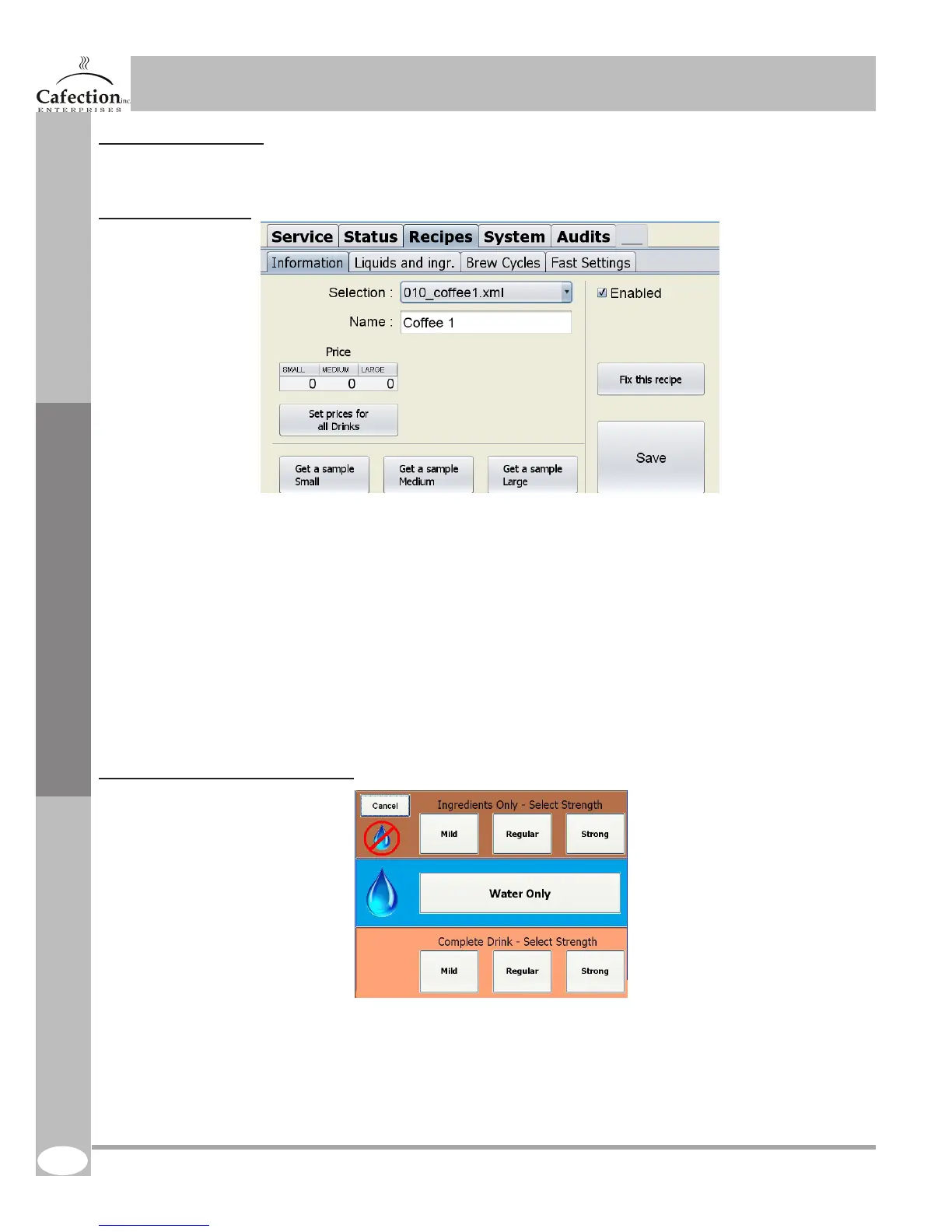
To get to the screen below press the setup (white) button (SW1 as shown in section 4.7) on the main
board inside the door of the machine and press the RECIPES tab.
6.6.1 Information tab
1. This button is used to choose the recipe you want to modify.
2. This button is used to set the name that will be shown on the selection screen. Note that if the
language of the system is changed the name of the products will be reset.
3. This table is used to set invidual prices for all the three sizes.
4. This button is used to enable or disable the drink on the selection screen. If you remove the check in
the box the drink will not appear on the selection screen
5. This button is used to set the prices for all drinks (recipes) at once. To do so, set te prices in table
5 and press the button. The prices for all other drinks (recipes) will be automatically set at the same
prices.
6. These button are used to get a sample of every size to help setting the amount of product and water
needed. See next page to more information about the pop-up that appears when you hit this button.
7. This button is used to x a recipe that has been lost or corrupted.
8. TO SAVE any parameters change press this button.
6.6.1.1 Sample pop-up explanation
1. These buttons allow the operator to have a sample of ALL the dry ingredients of the tested recipe.
To weight the ingredients MAKE SURE that a container is placed under each product dispenser.
2. This button allows the operator to have a sample of the drink but without the ingredients. No soluble
powder or coffee beans will be dispensed.
3. This button allows the operator to have a sample of a complete drink.
Note : Samples are not registered in the products counters.
Service Software
1.
2.
3.
1.
2.
3.
4.
5.
6.
7.
8.



 To Next Page