TOTAL LITE Revision 1
SERVICE MANUAL FOR INNOVATION TOTAL LITE Single-Cup Brewer
30
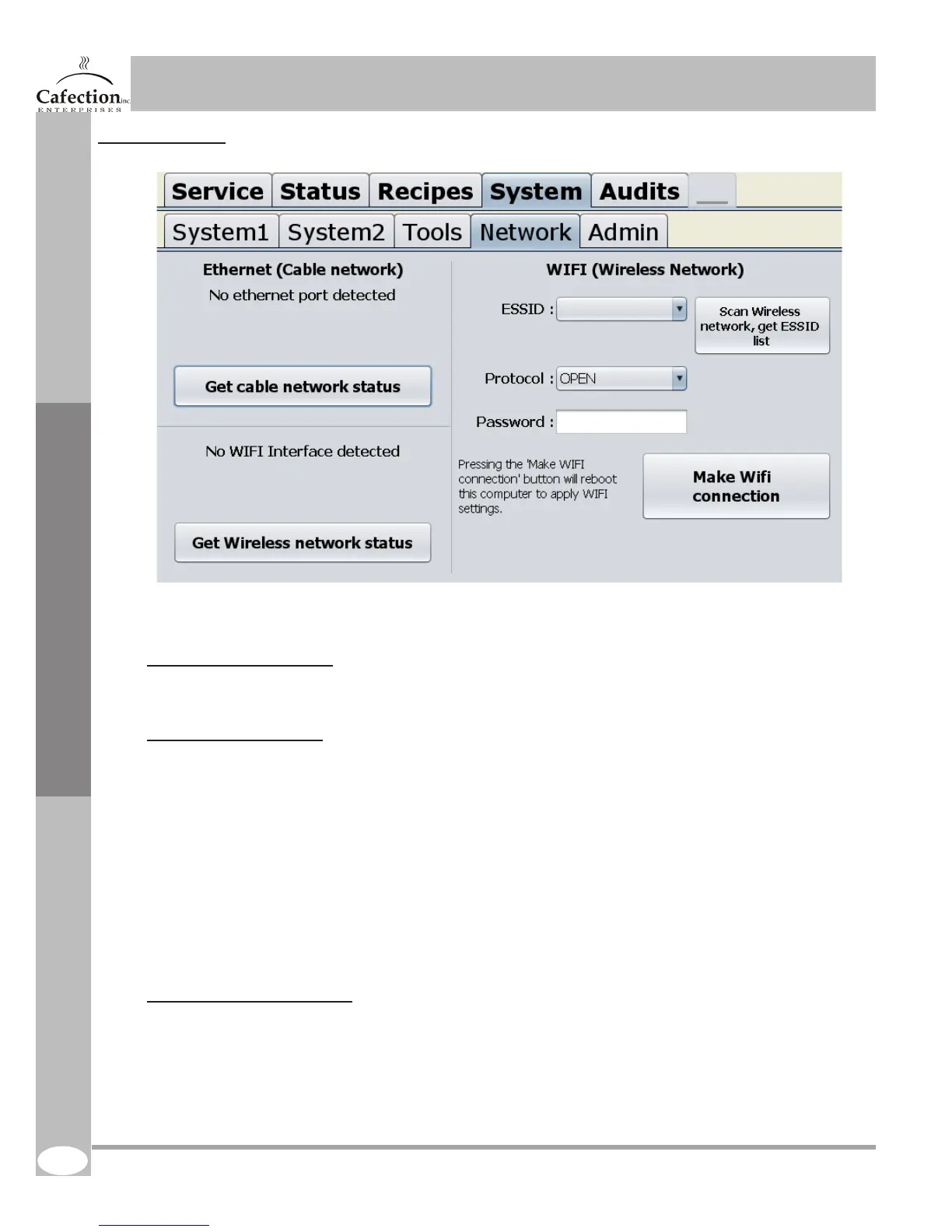
6.7.4 Network tab
A.Get cable network status
This is the cable network section.
B.Wi (Wireless Network)
Use this section to wirelessly link your coffee brewer to Internet. To do so, follow these steps :
1. Press on the “Scan wireless network” button. Within less than a minute, a list of available networks will
be available.
2. Select the network you want to use in the box beside ‘ESSID’
3. Select the protocol: OPEN or WPA/WPA2
4. If the selected protocol is WPA/WPA2, you have to enter the selected network password. (8 to 63 letters
and / or numbers). Contact your IT department for this password.
5. Press the ‘make WIFI connection’ button. The computer screen has to restart to apply the settings.
Complete process takes about 2 minutes.
C.Get wireless network status
Wi (Wireless Network) section will not keep in memory the wireless network settings. The “ESSID”,
“Protcol” and “Password” boxes will always be empty. To check the status of the wireless link, press this
button.
Service Software
1.
2.
3.
A.
C.
4.
5.
B.



 To Next Page