24
SAVE THE SETTINGS
PROGRAMMING
SAVE THE SETTINGS
1
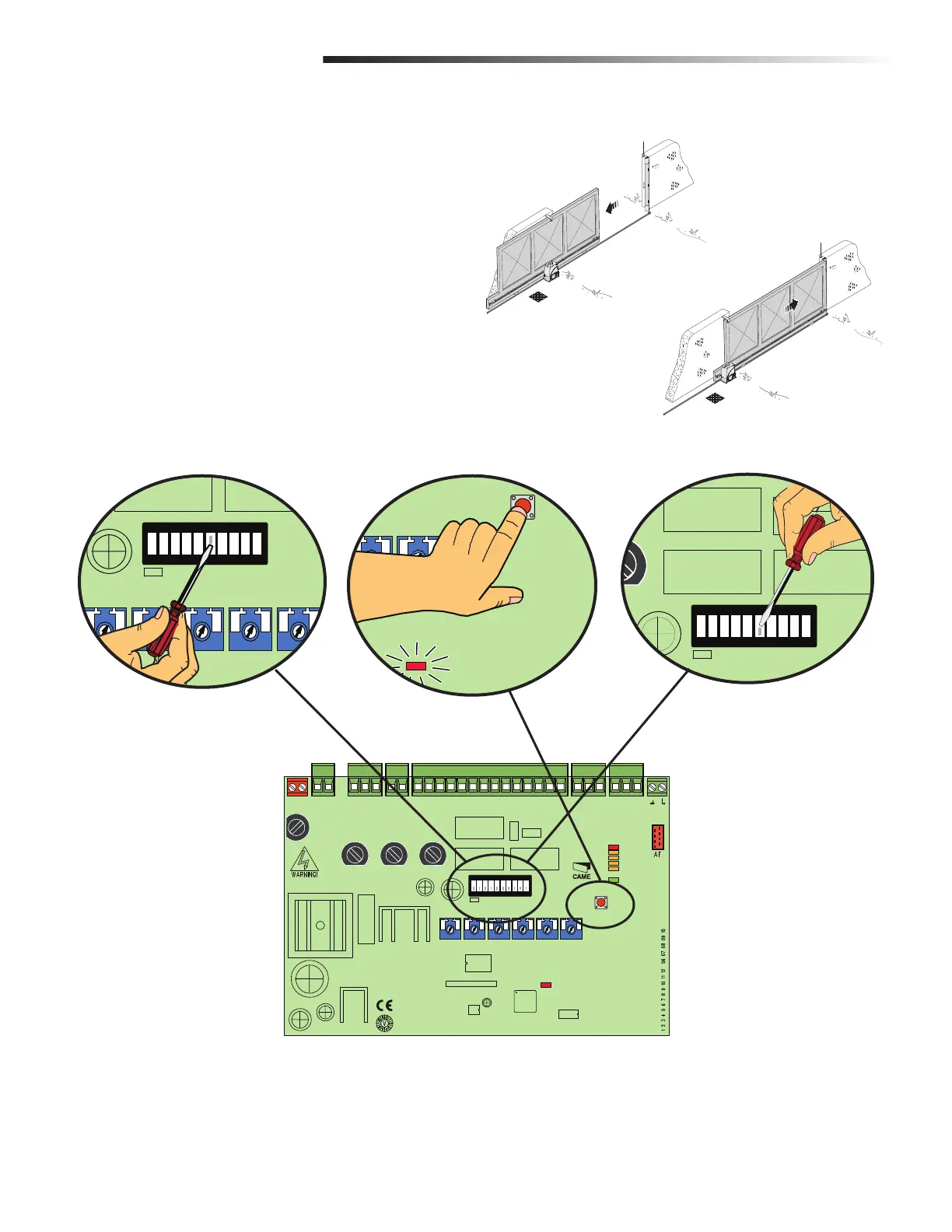
Run the operator through a complete open and close cycle (Figure 1).
2
The electronic card automatically registers the gate-run adjustments for the
opening and closing settings (Figure 2).
3
To save the adjustment, functionality switch 6 to ON and press the PROG
button until the PROG LED stays on. (Figure 3)
4
Move functionality switch 6 to OFF (Figure 4).
NOTE: You MUST set the functionality switch to OFF to save the settings to avoid
resetting the adjustments after power outage.
+ RUN S. - OW S. - RUN +
ON
2
1345678910
Functionality Switch 6 in ON
PROG
LED on
Functionality Switch 6 in OFF
FIGURE 1
FIGURE 2 FIGURE 3 FIGURE 4
MN
L2T
L T
0
17
26
10 11 E1 1 2 3P 5 7 2 C1 C3 C7 C8
TS
+E
-
FC FA
F
LINE FUSE
230V=1 6A F
120V=3 15A F
MOTOR FUSE
BX243=8A F
BX246=10A F
ACCESSORIES
FUSE
1 6A F
C BOARD
FUSE
1A F
+
RUN S
- +
SLOW S
- +
RUN V
- +
SLOW V
-
+
A C T
-
+
PAR OP
-
ZN5U5
ZN5
CONTROL BOARD
PWR
1
C1
C3
C7
C8
ON
2
1 345678910
PROG
MN
L2T
L1T
LN
0
17
26
10 11 E1 1 2 3P 5 7 2 C1 C3 C7 C8
TS
+E
-
FC FA
F


 To Next Page