Getting Started ooo,_
Getting Started
Charging the Battery Pack
The camcorder can be powered with a
battery pack or directly using the compact
power adapter. Charge the battery pack
before use.
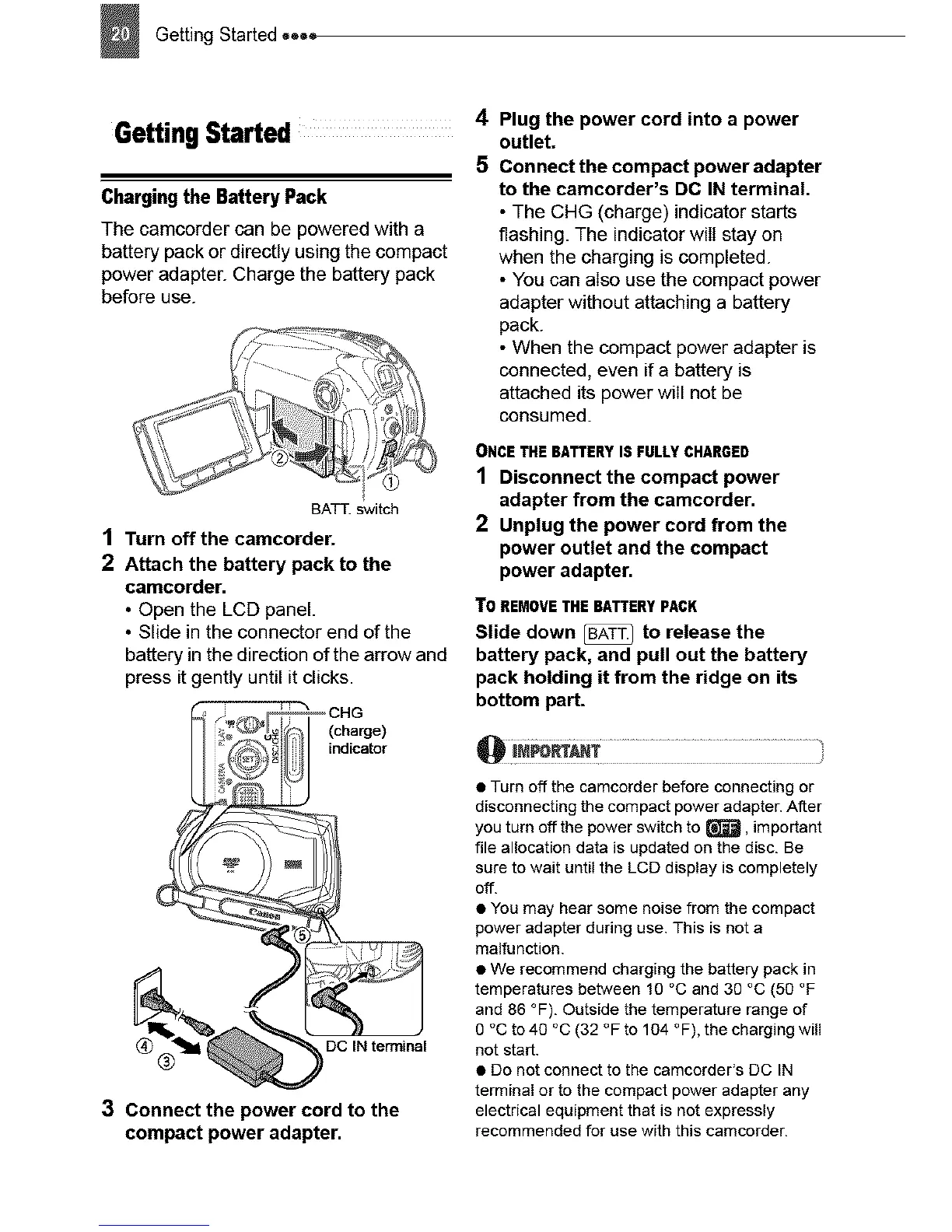
BATT. switch
1 Turn off the camcorder.
2 Attach the battery pack to the
camcorder.
• Open the LCD panel.
• Slide in the connector end of the
battery in the direction of the arrow and
press it gently until it clicks.
(charge)
indicator
(_) DC IN terminal
3 Connect the power cord to the
compact power adapter.
4
5
Plug the power cord into a power
outlet.
Connect the compact power adapter
to the camcorder's DC IN terminal.
• The CHG (charge) indicator starts
flashing. The indicator will stay on
when the charging is completed.
• You can also use the compact power
adapter without attaching a battery
pack.
• When the compact power adapter is
connected, even if a battery is
attached its power will not be
consumed.
ONCETHEBATTERYISFULLYCHARGED
1 Disconnect the compact power
adapter from the camcorder.
2 Unplug the power cord from the
power outlet and the compact
power adapter.
TO REMOVETHEBATTERYPACK
Slide down _ to release the
battery pack, and pull out the battery
pack holding it from the ridge on its
bottom part.
iiiiiiiiiiiiiiiiiiiiiiii
• Turn off the camcorder before connecting or
disconnecting the compact poweradapter.After
you turn off the power switch to _, important
file allocation data is updated on the disc. Be
sure to wait until the LCD display is completely
Off.
• Youmay hearsome noise from the compact
power adapter during use. This is nota
malfunction.
• We recommend chargingthe battery pack in
temperatures between 10 °C and 30 °C(50 °F
and 86 °F). Outside the temperature range of
0 °C to 40 °C(32 °F to104 °F),the chargingwill
not start.
• Do not connect to the camcorder's DC IN
terminal or to the compact power adapter any
electrical equipment that is not expressly
recommended for use with this camcorder.



 To Next Page