,--,,,StillImageRecordingOptions
Still Image Recording IL
Options O1024x768/FINE*
* Default value
II
Selecting the Size and Quality of Still
Images
Still images are recorded on the disc
using the JPEG (Joint Photographic
Experts Group) compression. As a
general rule select a larger image size for
higher quality.
(_ 12)
Options
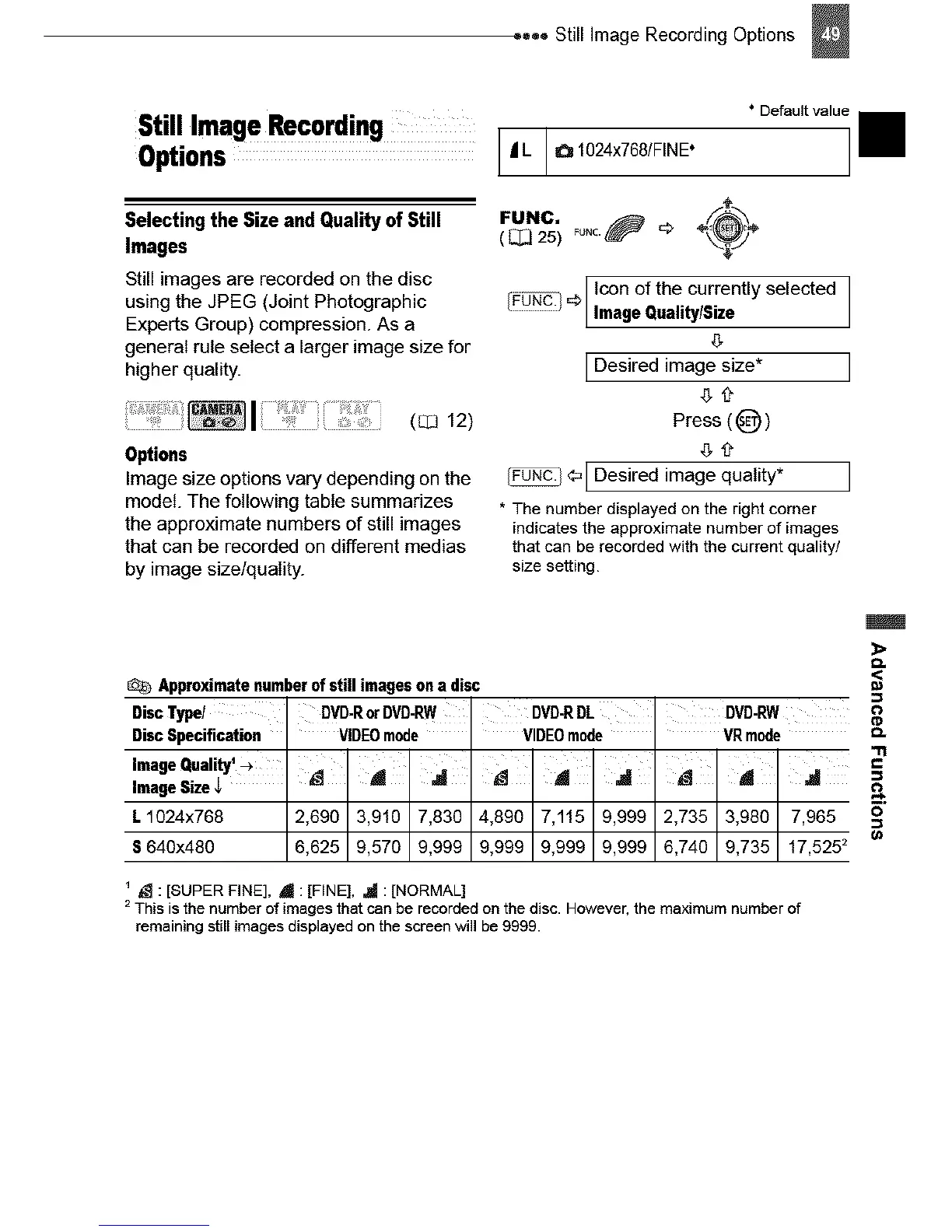
Image size options vary depending on the
model. The following table summarizes
the approximate numbers of still images
that can be recorded on different medias
by image size/quality.
FUNC. _uNc._ _ ÷_÷
( _[_ 25)
................................I con of the current y se ected
[FUND.!
...................................IImage Quality/Size
IDesired image size*
Press ( _ )
¢' IDesired image quality*
* The number displayed on the right corner
indicates the approximate number of images
that can berecorded with the current quality/
size setting.
Approximatenumberof stillimagesona disc
DiscType/ ' DVD-RorDVD-RW, DVD-RDL, DVD-RW
DiscSpecification VIDEOmode ' VIDEOmode ' VRmode
ImageQuality'_ '
ImageSize
L1024x768 2,690 3,910 7,830 4,890 7,115 9,999 2,735 3,980 7,965
S640x480 6,625 9,576 9,999 9,999 9,999 9,999 6,740 9,735 17,5252
_ : [SUPER FINE], _ : [FINE], _!_ : [NORMAL]
2 This is the number of images that can be recorded on the disc. However, the maximum number of
remaining still images displayed on the screen will be 9999.



 To Next Page