Recording _o_
Recording
Shooting Video
BeforeYouBeginRecording
Make a test recording first to check if the
camcorder operates correctly. Since
recordings made on a DVD-R or DVD-R
DL disc cannot be deleted, we recommend
you use a DVD-RW disc to make the test
record ngs.
(E_ 12)
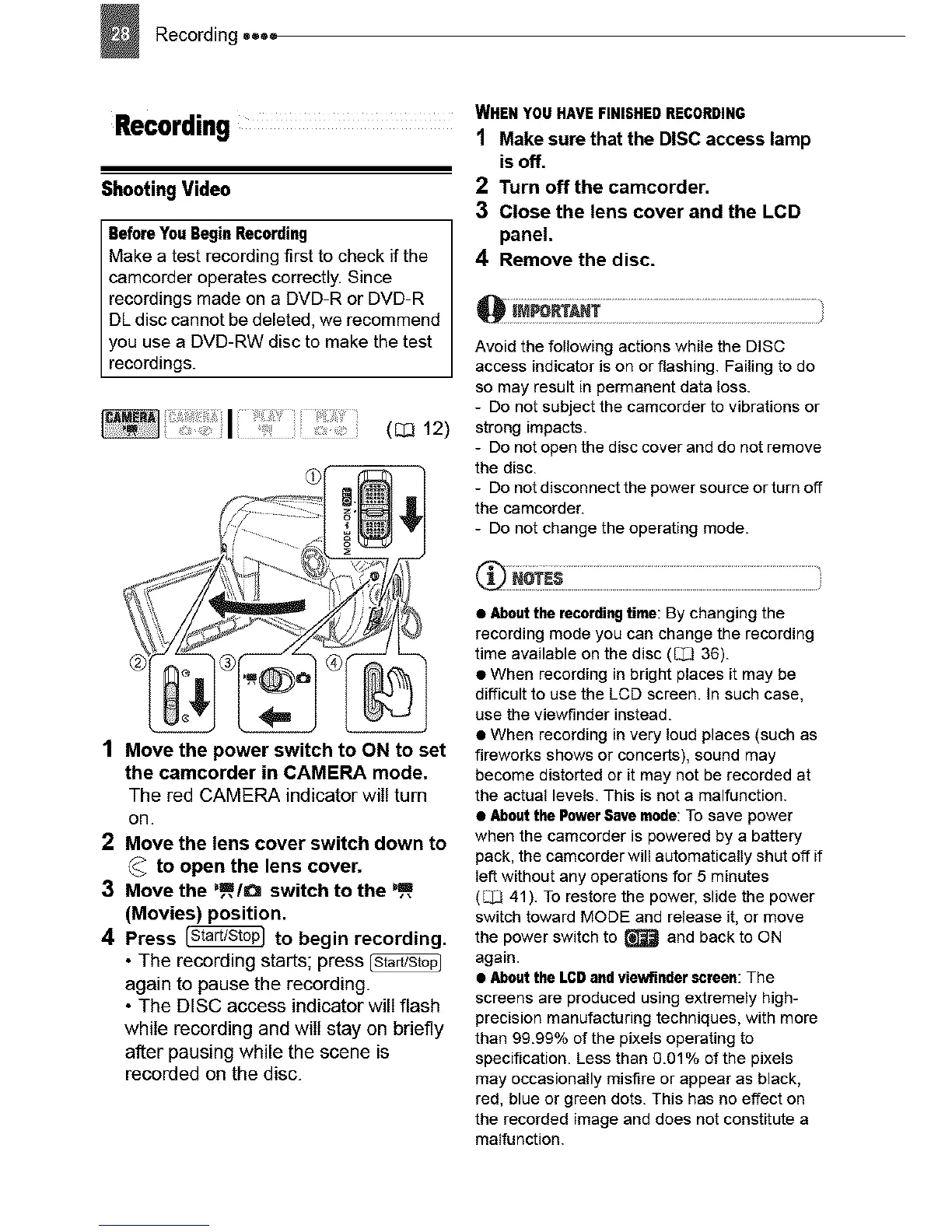
1 Move the power switch to ON to set
the camcorder in CAMERA mode.
The red CAMERA indicator will turn
on.
2 Move the lens cover switch down to
_ to open the lens cover.
3 Move the %_,/O switch to the ),_,
(Movies) position.
4 Press _ to begin recording.
• The recording starts; press
again to pause the recording.
• The DISC access indicator will flash
while recording and will stay on briefly
after pausing while the scene is
recorded on the disc.
WHEN YOUHAVEFINISHEDRECORDING
1 Make sure that the DISC access lamp
isoff.
2 Turn off the camcorder,
3 Close the lens cover and the LCD
panel.
4 Remove the disc.
Avoid the following actions while the DISC
access indicator is on or flashing. Failing to do
so may result in permanent data loss.
- Do not subject the camcorder to vibrations or
strong impacts.
- Do not open the disc cover and do not remove
the disc.
- Do not disconnect the power source or turn off
the camcorder.
- Do not change the operating mode.
• Aboutthe recordingtime: By changing the
recording mode you can change the recording
time available on the disc (_/2 36).
• When recording in bright places it may be
difficult to use the LCD screen. In such case,
use the viewfinder instead.
• When recording in very loud places (such as
fireworks shows or concerts), sound may
become distorted or it may not be recorded at
the actual levels. This is not a malfunction.
• Aboutthe PowerSave mode:To save power
when the camcorder is powered by a battery
pack, the camcorder will automatically shut off if
lef_ without any operations for 5 minutes
(_ 41). To restore the power, slide the power
switch toward MODE and release it, or move
the power switch to _ and back to ON
again.
• Aboutthe LCDand viewfinder screen: The
screens are produced using extremely high-
precision manufacturing techniques, with more
than 99.99% of the pixels operating to
specification. Less than 9.01% of the pixels
may occasionally misfire or appear as black,
red, blue or green dots. This has no effect on
the recorded image and does not constitute a
malfunction.



 To Next Page