Trouble? o_._
List of Messages
26
20
31
Message Explanation
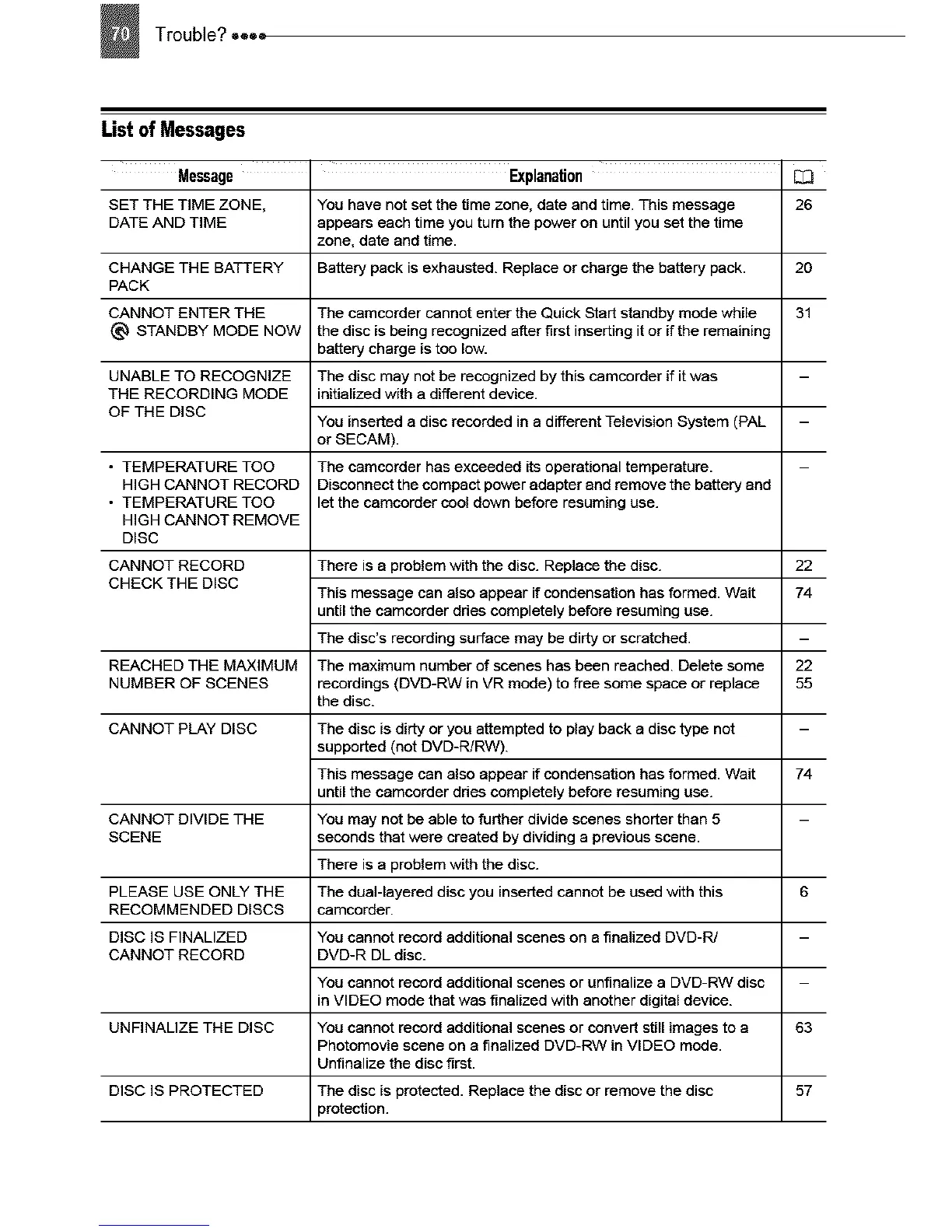
SET THE TIME ZONE, You have not set the time zone, date and time. This message
DATE AND TIME appears each time you turn the power on until you set the time
zone, date and time.
CHANGE THE BATTERY Battery pack is exhausted. Replace or charge the battery pack.
PACK
CANNOT ENTER THE The camcorder cannot enter the Quick Start standby mode while
(_ STANDBY MODE NOW the disc is being recognized affer first inserting it or if the remaining
battery charge is too low.
UNABLE TO RECOGNIZE The disc may not be recognized by this camcorder if it was
THE RECORDING MODE initialized with a different device.
OF THE DISC
You inserted a disc recorded in a different Television System (PAL
or SECAM).
• TEMPERATURE TOO The camcorder has exceeded its operational temperature.
HIGH CANNOT RECORD Disconnect the compact power adapter and remove the battery and
• TEMPERATURE TOO let the camcorder cool down before resuming use.
HIGH CANNOT REMOVE
DISC
CANNOT RECORD There is a problem with the disc. Replace the disc.
CHECK THE DISC
This message can also appear if condensation has formed. Wait
until the camcorder ddes completely before resuming use.
The disc's recording surface may be dirty or scratched.
REACHED THE MAXIMUM The maximum number of scenes has been reached. Delete some
NUMBER OF SCENES recordings (DVD-RW in VR mode) to free some space or replace
the disc.
CANNOT PLAY DISC The disc is dirty or you attempted to play back a disc type not
supported (not DVD-R/RW).
This message can also appear if condensation has formed. Wait
until the camcorder ddes completely before resuming use.
CANNOT DIVIDE THE You may not be able to further divide scenes shorter than 5
SCENE seconds that were created by dividing a previous scene.
There is a problem with the disc.
PLEASE USE ONLY THE The dual-layered disc you inserted cannot be used with this
RECOMMENDED DISCS camcorder.
DISC IS FINALIZED You cannot record additional scenes on a finalized DVD-PJ
CANNOT RECORD DVD-R DL disc.
You cannot record additional scenes or unfinalize a DVD-RW disc
in VIDEO mode that was finalized with another digital device.
UNFINALIZE THE DISC You cannot record additional scenes or convert still images to a
Photomovie scene on a finalized DVD-RW in VIDEO mode.
Unfinalize the disc first.
DISC IS PROTECTED The disc is protected. Replace the disc or remove the disc
_rotection.
22
74
22
55
74
63
57



 To Next Page