®*o. Trouble?
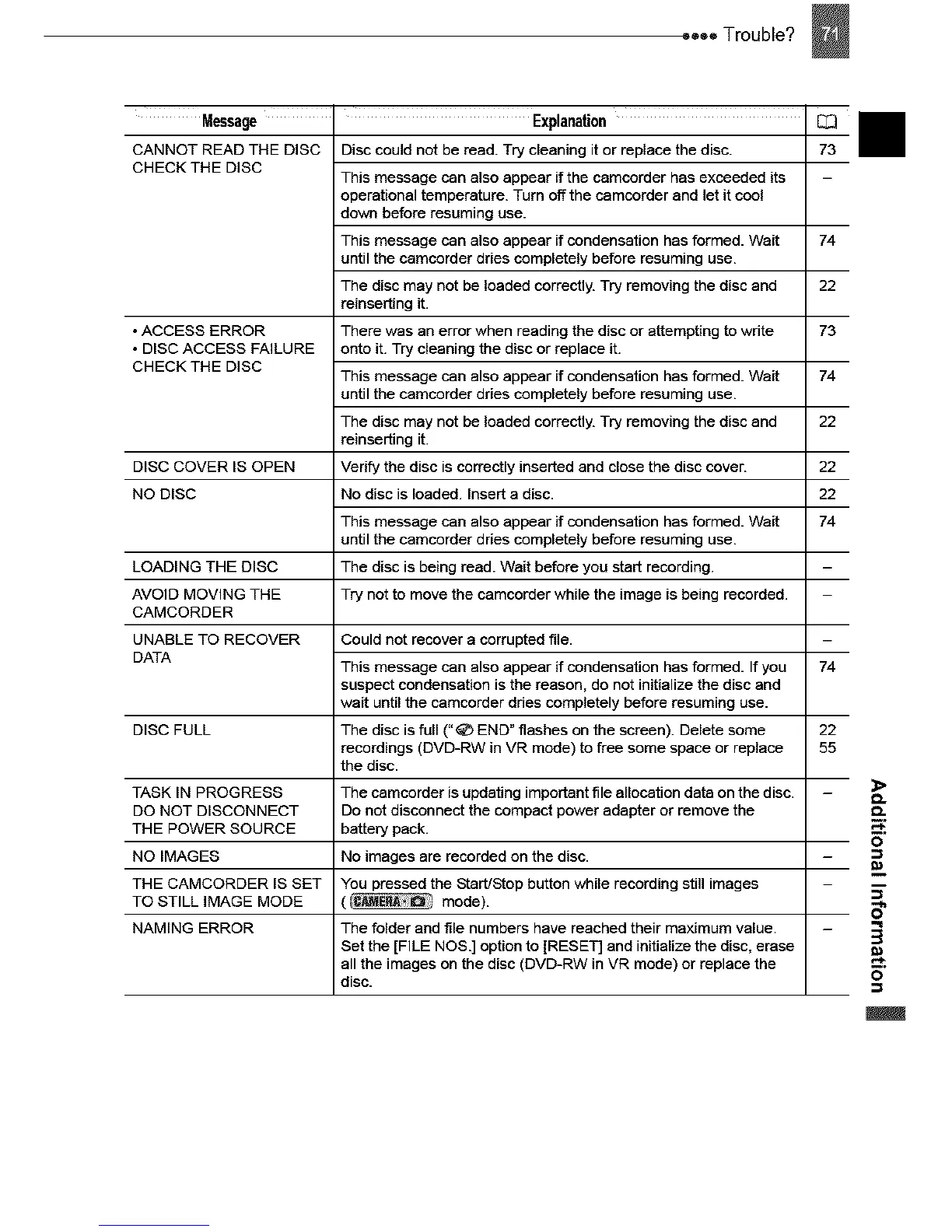
Message Explanation
CANNOT READ THE DISC Disc could not be read. Try cleaning it or replace the disc.
CHECK THE DISC
This message can also appear if the camcorder has exceeded its
operational temperature. Turn off the camcorder and let it cool
down before resuming use.
This message can also appear if condensation has formed. Wait 74
until the camcorder dries completely before resuming use.
The disc may not be loaded correctly. Try removing the disc and 22
reinserting it.
• ACCESS ERROR There was an error when reading the disc or attempting to wdte 73
• DISC ACCESS FAILURE onto it. Try cleaning the disc or replace it.
CHECK THE DISC
This message can also appear if condensation has formed. Wait 74
until the camcorder dries completely before resuming use.
The disc may not be loaded correctly. Try removing the disc and 22
reinserting it.
DISC COVER IS OPEN Verify the disc is correctly inserted and close the disc cover. 22
NO DISC No disc is loaded. Insert a disc. 22
This message can also appear if condensation has formed. Wait 74
until the camcorder dries completely before resuming use.
LOADING THE DISC The disc is being read. Wait before you start recording.
AVOID MOVING THE Try not to move the camcorder while the image is being recorded.
CAMCORDER
UNABLE TO RECOVER Could not recover a corrupted file.
DATA
This message can also appear if condensation has formed. If you 74
suspect condensation is the reason, do not initialize the disc and
wait until the camcorder dries completely before resuming use.
DISC FULL The disc is full (" _ END" flashes on the screen). Delete some 22
recordings (DVD-RW in VR mode) to free some space or replace 55
the disc.
TASK IN PROGRESS The camcorder is updating important file allocation data on the disc.
DO NOT DISCONNECT Do not disconnect the compact power adapter or remove the
THE POWER SOURCE battery pack.
NO IMAGES No images are recorded on the disc.
THE CAMCORDER IS SET You pressed the Start/Stop button while recording still images
TO STILL IMAGE MODE ( mode).
NAMING ERROR The folder and file numbers have reached their maximum value.
Set the [FILE NOS.] option to [RESET] and initialize the disc, erase
all the images on the disc (DVD-RW in VR mode) or replace the
disc.



 To Next Page