ManagingtheDisc,_.e_,
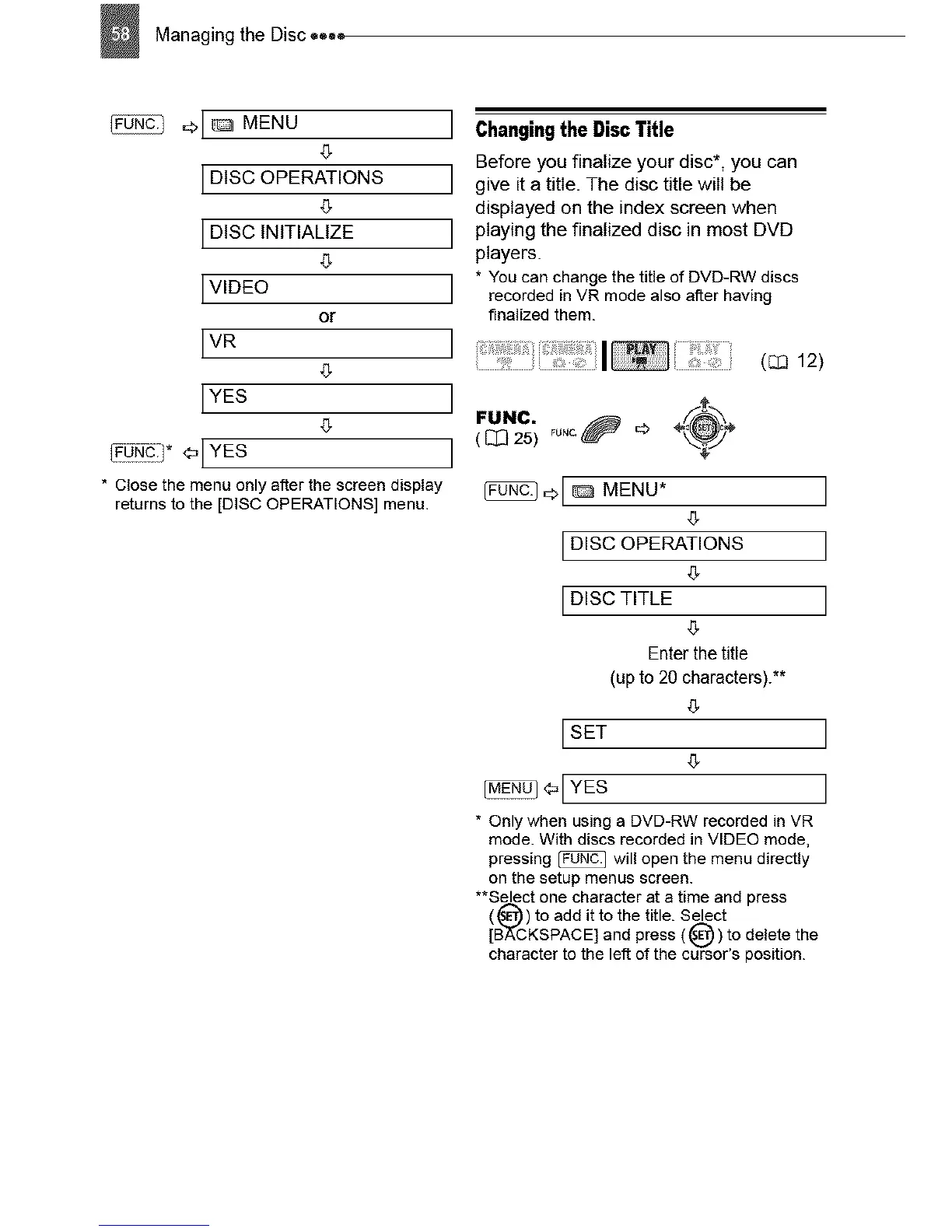
MENU
`5
LDISC OPERATIONS
LDISC INtTIAUZE
LVIDEO
or
LVR
LYES
`5
_D * <_LYEs
• Close the menu only after the screen display
returns to the [DISC OPERATIONS] menu.
J 6hangin9the DiscTitle
Before you finalize your disc*, you can
J give it a title. The disc title will be
displayed on the index screen when
J playing the finalized disc in most DVD
players.
j * You can change the title of DVD-RW discs
recorded in VR mode also after having
finalized them.
] I ( 12)
J
J
,..c. o°c.0o
( _I_ 25)
01 _ MENU* ]
`5
I DISC OPERATIONS ]
,5
I DISC TITLE ]
`5
Enter the title
(up to 20 characters).**
,5
I SET ]
,5
_1 YES ]
* Only when using a DVD-RW recorded in VR
mode. With discs recorded in VIDEO mode,
pressing _ will open the menu directly
on the setup menus screen.
**Select one character at a time and press
(_) to add it to the title. Select
[B'_CKSPACE] and press (_)) to delete the
character to the left of the cursor's position.



 To Next Page