EasyManua.ls Logo

Canon DC330 - Camcorder Component Locations

Canon DC330
124 pages
Print Icon
To Next Page IconTo Next Page
To Previous Page IconTo Previous Page
Loading...
CD
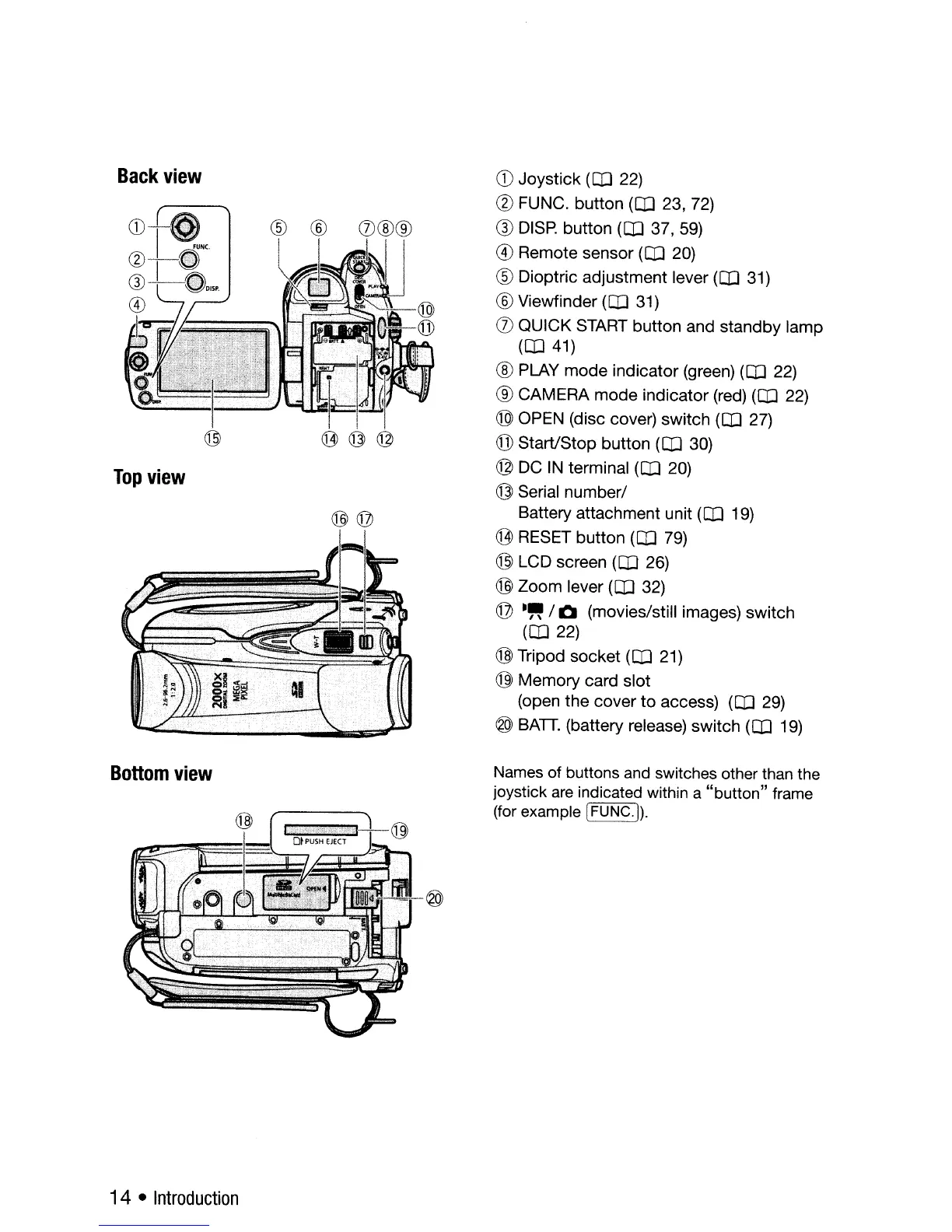
Joystick
(OJ 22)
(?)
FUNC.
button
(OJ 23, 72)
Q)
DISP.
button
(CD
37,59)
®
Remote
sensor
(OJ 20)
®
Dioptric
adjustment
lever (OJ 31)
® Viewfinder
(OJ
31)
([)
QUICK
START
button
and
standby
lamp
(OJ 41)
® PLAY
mode
indicator
(green)
(CD
22)
®
CAMERA
mode
indicator
(red) (OJ 22)
® OPEN (disc cover)
switch
(OJ 27)
@
Start/Stop
button
(OJ 30)
@
DC
IN terminal (OJ 20)
@ Serial
number/
Battery
attachment
unit (OJ 19)
C1])
RESET
button
(OJ 79)
@ LCD screen
(CD
26)
@
Zoom
lever (OJ 32)
©
.~
/Q (movies/still images)
switch
(OJ 22)
@Tripod
socket
(OJ 21)
@
Memory
card
slot
(open
the
cover
to
access) (OJ 29)
@ BATT. (battery release)
switch
(OJ
19)
@@
CD-I
~NC
w··--8
G)-L··~~D'"
®
I~
/-----,...-
%_i;:
.
Back
view
Top
view
Bottom
view
Names
of
buttons and switches other than the
joystick are indicated within a
"button"
frame
(for example
I
FUNC.!).
14
Introduction

Table of Contents

Related product manuals