Basic
Playback"
Viewing
Photos
To
print
photos
with
a
16:9
aspect
ratio.
Wide-sized
photo
paper
is
required.
To
print
photos
up
to
L
size
(9
x
13
em,
3.5
x5
in.)
or
postcard
size
(10
x
14.8
em,
4x6
in.).
To
send
images
as
e-mail
attachments
or
to
post
on
the
Web.
L
1152x864
S
640x480
You
can erase the still image recorded
last while reviewing it within the time set
for the
{REVIEW]
option (or immediately
after recording it, if [REVIEW] is set to
[gOFF]).
Erasing
the
Last
Photo
Just
Recorded
While reviewing the image immediately
after recording:
1 Push the joystick (
....
) toward
",r,.
2 Select (
~
~
) [ERASE] and press
@.
(OJ
22)
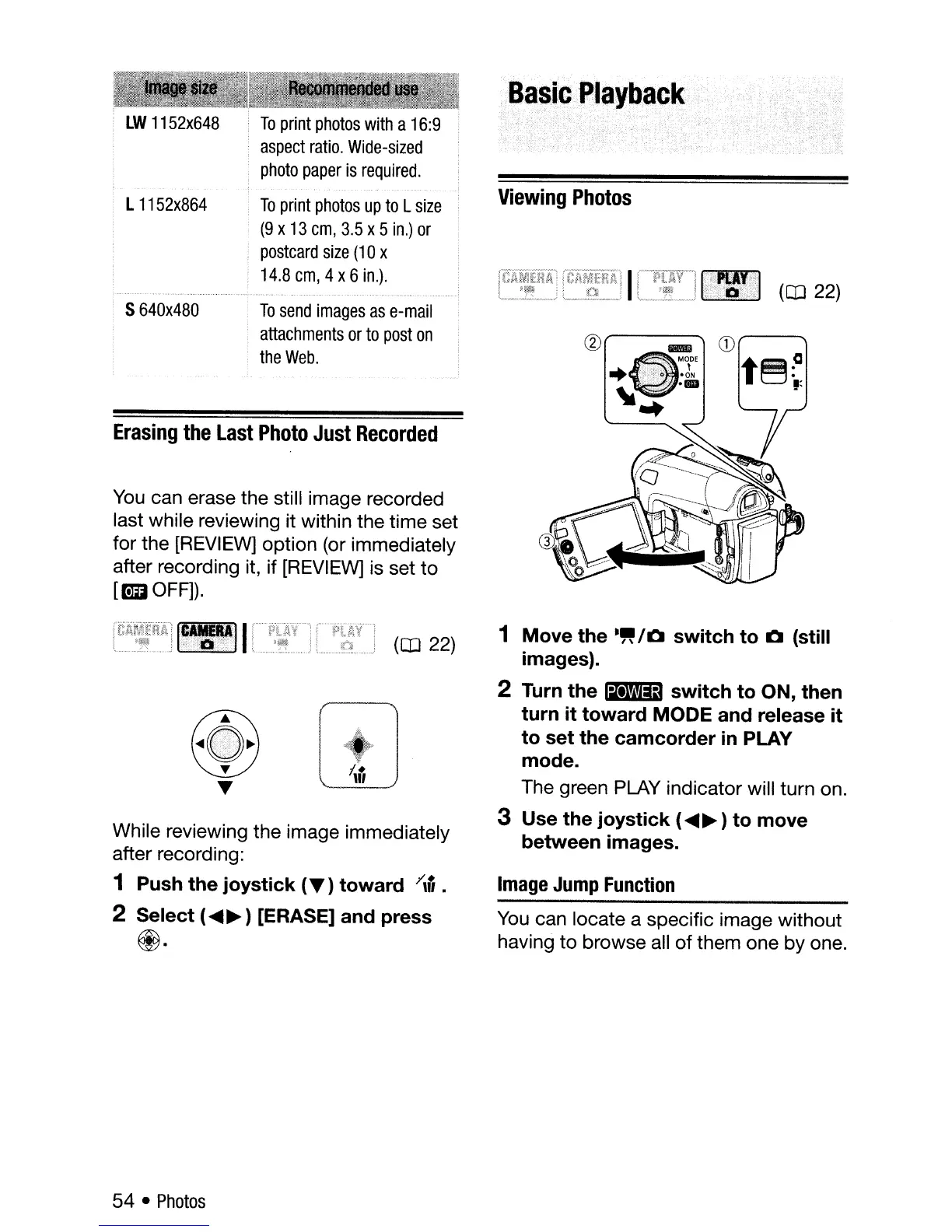
1 Move the
."
/0
switch to 0 (still
images).
2
Turn
the
~
switch to ON, then
turn it toward MODE and release it
to set the camcorder
in
PLAY
mode.
The green PLAY indicator will turn on.
3 Use the joystick (
~
~
) to move
between images.
Image
Jump
Function
You
can locate a specific image without
having to browse all
of
them one by one.
54 •
Photos



 To Next Page